SIGNAL / TOOLS

Codex sandbox security: file permissions, network rules and risks

SOURCEOpenAI
PUBLISHEDNovember 18, 2026
LAYERTools
SIGNAL SCORE28/100
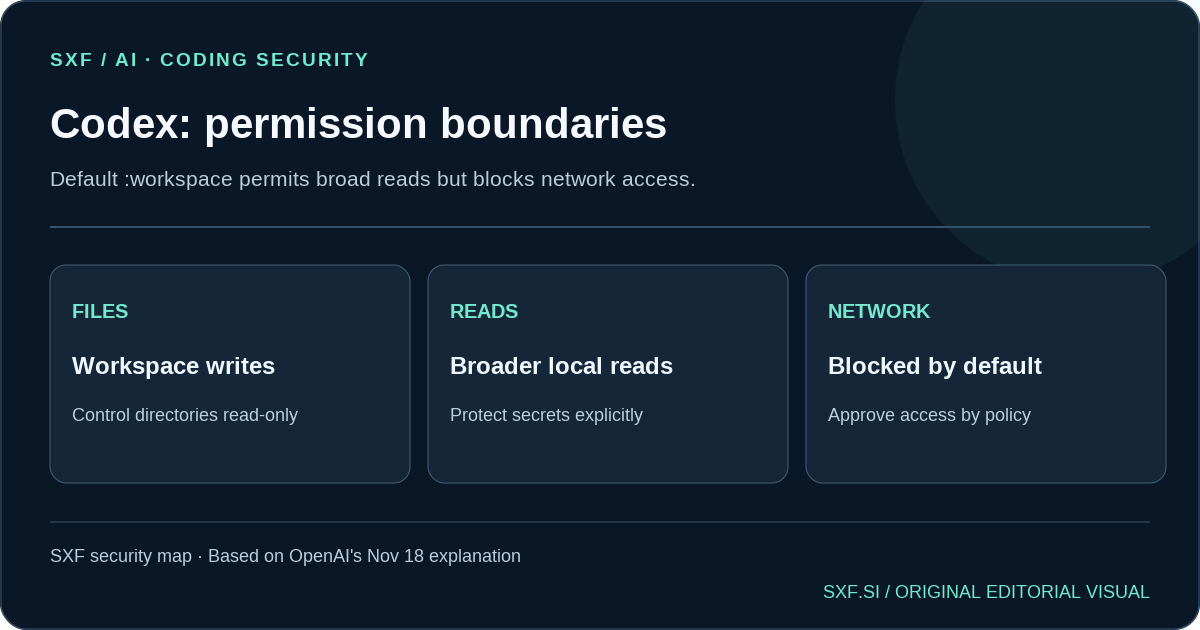
SXF Codex sandbox security diagram showing workspace writes, wider file reads and network blocked by default, with residual risks.
SXF permission boundary illustration based on OpenAI's engineering explanation, not an independent penetration test.

SXF VERIFIED BRIEF

OpenAI published an engineering-level explanation of how Codex enforces filesystem and network restrictions across operating systems, including permission profiles and escalation handling.

WHY IT MATTERS

Teams must understand both the actions a coding agent can take and the data it can read; a workspace write boundary is not a guarantee that secrets elsewhere are invisible.

WHAT TO VERIFY

The default profile allows broad reads under existing OS permissions, disables network by default and still admits some downstream execution risks. Sandbox limits are defense in depth, not evidence that agent output is trustworthy or safe to execute outside the boundary.

SXF RESEARCH EXPLAINER

What the technical evidence means.

Source-grounded analysis

TECHNICAL ANALYSIS / 01

What does the default Codex :workspace sandbox actually allow?

The :workspace permission profile balances ordinary coding with conservative control over write access. It permits editing files beneath workspace roots but keeps directories such as .git and .codex read-only, reducing the ability of commands to rewrite hooks or the agent's own configuration. Network access is disabled by default. These limits matter because an agent can run real shell commands, not merely suggest edits in a chat.

The less obvious tradeoff is read permission. OpenAI says tools can read broadly outside the repository when the operating-system user could read those paths. Builds often need SDKs and libraries outside the checkout, but the same freedom may include configuration files containing credentials. A developer who needs stronger secrecy must explicitly deny sensitive paths or isolate credentials at the OS level; merely selecting :workspace does not make every non-project file invisible.

Check primary-source evidence ↗

TECHNICAL ANALYSIS / 02

How does Codex decide when to escalate a command?

Codex sends commands through its harness, which starts processes using a permission profile. Its documented command options distinguish using the current rules, requesting extra scoped access inside the sandbox and seeking an elevated execution outside it. The harness evaluates that request against settings and approval rules. A tool cannot assume that asking for more access makes the request authorized.

This division creates two audit questions: what was the configured default at the time, and who approved any deviation? A sensitive operation such as downloading code or changing protected files should be recorded with its purpose and scope. For organizational designs, compare those decisions with the SXF AI agent authorization guide, which treats authorization as a separate control from the model's confidence.

Check primary-source evidence ↗

TECHNICAL ANALYSIS / 03

How do filesystem and network permission profiles work?

OpenAI documents named profiles under the permissions configuration in config.toml. A custom profile can extend :workspace, assign read or write access to specific paths, deny access to secrets and protect editor configuration. Workspace-root-relative rules let the same restrictions apply across relevant project folders. The effective policy can be layered with managed enterprise requirements, so a local profile is not necessarily the only controlling input.

For networking, distinguish no access, direct access and a restricted proxy. OpenAI shows domain allow and deny rules when a network proxy is enabled; an allowlist in a file should not be mistaken for enforcement if the proxy is off. For an initial secure pilot, prefer no network, then add only specific endpoints needed by the task. Inspect effective permissions after layering workspace and managed policies rather than reviewing just one config file.

Check primary-source evidence ↗

TECHNICAL ANALYSIS / 04

Codex sandbox versus containers: what is the real security boundary?

OpenAI deliberately uses native platform isolation instead of always moving work into a Docker image or VM, because developers may depend on host SDKs, compilers and simulators. That reduces friction but leaves the process sharing much of the user's development environment. The sandbox is a filesystem and network policy boundary around commands, not a claim that the entire host has become a disposable isolated machine.

Consider the risk OpenAI gives directly: an agent modifies an ignored dependency under node_modules. A later editor action can execute that changed package outside the original sandbox. The practical takeaway is to inspect untracked and ignored executable inputs, regenerate dependencies from known sources and run security-sensitive changes in an environment with minimized secrets. See SXF's prompt injection guide for why untrusted project text can also influence agent behavior.

Check primary-source evidence ↗

TECHNICAL ANALYSIS / 05

SXF analysis: a safer permission review before running coding agents

Design a short threat-model test before giving the agent real code. First document the workspace roots and approved write destinations. Then attempt safe, non-sensitive probes confirming that protected configuration files cannot be changed, known secret directories cannot be read if denied and network connections do not pass under the intended profile. Record any requests for additional permissions and refuse broad escalation unless the task genuinely requires it.

After the session, review tracked changes and ignored executable paths, run tests with a separate account and ensure that generated scripts are not automatically executed by trusted editor actions. This is a proposed SXF control checklist, not evidence that we penetrated or independently benchmarked Codex. Organizations deploying similar agents should also use the production AI agents guide for logging, rollback and incident-response boundaries.

Check primary-source evidence ↗

TECHNICAL ANALYSIS / 06

How is sandboxing different from evaluating a coding agent?

A security boundary answers what an agent's commands are allowed to touch, whereas an evaluation answers whether it performs the intended coding task correctly. Strong isolation cannot prove a patch is correct, and a high score on a test suite cannot prove that a process could not access credentials. Keep both control planes separate, with different acceptance criteria, reviewers and failure handling.

GitHub's new Copilot Evals workflow illustrates the evaluation side: repeatable checks for skills, agents and tools. The SXF Copilot Evals guide explains how to evaluate agent behavior without treating a pass/fail report as a sandbox. Comparing these products is useful for engineering governance, but they are not drop-in replacements for one another.

Check primary-source evidence ↗
SXF SECURITY MATRIX / PERMISSIONS

What the Codex sandbox protects, and what it does not

File reads, file writes and network access are independent permissions. This table maps the published defaults to practical validation work.

BoundaryDocumented :workspace behaviorDecision for a security reviewer
Write filesWrite inside workspace; .git and .codex read-onlyProtect hooks and agent configuration
Read local filesBroad read access under OS permissionsDeny credentials and sensitive host paths
Network accessDisabled by defaultApprove explicit proxy/domain needs, not blanket access
EscalationRequests pass through the harnessLog extra permissions and authorized overrides
Ignored dependenciesCan still be modified within writable pathsInspect node_modules and other later-executed code
Host isolationNative platform sandbox for commandsDo not assume container or VM isolation

A secure posture depends on effective policy, operating-system permissions and later host actions; no row is a guarantee of exploit prevention. Check the original evidence ↗

READER QUESTIONS

Codex sandbox questions

Can Codex read files outside my workspace?

Under the documented default :workspace profile, broad local reads can be allowed if the OS user has access. Add explicit deny rules and handle credentials separately.

Can Codex access the internet by default?

The :workspace profile disables network access by default. Other permission profiles and approved requests may enable direct or proxy-limited access.

Is the .git directory writable by default?

OpenAI documents .git and .codex as read-only under :workspace. Verify the actual effective policy before relying on that boundary.

Does a Codex sandbox equal Docker or a virtual machine?

No. OpenAI describes using native sandboxing facilities around commands in the existing host environment, with different tradeoffs from a separate container or VM.

Are secrets automatically hidden from Codex?

Not necessarily. Default read permissions may include files with API keys. Explicit deny rules, OS isolation and secret hygiene are important.

Can the agent ask for more permissions?

Yes, but the harness evaluates scoped or elevated access against user preferences and approval controls; a request is not an automatic grant.

Does sandboxing guarantee secure AI-generated code?

No. It constrains command access, while code correctness, supply-chain risk and prompt injection need separate tests and review.

PRIMARY-SOURCE FACTS

What the evidence establishes.

Reviewed 2026-11-20
Publication

OpenAI published the engineering explanation November 18, 2026. Primary evidence ↗

Workspace writes

The built-in :workspace profile permits writing within workspace roots and protects .git and .codex as read-only. Primary evidence ↗

Read scope

The default allows broad local reads under the current operating-system user's permissions. Primary evidence ↗

Default network

Direct network access is disabled under the :workspace profile. Primary evidence ↗

Residual execution risk

OpenAI describes a malicious change to ignored node_modules that could be run later by an editor outside the sandbox. Primary evidence ↗

Permission profile configuration

Named profiles in config.toml can extend :workspace and define read, write and deny rules. Primary evidence ↗

Network controls

OpenAI explains disabled, direct and proxy-constrained network configurations and domain allow/deny rules. Primary evidence ↗

Escalation

The harness evaluates requests for additional permissions or execution outside the default sandbox rather than blindly granting them. Primary evidence ↗

Operating systems

OpenAI describes native sandbox enforcement approaches for macOS, Linux and Windows rather than requiring a project container. Primary evidence ↗

LIMITATIONS

A sandbox applies constraints to a particular executed process tree, not an independent audit of the model's instructions. Broad reads can expose sensitive files even when network is blocked. Later execution of modified dependencies or user-approved elevated commands can cross the security boundary. The published engineering explanation does not prove that every attack or configuration is covered on every platform.

PRACTICAL TAKEAWAYS

What readers can check next.

Verification checklist

  1. Identify the actual workspace roots, process user and protected files.
  2. Keep direct network disabled until an authorized task specifically needs it.
  3. Deny sensitive paths rather than assuming workspace mode prevents reads.
  4. Review every elevated or extra-permission request with its purpose.
  5. Inspect ignored executable dependencies and editor hooks after an agent session.
  6. Run build and behavioral tests separately from sandbox permission checks.

Read the related SXF guides

TOPICSOpenAICoding AIAI Security
MODELSNo named model detected