SXF RESEARCH / CODING AGENT SYSTEMS
AI Coding Agent Architecture:
Tools vs Subagents, Plugins, Functions & Actions
What really happens between “fix my repository” and a verified pull request? A technical reference to the control loop behind modern AI coding agents: tools, function calls, plugins, skills, subagents, MCP, permissions, sandboxes, evaluation and proof of execution.
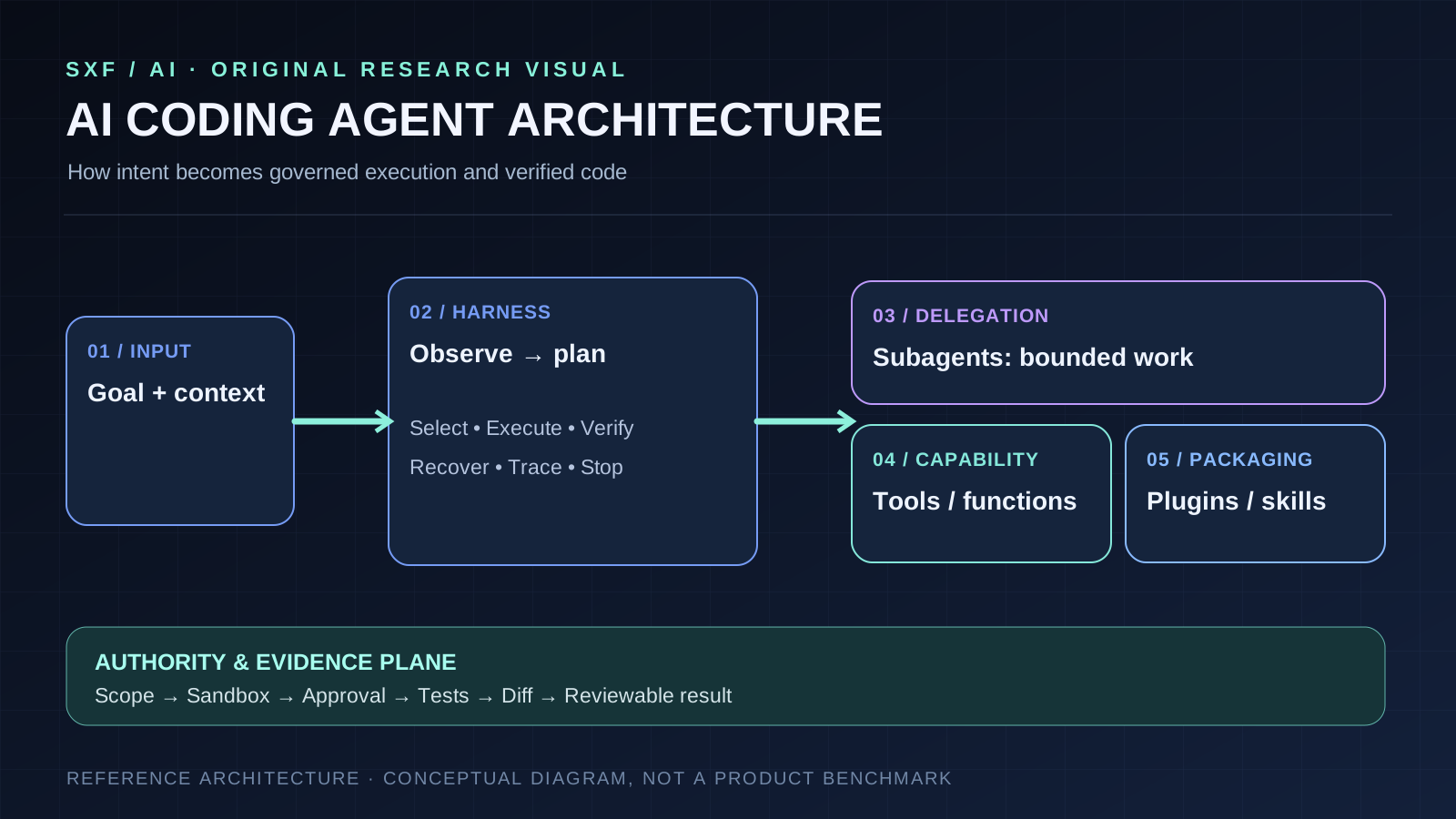
Tools execute capabilities; subagents own delegated tasks; functions expose host handlers; plugins package extensions; actions produce effects.
These concepts describe different architectural layers. Skills encode repeatable instructions, MCP standardizes access to capabilities, and the agent harness manages context, selection, recovery and verification. Crucially, a model's tool request is not itself authority to act.
DEFINITION
What is AI coding agent architecture?
AI coding agent architecture is the design of the control loop, context pipeline, execution environment, capability interfaces, delegated workers, authority boundaries and verification process that turn a software-development objective into a reviewable, testable change. The language model is an important component, but it is not the architecture.
A basic coding assistant predicts or edits code in response to a user. A coding agent can inspect a repository, select tools, execute commands, respond to failing tests, change state and continue until it reaches a stopping condition. This makes the critical questions operational: What can it observe? What may it change? Who authorizes those changes? How does the system prove its work?
The decision loop
The model and harness inspect context, plan, select capabilities, receive tool results and decide whether to continue.
The real environment
A sandbox or application runtime reads files, runs commands, invokes APIs and produces observable effects.
Who can do what?
Identity, permission scopes, tool allowlists, approvals and audit logs restrict actions outside the model's discretion.
What actually succeeded?
Tests, diffs, exit codes, logs, artifacts and human review substantiate outcomes rather than trusting claims.
SEARCH-INTENT COMPARISON
AI coding agent platform concepts: tools vs subagents vs plugins vs functions vs actions
The key terms appear together in product menus and documentation, but they represent different layers of the system. An apples-to-apples comparison begins by asking whether an item is a worker, a capability, an invocation interface, a distribution mechanism or an effect.
| Concept | Technical role | What it owns | Coding example | Do not confuse with |
|---|---|---|---|---|
| Tool | Callable capability | One bounded operation and a result | Search the repo; run a test; edit a file | An independent reasoning worker |
| Function | Application-defined call interface | Schema + host handler | run_tests(target) | Every possible tool type |
| Subagent | Delegated agent execution | A scoped subtask, context and multiple steps | Read-only security reviewer | A single function/API request |
| Plugin | Platform-defined extension package | Distribution and configuration | Bundle an MCP connector and a skill | A universal protocol primitive |
| Skill | Reusable task instructions | Procedural guidance and optional assets | A documented migration workflow | Authorization or tool execution |
| Action | Attempted state transition | An operation with side effects and outcome | Apply patch; open pull request | Inherent proof of authorization |
| MCP server | Interoperable capability provider | Discoverable tools, context and service-side checks | GitHub repository access connector | An autonomous subagent |
These are precise analytical distinctions, not a claim that every vendor uses identical vocabulary. For example, GitHub distinguishes tools, MCP servers, skills, hooks, subagents and custom agents; OpenAI describes plugins as packages that can contain skills and MCP configuration. The authoritative names for a particular product should always come from that product's documentation. [1][2][8][9]
END-TO-END SYSTEM
How does an AI coding agent work? The complete execution loop
Suppose the task is: “Upgrade the authentication dependency, keep existing behavior, and prepare a pull request.” A serious agent architecture must connect intent to executed evidence without silently enlarging the task's scope.
Turn the request into a contract
Resolve repository, base revision, acceptance criteria, allowed file scope and whether edits or external writes are authorized. Stop or ask when the goal is not sufficiently defined.
Retrieve relevant source evidence
Inspect manifests, lockfiles, repository instructions, call sites, tests and git state. Treat retrieved files, web pages and tool output as untrusted data, not fresh higher-priority instructions.
Make steps measurable
Identify dependent migrations and validation work, and decide whether specialist research is separable enough to delegate. A plan must include a stopping condition.
Run approved operations
Call read, edit and test tools through a constrained executor. Capture arguments, principal, environment, output and side effects. Timeouts and permission denials are normal results.
Prove the implementation
Run targeted tests, inspect changes, check lockfiles and identify untested paths. A generated summary is not evidence that commands were actually run.
Make review possible
Create a patch or pull request with commands executed, observed pass/fail results, changed files and outstanding risks. Keep merge and deploy permissions separately gated.
OpenAI's managed-agent documentation explicitly separates the harness controlling the loop, an optional environment for files and execution, and the application server integrating external function tools and the product. This decomposition is useful even when another vendor ships all three together. [5][6][7]
CAPABILITY INTERFACES
AI agent tools vs function calling: what actually executes?
A tool is an interface the agent may invoke to read information or effect a bounded operation. The implementation could be internal to the harness (terminal, patch, browser), provided as a host-application function, or exposed by an MCP server. Function calling is a common structured invocation mechanism: the model proposes a function name and arguments, while host code validates the request, runs the handler and supplies its result.
The language model does not execute arbitrary operations merely by emitting a JSON object. A model can request run_tests; the executor must validate the path, ensure the caller is allowed, run the process under limits and return actual exit status.
# Illustrative pseudocode: not a vendor SDK signature
def handle_tool_call(request, identity, sandbox):
    target = validate_test_target(request.arguments["target"])
    policy.require(identity, "tests.execute", target)
    result = sandbox.run(["test-runner", target], timeout=120)
    return {
        "exit_code": result.exit_code,
        "report": result.report_artifact,
        "stdout": redact_and_truncate(result.stdout)
    }
# Tool invocation is a request; execution and permission live in the host.
Good interfaces expose typed inputs, stable names, timeouts, output limits, retry rules and explicit side-effect classification. A correct schema catches malformed arguments; it does not determine that an otherwise well-formed operation should be allowed.
Is a shell command a tool or an action?
The shell executor is a tool. A particular invocation such as git diff --check is an action requested through it. The exit status, output and changed repository state are results. Logging these separately is essential for post-run verification.
PROTOCOL LAYER
How MCP fits into AI coding agent architecture
The Model Context Protocol (MCP) is an interoperability boundary that lets a client discover and invoke capabilities exposed by a server. MCP tools have names and schemas, and the client can use tools/list to discover them and tools/call to invoke them. An MCP server can also expose other context capabilities, which are not automatically executable tools. [11]
The 2026-07-28 MCP specification is materially different from older examples that assume legacy initialization and session behavior. Its stateless requests and metadata rules should be followed for new integrations; version pinning and backward compatibility must be explicit. [12]
Select and mediate
Decides which eligible server tools to expose to the model and handles invocation and responses.
Validate and serve
Advertises capabilities; independently checks inputs, identity, scopes and service authorization.
Constrain shape
Describe valid tool inputs and, where provided, structured outputs. They are not the permission system.
Enforce policy
Treat tool results and annotations carefully; get confirmation for sensitive operations, with audit records.
MCP is neither a subagent nor a plugin by definition. A plugin may configure an MCP server. A subagent may invoke MCP tools. Those are composition choices. See the site's deeper Model Context Protocol guide for transport, OAuth, resources, prompts and server architecture.
DELEGATION STRATEGY
Subagents vs tools: when should you create another coding agent?
A subagent is a delegated worker with a defined objective, a distinct execution context and, ideally, intentionally restricted capabilities. It may perform many tool calls to deliver a review, report, patch or research result. A tool call, by contrast, is a bounded capability invocation. GitHub's Copilot SDK documentation illustrates specialist agents with independent prompts and tool restrictions, and explicitly describes subagent lifecycle events. [4]
Low coordination cost
Prefer one agent for small sequential fixes, tightly coupled file edits and work that already fits a clear verification loop.
Isolated exploration
Use read-only workers to map APIs, inspect tests or research migrations without sharing write permissions.
Independent check
Give a security or test reviewer a fixed diff and rubric. Do not assume independence if it inherits the writer's unsupported conclusions.
Avoid merge hazards
Give each writer isolated branches or worktrees and explicit file ownership; validate the integrated patch afterward.
Extra agents cost tokens, initialization, duplicated retrieval, coordination time and conflict resolution. Parallelism is valuable only when subtasks can proceed independently and a final integrator checks the combined output. A specialist without a measurable deliverable is often overhead, not architectural sophistication.
EXTENSION MODEL
Plugins vs skills vs hooks vs custom agents explained
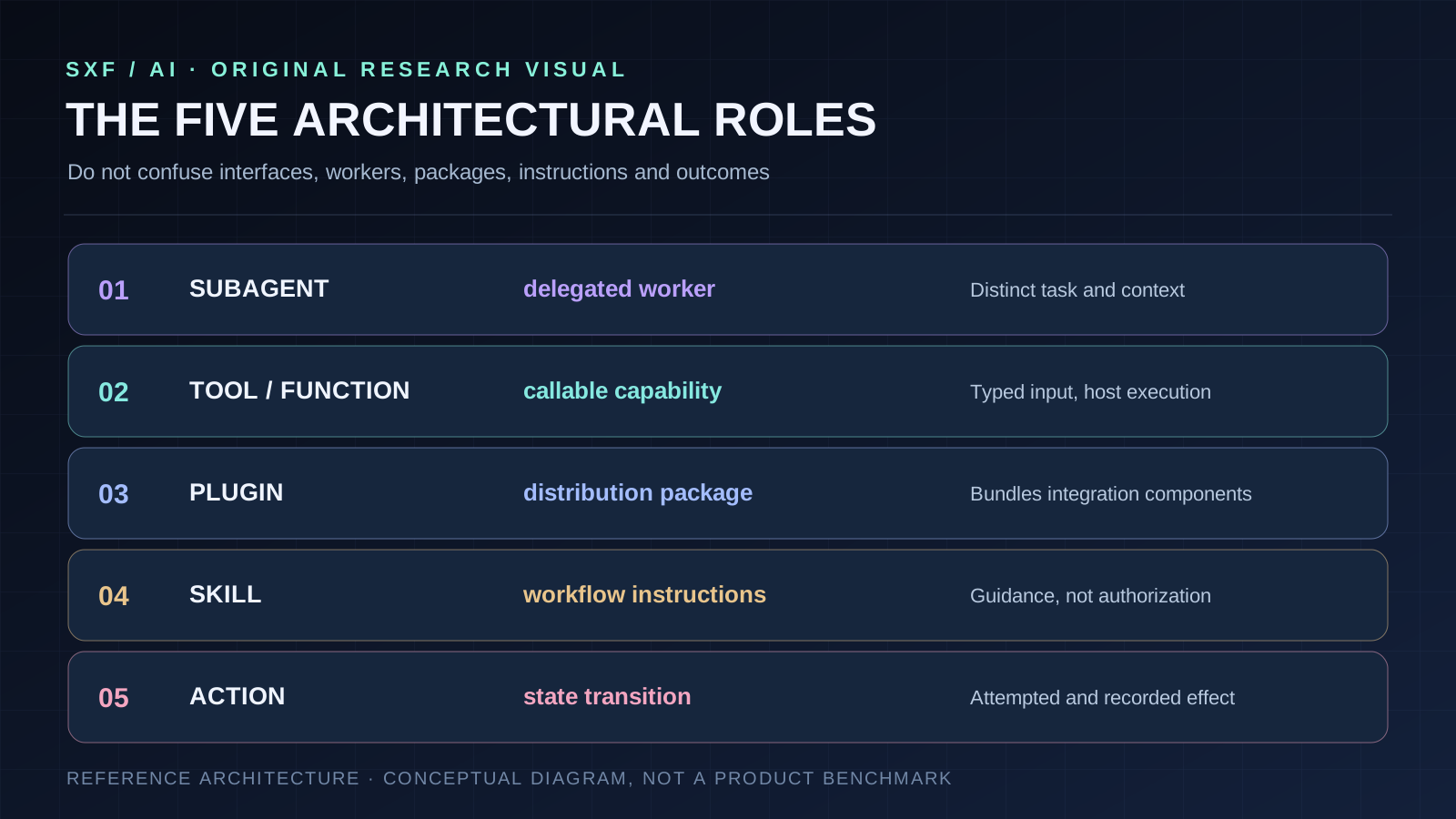
A plugin generally packages integrations for distribution or installation; the payload is platform-specific. OpenAI documents plugins packaging skills and MCP configuration. GitHub Copilot's extension documentation describes bundles that may include skills, custom agents, hooks and MCP server configurations. Neither makes “plugin” a synonym for a remote reasoning agent. [8][2]
A skill stores task guidance, potentially supported by reference files and scripts. It tells an agent how to approach work; it does not give the agent credentials or bypass policy. A hook is application-controlled code invoked at a lifecycle event rather than a new free-form model-selected agent. A custom agent profile defines specialist instructions and tools; a subagent is a particular delegated run. These distinctions prevent both unsafe configuration and inflated product claims.
Do skills or repository instructions give the agent new permissions?
No. A skill saying “merge this code” does not create a valid merge authorization. Tool registration determines which operations are reachable; identity and policy decide what the current principal may do. A repository file is also untrusted input relative to the application's privileged instructions. Related context: GitHub Copilot Memory discusses durable repository knowledge separately from instructions.
SIDE EFFECTS
What are actions in AI coding agents?
An action is the system's attempted operation: run a compiler, apply a patch, make a network request, delete a branch or open a pull request. The word may also name a vendor feature—GitHub Actions is a specific CI/CD product—so technical writing must distinguish general actions from branded ones.
Record three levels independently: intent (“test package A”), execution (tool, arguments, principal, environment, time and exit code) and outcome (logs, artifacts, test verdict or changed state). An agent claiming that “tests passed” is not evidence that a test command ran successfully. The executor's observed report is evidence.
Actions should also be classified by side effects: read-only, local reversible write, external write and irreversible or production-affecting operations. These classes guide approval gates and retry rules; repeating a failed read is not equivalent to retrying a payment, merge or deployment.
PRODUCTION PATTERN
A practical AI coding agent reference architecture
The following is an SXF recommended architecture pattern, derived from the verified roles and general isolation principles—not a claim that vendors implement one identical design or that it has been independently benchmarked.
USER GOAL + ACCEPTANCE CRITERIA
              |
       SCOPE / IDENTITY GATE
              |
     ORCHESTRATOR + TASK STATE
       /                 \
READ-ONLY SPECIALIST   SCOPED EXECUTOR
  (optional worker)     (typed tools)
       \                 /
           VERIFICATION
      test | diff | logs | review
                  |
        HUMAN APPROVAL / PR
                  |
          SEPARATE MERGE GATE
Start with one orchestrator and a minimal set of discover, edit and test tools. Run writes in a repository-scoped sandbox, keep external network access explicit, and require checks before proposing a reviewable change. Only then add custom skills, MCP connectors, plugins or specialist subagents.
What should a tool execution record contain?
call:
  tool: repo.run_tests
  principal: task-agent
  target: packages/auth
  workspace: isolated-worktree-73
  timeout_seconds: 120
authorization:
  permission: tests.execute
  decision: allow
result:
  exit_code: 1
  status: failed
  artifact: test-report.json
  state_delta: none
  trace_id: run-73-step-04
The goal is to make failure explicit, observable and recoverable. A failed test is useful feedback; silently rewriting it as success is an architecture failure.
ENGINEERING CASES
Three AI coding agent architectures compared in real workflows
Bounded bug fix
One agent + repository search + edit + tests. Strong when the task is sequential and localized. Measure regression-test outcomes, smallest valid diff and review time.
Large dependency migration
A parent coordinates read-only compatibility and security reviewers while one writer owns integration. Watch duplicated research, stale context and branch conflicts.
Cross-system workflow
An agent uses MCP tools for issues, code hosting and internal docs while service-side policies protect external writes. Require explicit scopes and approvals.
There is no universal winner. The correct architecture depends on task coupling, isolation needs, run length, repository size, cost constraints, permission boundaries and the reliability of the tools behind it.
THREAT MODEL
AI coding agent security: where authority must stop
A coding agent routinely consumes attacker-influenced material: repository comments, issue descriptions, external docs, package metadata, web pages and tool output. A malicious instruction embedded in that material can attempt to redirect the agent to leak a secret or invoke a privileged tool. The defense is not merely to ask the model to ignore suspicious prose; the execution system must enforce the boundary.
Least-privilege scopes
Separate read, local edit, test execution, network and publish privileges. Credentials belong to the service or bounded executor, not arbitrary prompt text.
Contain effects
Limit filesystem roots, outbound network, CPU, time and mounted credentials; isolate untrusted tasks from production systems.
Gate expensive actions
Independently approve merges, deployments, deletion, secret access and high-risk external writes.
Audit and validate
Capture which principal called which tool, exact arguments, authorization decision, result and resulting state; validate returned content.
MCP's current tools specification requires server-side input validation and access controls, and recommends client confirmations around sensitive operations. Protocol compliance alone is not a complete security model. Read the companion AI Agent Security and Prompt Injection references. [11]
MEASUREMENT
How to benchmark AI coding agent architecture—not just its model
Hold the task set, repository revision, model budget, timeout, permitted tools, environment and reviewer rubric constant across configurations. Repeat runs. Compare the full system's accepted changes—not screenshots of a successful chat response. Evaluate a single-agent baseline before adding one extension at a time.
| Metric | What it tests | Record |
|---|---|---|
| Accepted change rate | Actual success on the business task | Accepted patches / tasks |
| Repeated-run consistency | Whether success is dependable | Run-level variance and strict pass-all runs |
| Tool fault recovery | Resilience to API errors and failed commands | Recovered faults / injected faults |
| Side-effect discipline | Whether the agent edits beyond scope | Extraneous files and prohibited operations |
| P50/P95 latency | Tail performance and coordination overhead | Wall-clock distribution |
| Total task cost | Whether delegation is economically useful | Tokens, compute, retries, human review time |
| Reviewability | Quality of delivered evidence | Corrections, diff clarity, test trace completeness |
| Safety boundary adherence | Whether policy was enforced | Unauthorized attempts and violations |
Run ablations: baseline; baseline + skill; baseline + MCP; baseline + read-only reviewer; baseline + parallel specialists. Attribute any improvement to a mechanism, such as better repository retrieval, clearer requirements, stronger test coverage or reduced latency. Do not assume adding agents increases accuracy. For deeper consistency metrics see AI Agent Reliability; for retrieval and persistent state see AI Agent Memory.
DESIGN ERRORS
Seven AI coding agent architecture mistakes to avoid
- Calling every integration an “agent.” A remote API capability is not automatically a delegated worker.
- Confusing tool-call syntax with authorization. Typed arguments are necessary but do not establish a right to execute.
- Treating skills as runtime permissions. Instructions are not credentials or policy grants.
- Assuming MCP provides a trust boundary for free. It standardizes interfaces; clients and services still must verify.
- Parallel editing without ownership. Shared worktrees and overlapping patches can invalidate each other's assumptions.
- Accepting narrative success without run evidence. A claimed passing test is not an executed passing test.
- Comparing models while changing the harness and budget. Without controlled conditions, architecture conclusions are not reproducible.
ARCHITECTURAL DECISION
Which AI coding agent architecture should you build first?
Begin with one agent, one bounded repository workspace, explicit read/edit/test tools and an independent review gate. Add a skill for repeatable instructions, an MCP connector for external capabilities, a plugin for packaging integrations and a subagent only when an isolated work package has measurable benefits.
For decisions about actual developer products, see Best AI Coding Tools. For larger orchestration, consult How to Build an AI Super Agent. These references answer different search intentions: product choice, workflow design and the underlying architecture described here.
DIRECT ANSWERS
AI coding agent architecture FAQs
What is AI coding agent architecture?
It is the system design that connects a model-driven control loop to context retrieval, tools, execution environments, delegated workers, permissions, verification and final code artifacts.
What is the difference between tools and subagents?
A tool performs a bounded operation through a defined interface. A subagent is a delegated agent execution with its own task and usually a separate context; it may use several tools before returning a result.
Are tools and functions the same in AI agents?
A function call is one interface for invoking an application-implemented operation. Some tools are functions, but tools may also be shell, browser, search, code execution or MCP capabilities.
What is the difference between plugins, skills and MCP?
A plugin is a platform-defined extension package. A skill contains reusable workflow instructions and optional supporting resources. MCP is a protocol for exposing tools and other context capabilities; the three are not interchangeable.
What are actions in a coding agent?
An action is an attempted operation such as editing a file, executing a test or opening a pull request. A tool exposes the interface, a host executes the action, and an authorization layer decides whether it is allowed.
When should I use coding subagents?
Use subagents when there are independent tasks with clear deliverables, separate context requirements or distinct tool scopes. Avoid delegating work when coordination and reconciliation costs dominate.
Does MCP automatically secure an AI coding agent?
No. MCP provides interoperable interfaces; systems still require identity, narrow permission scopes, sandboxing, validation, audit records and approvals for sensitive side effects.
How should AI coding agents be compared?
Hold tasks and environment constant, repeat evaluations, and measure accepted-change rate, test results, run-to-run variability, tool recovery, unnecessary edits, latency, cost, reviewer burden and boundary violations.
RESEARCH METHODOLOGY
What the evidence supports—and what it does not
This SXF article is an independently authored technical synthesis, last verified October 10, 2026, built from official vendor documentation and the published MCP specification. Our layer model, matrices, sample architecture and decision rules are original explanatory frameworks, not results of a controlled performance experiment. Vendor documentation is evidence for that vendor's interface and terminology, not proof of performance superiority. Implementation details, pricing and feature support may change; the permanent URL deliberately contains no year.
No claim is made that subagents always improve coding accuracy, that one agent framework wins every workload, or that an MCP connection alone establishes security.
PRIMARY SOURCES
Source ledger: protocols and official engineering documentation
These sources substantiate specific architecture concepts. The article distinguishes documentation-backed facts from SXF analysis.