Claude Sonnet 5.5 in GitHub Copilot: Availability, Cost & SXF Analysis
SOURCEGitHub
PUBLISHEDSeptember 28, 2026
LAYERTools
SIGNAL SCORE52/100
SXF VERIFIED RELEASE BRIEF · UPDATED NOVEMBER 8, 2026
Claude Sonnet 5.5 is generally available in GitHub Copilot. GitHub announced the release on September 28, 2026 for Copilot Pro, Pro+, Max, Business and Enterprise users. You can select it in supported editors, GitHub.com and Copilot CLI; team policies and rollout conditions still apply. GitHub's early testing described shorter, more efficient coding workflows, not a universal win over every model.
THE DECISION
Use Sonnet 5.5 as a candidate for bounded feature work and bug fixes. Judge it by reviewed, test-passing changes, elapsed time and AI Credit use—rather than benchmark headlines alone. See the complete Sonnet-in-Copilot setup guide.
THE IMPORTANT DISTINCTION
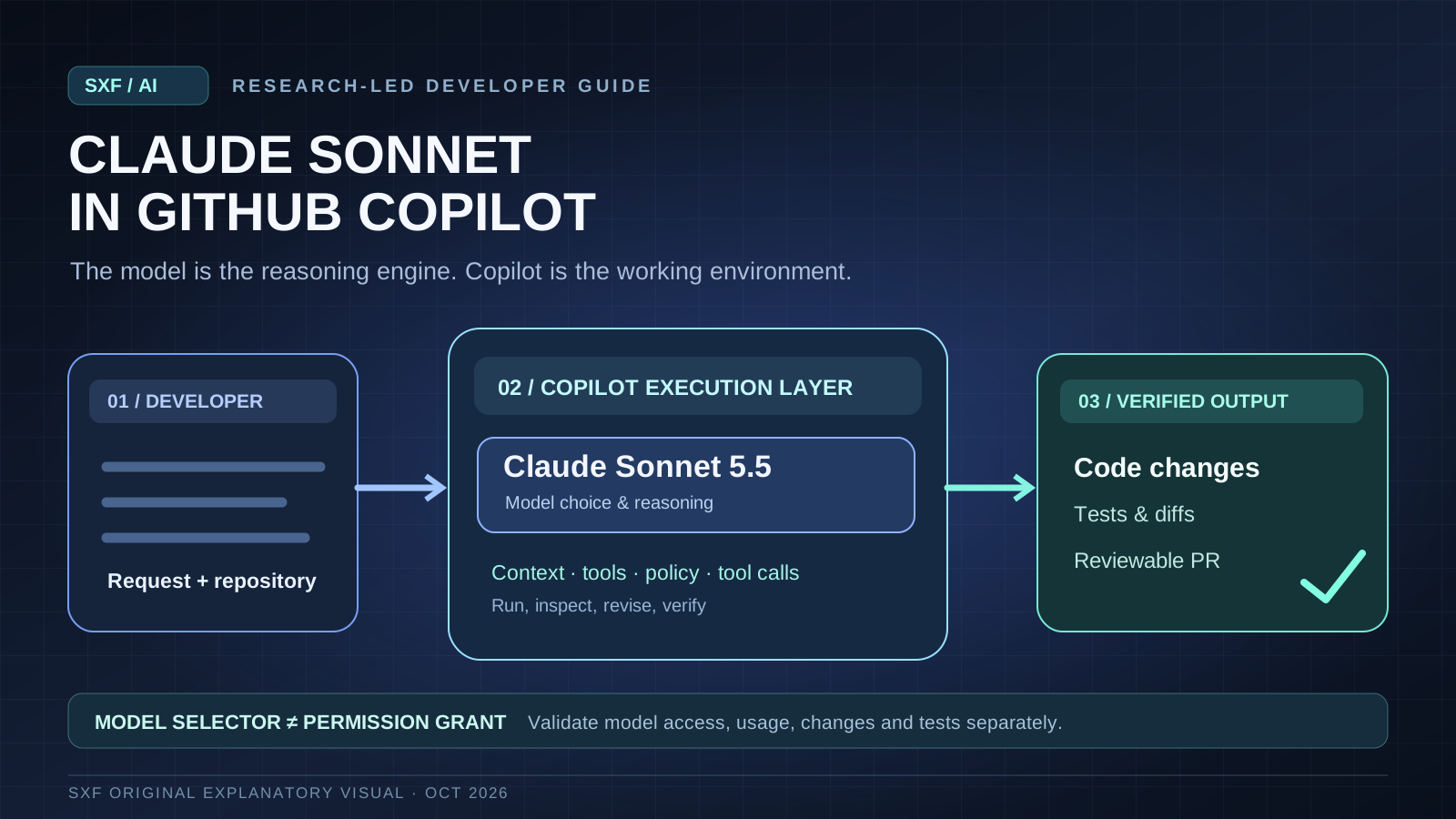
Claude Sonnet is the model. GitHub Copilot is the product, tool and permission layer. Selecting a model never grants repository or terminal permissions by itself.
SXF / RELEASE ANALYSIS
Claude Sonnet 5.5 in GitHub Copilot: what changed, who can use it, and whether it is worth choosing.
Verified November 8, 2026
For developers searching “Sonnet in Copilot” or “Claude Sonnet on Copilot,” the short answer is yes: GitHub supports the model. The more useful answer is how it changes coding workflows, what it costs in GitHub's billing system, and what evidence is still missing. This analysis focuses on the September 28 release and its practical implications; the evergreen setup and troubleshooting guide covers step-by-step usage in greater depth.
RELEASE STATUSGeneral availabilityAnnounced September 28, 2026
ELIGIBLE PLANSPro · Pro+ · MaxBusiness and Enterprise also included
GITHUB PRICE BASIS$2 input · $10 outputPer 1M tokens; see full pricing table
SXF ASSESSMENTEvaluate for bounded codingNot an independent performance ranking
Is Claude Sonnet 5.5 available in GitHub Copilot?
Yes. GitHub's September 28 release post calls Claude Sonnet 5.5 generally available. Its announced eligible subscriptions are Copilot Pro, Pro+, Max, Business and Enterprise. It is listed for Visual Studio Code, Visual Studio, Copilot CLI, Copilot coding agent, the Copilot app, GitHub.com, GitHub Mobile, JetBrains IDEs, Xcode and Eclipse. The initial rollout was gradual; availability can still be affected by plan, app version and organizational settings. GitHub release note.
Free plan vs paid plan: GitHub's launch announcement specifically lists the five paid plan families above. Do not assume a Copilot Free account can explicitly select Sonnet 5.5. Check the live supported-models matrix for changes.
Where can you select it?
Copilot surface
What the announcement confirms
What to check
VS Code / Visual Studio / JetBrains / Xcode / Eclipse
Model selection in supported integrations
Sign-in, extension version and model picker
Copilot CLI
Model supported for eligible users
Current CLI model list and account policy
GitHub.com / GitHub Mobile / Copilot app
Listed as launch surfaces
Feature availability for the current account
Copilot coding agent
Listed as supported
Repository access, agent permissions and team policies
What actually changed in the September 28 GitHub release?
The change was not the invention of an entirely new Copilot product. It was the addition of Anthropic's Sonnet 5.5 as a selectable model inside existing GitHub Copilot workflows. GitHub said that in its early coding tests the model matched Sonnet 5 on its chosen tasks while needing fewer steps, tokens and tool calls, and finished noticeably faster. That is an internal GitHub observation; the post does not publish a full methodology, task corpus or reproducible per-task measurements.
For a developer this can matter in two distinct ways. First, a model that needs fewer tool calls can reduce interaction time and context overhead on routine changes. Second, the lower amount of work can reduce token spend, although GitHub's billing is driven by actual token consumption and rates. Neither observation establishes that Sonnet 5.5 is best for every monorepo, difficult debugging case or long-running agent task.
Original SXF conceptual diagram. Model selection is separate from Copilot's execution, policy and approval layers; this is an architecture illustration, not an observed benchmark result.
How to use Claude Sonnet 5.5 in Copilot
Check eligibility. Confirm a supported Copilot plan and sign in to the same account in GitHub.com or your editor.
Open the model selector. In a supported Copilot chat or agent workflow, open the model picker and select Claude Sonnet 5.5. Copilot CLI also documents claude-sonnet-5.5 as a model identifier and supports model selection via --model or /model; check the current CLI reference first.
Verify policy and scope. On Business and Enterprise, administrators can restrict models. If Sonnet is missing, verify the organization's model policies, the app version and supported surface before assuming the model was removed.
How much does Claude Sonnet 5.5 cost in GitHub Copilot?
GitHub says Sonnet 5.5 uses provider list pricing under usage-based billing. Its current Copilot price table shows $2 per million input tokens, $0.10 per million cached-input tokens, $2.50 per million cache-write tokens and $10 per million output tokens for Sonnet 5.5. These are model unit rates, not a fixed per-prompt charge. GitHub converts measured usage into AI Credits, and subscription allowances, budget controls and the selected surface affect the final bill. GitHub's official pricing table.
Model
Input / 1M
Cached input / 1M
Cache write / 1M
Output / 1M
Claude Sonnet 5.5
$2.00
$0.10
$2.50
$10.00
Claude Sonnet 5
$2.00
$0.20
$2.50
$10.00
Claude Opus 5.5
$4.00
$0.20
$5.00
$20.00
Claude Haiku 5.5
$0.10
$0.01
$0.125
$0.50
Snapshot checked November 8, 2026. Haiku 5.5 figures in this table apply to GitHub's default context tier; long-context rates differ. Prices and supported models can change. Verify the linked live pricing table before making a purchase or budget decision.
Illustrative calculation, not a Copilot invoice: 100,000 uncached input tokens at $2 per million plus 20,000 output tokens at $10 per million equal $0.40 in model token charges before any cache writes, other model calls or platform-specific usage. A real agent task may generate many separate calls. To estimate costs accurately, look at the entire run, not just the user's visible prompt.
SXF cost interpretation: Sonnet 5.5's cached-input rate is half Sonnet 5's in GitHub's price table. But a cheaper cached token is not proof that your project will cost less overall: the number of turns, repeated tool calls, tool outputs, cache behavior and failed attempts can dominate the bill.
Is Sonnet 5.5 better than Sonnet 5 or Opus 5.5 for coding?
Anthropic's launch report says Sonnet 5.5 generates output over 30% faster than Sonnet 5 and uses fewer tokens for many tasks. It reports 70.6% on Terminal-Bench 4.0 against 10.3% for Sonnet 5 under Anthropic's stated evaluation setup. These results should be attributed to Anthropic; they are not an independent SXF replication. Different benchmark environments, tool policies and reasoning-effort settings can substantially change outcomes. Anthropic's launch evidence and caveats.
Evidence
What the source says
What it does NOT prove
GitHub early coding test
Sonnet 5.5 matched Sonnet 5 in GitHub's tasks with fewer steps, tokens and calls
That all repositories or agents will see the same result
Anthropic Terminal-Bench 4.0
70.6% vs 10.3% for Sonnet 5 in reported setup
That model choice alone guarantees reliable PRs
Anthropic speed claim
30%+ faster generation than Sonnet 5 in its tests
That entire end-to-end agent workflows are 30% faster
For complex, open-ended work requiring sustained judgment, Anthropic itself still describes Opus 5.5 as stronger. For small, repetitive or high-volume tasks, Haiku 5.5 may be the better cost candidate. A project's best default should follow its own error tolerance, review burden and budget—not the model family name. The site also tracks Opus 5.5 in Copilot and Haiku 5.5 in Copilot.
SXF analysis: the real advantage is fewer verified steps, not a larger benchmark number
SXF's view: Sonnet 5.5 is most interesting as a workflow-efficiency option for ordinary developer work. GitHub's reported reduction in steps and tokens matters only if it preserves correctness. A coding agent that completes a task quickly but introduces a regression creates downstream review and repair costs that a token benchmark does not measure.
01 / FIRST CHOICE
Bounded bug fixes and features
Try Sonnet 5.5 first for changes with a clear failing test, scoped files, a specific acceptance criterion and limited side effects. Require a patch and evidence that the relevant tests pass.
02 / ESCALATE
Ambiguous, high-stakes refactors
Compare Opus 5.5 or another stronger reasoning model when architectural uncertainty, cross-service migrations or hidden requirements dominate. Do not assume a higher-priced model removes the need for review.
03 / DOWNSHIFT
Repetitive, low-risk tasks
Compare Haiku 5.5 or a lightweight model for mechanical edits, categorization and short explanations, then reserve Sonnet for tasks where added reasoning demonstrably improves the outcome.
A useful outcome measure is verified changes per dollar and per developer hour, not tokens per second alone. Consider review effort, escaped bugs, tool-call failures and time spent explaining or undoing a patch. That creates a different model ranking for a mature test-rich repository than for a fast-moving prototype with weak test coverage.
Editorial boundary: This framework is original SXF interpretation of published evidence. SXF has not run a controlled Sonnet 5.5 vs Opus 5.5 vs Haiku 5.5 experiment here, and does not claim an independent speedup or win rate.
A practical evaluation protocol before your team switches
Rather than choosing one global default from a single demonstration, run a small, repeatable internal trial. SXF recommends the following decision protocol as an evaluation design, not as a measured result:
Define 20 representative tasks: eight scoped bug fixes, six feature additions and six larger debugging or refactoring tasks. Use identical repository snapshots and the same acceptance tests across candidate models.
Control the environment: match Copilot product surface, tool permissions, instructions, test harness and budget limits; record effort settings where exposed. Repeat at least some tasks to assess variability.
Grade independently: count fully passing changes, regressions, reviewer corrections and how often the model invents APIs or modifies unauthorized files.
Measure complete costs: log end-to-end elapsed time, model calls, AI Credits, tool failures and human review minutes. A failed first attempt is not free if a second model must repair it.
Choose by task group: use Sonnet for the class where it produces the best verified outcome; retain an escalation route for more complex work.
Security, access and organization policy: what model selection does not change
Sonnet 5.5 operates inside the selected Copilot feature. A chat suggestion, IDE agent, CLI action and cloud coding agent have different execution paths and permissions. Choosing Sonnet does not automatically allow filesystem writes, terminal commands, secret access or merges. Set repository and tool permissions separately, review proposed changes, and keep sensitive credentials out of prompts and output artifacts.
For Business and Enterprise, the organization can manage which models are available. GitHub documents separate Copilot policy and model controls, and enterprise rules can override organization choices. A “missing model” issue may therefore be governance rather than rollout. Official organization policy instructions. The Copilot memory guide covers context persistence and its practical boundaries.
Frequently asked questions about Sonnet in Copilot
What is Sonnet in Copilot?
Sonnet is an Anthropic Claude model tier. In GitHub Copilot, it is one of the selectable reasoning models; Copilot provides the interface, code context, tools and billing system.
Can I use Claude Sonnet 5.5 in GitHub Copilot for free?
The September 28 launch announcement lists Pro, Pro+, Max, Business and Enterprise, not Copilot Free, for explicit Sonnet 5.5 availability. Check current model support and billing before assuming access.
How do I enable Claude Sonnet 5.5 in VS Code?
Sign in with an eligible Copilot subscription, open Copilot Chat, select Claude Sonnet 5.5 from the model picker and verify that your account or organization permits that model.
Why is Sonnet 5.5 not showing in Copilot?
Check your subscription, signed-in account, model policy, editor extension version and whether the product surface supports the model. GitHub's release initially used a gradual rollout.
Is Claude Sonnet 5.5 cheaper than Opus 5.5 in Copilot?
On GitHub's published standard token rates, Sonnet 5.5 has lower input and output prices than Opus 5.5. Total task cost still depends on calls, tokens, cache use and retries; lower per-token prices do not guarantee a cheaper completed task.
Is Claude Sonnet 5.5 the same as Claude Code?
No. Sonnet is a model; Claude Code is Anthropic's separate coding product. Selecting Sonnet inside Copilot does not switch you into Claude Code.
Official sources, verification and related reading
This story is based on GitHub's public release note, its current product and billing documentation, and Anthropic's launch evidence. Product availability and pricing are point-in-time facts and may change; SXF's recommendations are explicitly marked as editorial analysis. Last verified: November 8, 2026.