SXF GUIDE / AI CODING · GITHUB COPILOT
What Is Claude Sonnet in GitHub Copilot?
Setup, Pricing & Best Uses
Claude Sonnet in Copilot is not Claude Code—and choosing a model is not the same as authorizing an agent. This complete source-backed guide explains what Sonnet 5.5 does in GitHub Copilot, which plans support it, how to enable it, what AI Credits cost, when to choose Opus or Haiku, and how to verify results in real repositories.
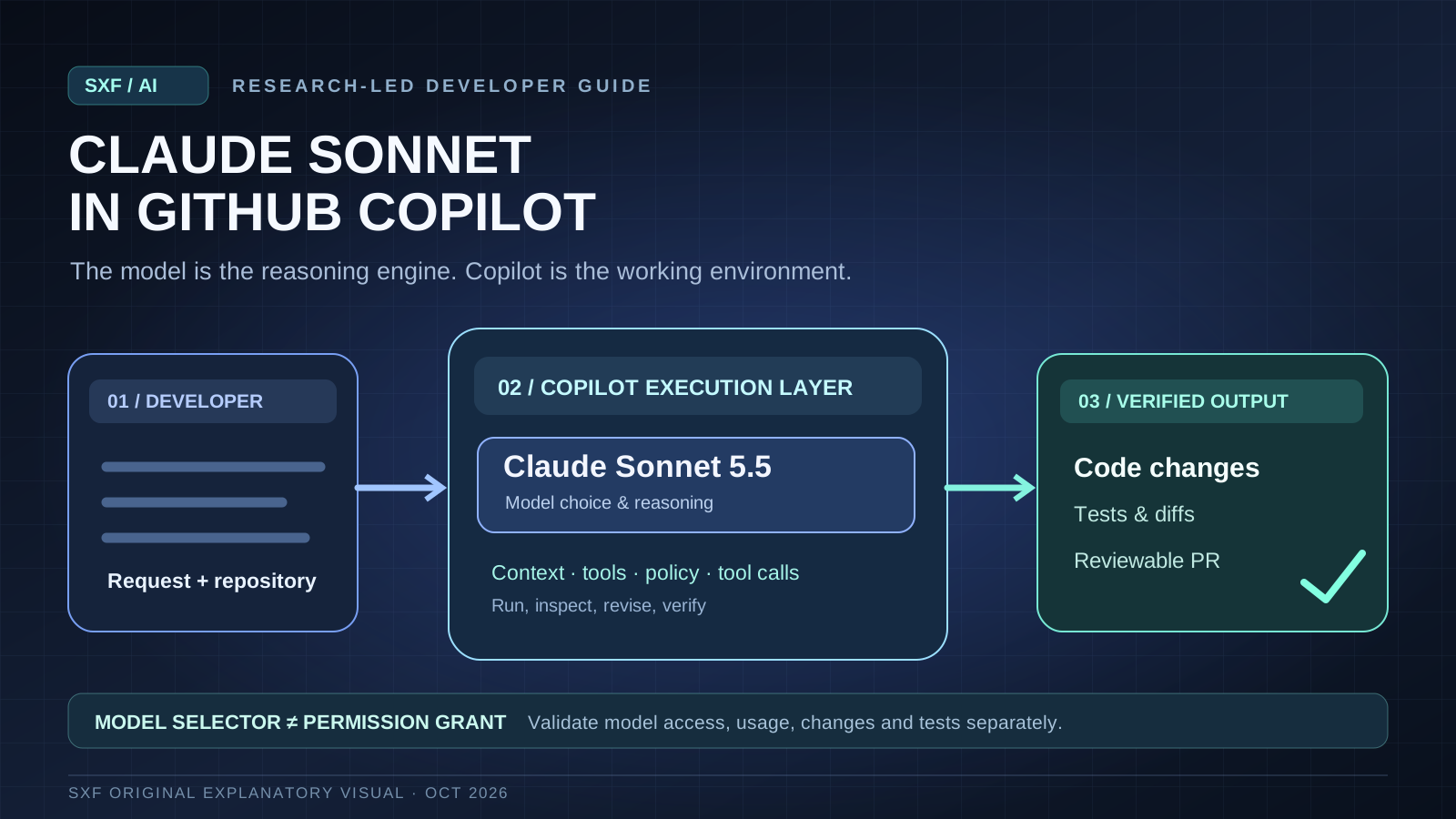
Claude Sonnet is Anthropic's coding-capable model available as a selectable model in eligible GitHub Copilot experiences—not a separate Copilot product.
GitHub made Sonnet 5.5 generally available on September 28, 2026. To use it, sign in with an eligible plan, open the Copilot model picker and select Sonnet 5.5 where supported. Cost and access depend on AI Credits, token use, product surface and organization policy. The code you can actually edit or execute still depends on Copilot's selected workflow and permissions.
DIRECT ANSWER
What is Claude Sonnet in GitHub Copilot?
Claude Sonnet in GitHub Copilot means Anthropic's Claude Sonnet model is available as a model choice inside GitHub's Copilot experiences. Claude is the model family; Sonnet is a model tier; GitHub Copilot is the product and execution environment that supplies editor integration, context, tools, governance and billing. Choosing Sonnet changes the reasoning model available to the Copilot workflow. It does not turn Copilot into Anthropic's Claude Code product or automatically confer unrestricted access to the terminal, repository or external services.
As of October 10, 2026, Claude Sonnet 5.5 is generally available in GitHub Copilot following GitHub's September 28 announcement. GitHub lists support in VS Code, GitHub.com and Copilot CLI for eligible users, subject to product and organizational settings. Anthropic's standalone API pricing and Claude.ai subscriptions should not be confused with Copilot's billing and entitlements. [1][2][10]
Claude Sonnet
The model used to interpret requests, understand code and generate candidate changes.
GitHub Copilot
The application layer providing coding context, editor workflows, tools and usage accounting.
Available features vary
A chat response, agent-mode edit, CLI command and cloud workflow do not share identical permissions or abilities.
Plan and policy
Visibility depends on subscription, product surface, rollout and team restrictions.
Selecting Claude Sonnet 5.5 answers “which model reasons about this task?” It does not answer “which operations is Copilot authorized to perform?” Those are separate controls.
AVAILABILITY
Is Claude Sonnet 5.5 available in GitHub Copilot—and on which plans?
GitHub announced general availability on September 28, 2026 for Copilot Pro, Pro+, Max, Business and Enterprise customers. Model availability can still vary by surface, region, organization policy and rollout status. A paid subscription by itself does not guarantee that every interface exposes the model at the same moment. [1][2]
| Plan or context | Availability described by GitHub | What to verify |
|---|---|---|
| Copilot Pro | Included among eligible plans | Check model picker and remaining AI Credits. |
| Copilot Pro+ | Included among eligible plans | Confirm model visibility and usage-based spend. |
| Copilot Max | Included among eligible plans | Check availability and current billing rules. |
| Copilot Business | Included among eligible plans | Organization policy may control model enablement. |
| Copilot Enterprise | Included among eligible plans | Enterprise policies and supported surfaces may constrain choice. |
| Copilot Free | Not part of the announced Sonnet 5.5 eligible-plan list | Do not assume access from generic Copilot marketing pages. |
GitHub's supported-models reference is the better ongoing source than a static screenshot. Check the model name exactly: a workspace may show an older Sonnet release, an organization-approved subset or an automatic model selector.
STEP-BY-STEP
How to enable Claude Sonnet in GitHub Copilot (VS Code, GitHub.com and CLI)
How do you select Sonnet in Visual Studio Code?
- Update VS Code and the GitHub Copilot extension, then sign in to the correct eligible GitHub account.
- Open Copilot Chat and start a new coding conversation or task.
- Locate the model picker in the chat interface. The exact placement changes across VS Code and Copilot extension releases.
- Select Claude Sonnet 5.5 when available. If the model is absent, check your subscription and organizational model policy before reinstalling anything.
- Try a bounded repository task and review the diff and tool outputs. Changing the model alone does not activate agent mode or automatic code edits.
How do you use Sonnet on GitHub.com?
Open a GitHub Copilot Chat surface that exposes model selection. Choose Sonnet 5.5 from the available models and ask a narrowly specified question or repository-related task. Features differ among chat, pull request review and cloud-agent contexts; do not assume the model selector is identical across all of them. [2][3]
How do you change to Sonnet in Copilot CLI?
Launch the official Copilot CLI, authenticate and use the CLI's documented model-selection control—commonly /model in interactive sessions—then select the supported Sonnet model. CLI options can change, so consult its current help and GitHub documentation rather than relying on a hard-coded, unverified command-line flag. In a repository, keep working-directory permissions and approval prompts constrained. [8]
Model-picker wording, default model and surface availability can shift by release. This guide describes durable selection steps and links to official interface documentation instead of presenting old UI screenshots as current fact.
COST EXPLAINED
How much does Claude Sonnet cost in GitHub Copilot? Plans, AI Credits and token billing
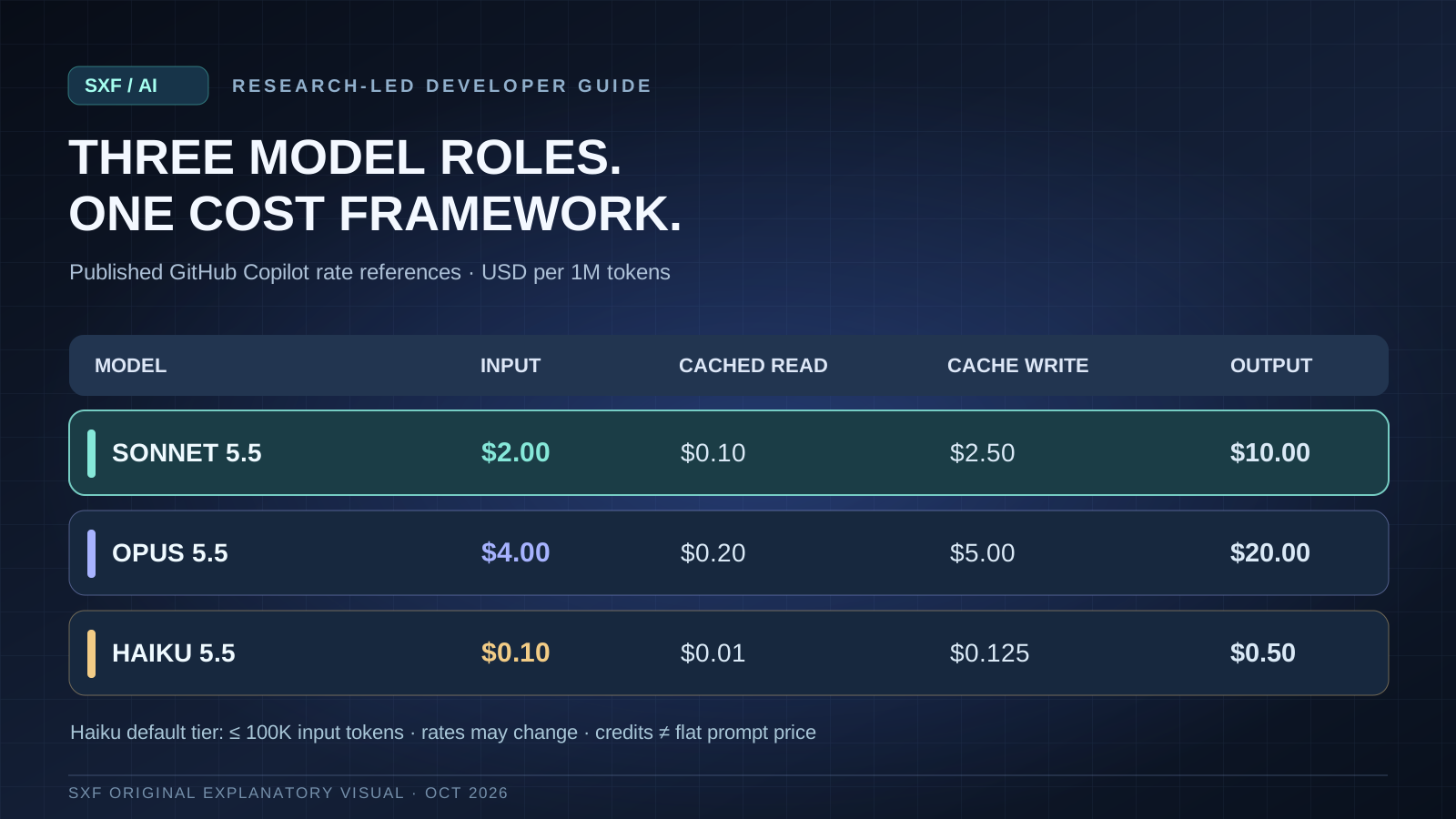
The central billing question in late 2026 is how Copilot measures the particular model's token usage and AI Credits, not the old shortcut “one prompt costs one fixed premium request.” Subscription fees, included credits, any additional purchased usage, cached tokens and output volume all influence the effective price. GitHub's published billing documentation and model-rate tables should be checked before a purchasing decision. [4][5][6]
Quoted per-million-token rates are rate-card reference values, not a promise that every Copilot request is billed identically. Effective cost can differ with caching, included credits, feature-specific usage and organization settings.
| Reference model | Input / 1M | Cached read / 1M | Cache write / 1M | Output / 1M |
|---|---|---|---|---|
| Claude Sonnet 5.5 | $2.00 | $0.10 | $2.50 | $10.00 |
| Claude Opus 5.5 | $4.00 | $0.20 | $5.00 | $20.00 |
| Claude Haiku 5.5, default tier | $0.10 | $0.01 | $0.125 | $0.50 |
Rates shown: GitHub Copilot AI-credit model-pricing reference as reviewed October 10, 2026; the Haiku line is its default ≤100K-input-token tier. Higher context windows, cached vs non-cached tokens and later product updates can change your bill. Confirm the current pricing table rather than treating this snapshot as permanent.
What would a Sonnet task cost before included credits?
Suppose a task uses 40,000 regular input tokens and 12,000 output tokens, with no prompt-cache discounts or extra charges. At the reference rates above, the modeled usage cost is $0.20: 0.04 × $2.00 + 0.012 × $10.00. That is an illustrative arithmetic example, not a measured Copilot invoice. A long iterative agent run may be much costlier because it replays context, reads repositories and performs multiple model calls.
What drives unexpectedly high Copilot model usage?
Large repository files, repeated terminal output, broad agent exploration, retries, high output-token counts, and poor cache reuse can dominate a task's cost. Teams should observe usage per accepted code change, not merely compare list prices per million input tokens. Set limits and review usage in Copilot's official billing views. [6]
MODEL CHOICE
Claude Sonnet vs Opus vs Haiku in Copilot: which model should you choose?
The right model depends on your task's complexity, latency budget, risk and verification needs. Sonnet is the practical starting point for broad everyday coding work; Opus can be worth considering for difficult reasoning-intensive work if its higher cost is justified; Haiku is attractive for bounded low-cost tasks. These are workflow-fit heuristics, not independent benchmark superiority claims.
| Model tier | Start here when… | Trade-off to test |
|---|---|---|
| Sonnet 5.5 | Debugging, multi-file feature changes, refactoring, test generation and daily agentic coding | Balance successful output, turnaround time and usage. |
| Opus 5.5 | Architectural tradeoffs, ambiguous migrations, complex debugging and detailed code-review reasoning | Measure whether extra reasoning value offsets higher output-token price. |
| Haiku 5.5 | Short transformations, targeted classification, simple explanations and fast low-cost checks | Watch correctness and escalation for tasks exceeding its capability. |
Does Sonnet always outperform another model in coding?
No credible answer is universal. The model interacts with Copilot's retrieval, tools, prompts and testing loop. Independent comparisons must hold repository, task, agent permissions, execution budget and test rubric constant. Vendor benchmarks may report strong performance in their stated settings but do not prove better results in your specific codebase. See AI Agent Reliability for repeated-run evaluation methodology.
ENGINEERING APPLICATIONS
Best uses for Claude Sonnet in Copilot: five coding tasks worth delegating
Repository investigation
Ask Sonnet to identify where a failure originates, quote file paths and explain its evidence before changing code.
Targeted bug fixing
Supply a reproducible failing case and ask for the smallest valid patch plus tests and residual risks.
Refactoring with constraints
Specify public interfaces and performance invariants, require a scoped diff and run the affected test suite.
Pull-request review
Use Sonnet as a second reader to flag test gaps, security concerns, error paths and unwanted behavior changes; validate its findings.
Feature implementation
Provide acceptance criteria and allow bounded edits. Require a final summary of actual tool executions, changed files and unverified assumptions.
Separate chat suggestions from executed code changes. A model that writes a plausible patch in conversation has not necessarily modified a file, run a test or produced a trustworthy pull request. The full workflow also depends on which Copilot mode is active. Our AI Coding Agent Architecture reference explains that execution distinction.
PRACTICAL INSTRUCTIONS
Four practical Claude Sonnet Copilot prompts that produce reviewable results
Good coding prompts specify environment, constraints, evidence, and the definition of done. These prompts can be adapted for your repository without requiring privileged autonomy.
Investigate the failing authentication test. Locate the root cause, list the relevant files, propose the smallest change, then run only affected tests if tool access is approved. Report the exact commands executed and their exit status. Do not change unrelated files.Refactor this module without changing its public API. Before editing, identify invariants and current test coverage. After editing, explain the diff, execute available checks, and explicitly identify behavior you could not verify.Review this pull request against the base branch. Prioritize correctness, security, race conditions and missing regression tests. Cite precise file and line evidence; distinguish confirmed issues from hypotheses. Do not modify code.Create a dependency migration plan from the current lockfile. Identify breaking changes with official upstream references, enumerate required code edits, and propose verification gates. Do not update dependencies or access production systems before approval.TROUBLESHOOTING
Why doesn't Claude Sonnet appear in GitHub Copilot? Eight checks
- Wrong account: verify you are logged into the GitHub account with the eligible Copilot subscription.
- Unsupported plan: check the eligible-plan list rather than assuming any free Copilot access includes Sonnet 5.5.
- Organization policy: Business and Enterprise administrators can limit which models are allowed.
- Different surface: VS Code, GitHub.com, code review, cloud agent and CLI may expose different model menus.
- Outdated editor or extension: update VS Code and the official Copilot extension, then reopen the chat picker.
- Gradual rollout or regional availability: check the supported-models documentation and current status rather than inferring a local installation defect.
- Model renamed or retired: look for exact release labels and migration notices; “Sonnet” by itself may refer to a different version.
- Usage or billing restrictions: review available AI Credits, spending controls and organization restrictions.
When escalating a missing-model issue, record your GitHub plan, organization policy state, VS Code/Copilot extension versions, product surface, date and what exact models appear. Do not publish private organization identifiers or credentials in a public issue.
SECURITY & TRUST
Is Claude Sonnet in Copilot private, safe and suitable for enterprise repositories?
Privacy and enterprise suitability depend on the Copilot product, contract, organizational settings and execution mode, not only the chosen model family. Review GitHub's published policies, model-hosting details, data-processing commitments and retention statements for the plan you actually use. Do not import assumptions from the standalone Claude API or Claude.ai into GitHub Copilot. [2][7][11]
Repository boundaries
A model may need relevant files and issue context. Scope access and avoid pasting production secrets.
Approval rules
Run shell, filesystem and external writes through the product's permission and review controls.
Independent evidence
AI-generated code needs ordinary tests, static analysis, peer review and dependency checks.
Usage visibility
Inspect team AI Credits and spending controls; a model setting does not enforce a project budget.
Prompt injection remains relevant: a repository README, test output or fetched web page can contain instructions the developer never authorized. Treat such content as untrusted and maintain boundaries between source data, model proposals and executable actions. For a deeper threat model, see AI Agent Security.
CONCEPT CLARITY
Claude Sonnet in Copilot vs Claude Code vs Claude.ai: what's different?
| Surface | What it supplies | Important distinction |
|---|---|---|
| Claude Sonnet in GitHub Copilot | A selectable Anthropic model within supported GitHub coding experiences | Copilot plans, tools, policies and usage accounting apply. |
| Claude Code | Anthropic's own agentic developer tool and integrations | Its CLI, tooling, pricing and permissions are separately defined. |
| Claude.ai | Anthropic's general assistant product | A consumer subscription does not automatically enable a model in Copilot. |
| Anthropic API | Direct developer access to Claude model endpoints | API usage costs and integration responsibility differ from Copilot. |
For a broader buying decision across coding products, see Best AI Coding Tools and GitHub Copilot Alternatives. This page stays focused on the specific Sonnet-in-Copilot search intent so it does not compete with those guides.
EVALUATION METHOD
How to test whether Claude Sonnet is the best Copilot model for your codebase
A defensible comparison runs the same task set under fixed repository snapshots, permissions, token budgets and reviewer criteria. Use tasks with known accepted outcomes: a bug reproduction, bounded refactor, migration, test-writing task and security review. Repeat runs to see how results vary.
| Measure | Why it matters |
|---|---|
| Accepted patch rate | Tracks whether reviewers accept the resulting behavior, not merely whether text looks convincing. |
| Regression test outcomes | Verifies observed behavior and identifies any failed or skipped checks. |
| Unnecessary file changes | Captures scope drift and risks hidden by a pass/fail score. |
| Human correction minutes | Measures reviewer time saved or created. |
| P50 / P95 completion time | Exposes unstable slow runs beyond the average. |
| AI-credit use per accepted task | Connects model choice to real engineering economics. |
| Security or permission exceptions | Shows whether the workflow remains inside organizational controls. |
Use an ablation: Sonnet first, then Opus or Haiku under the same conditions. If a more expensive model improves accepted work, ask whether the gain outweighs cost and review time. A model's public score is not a substitute for this evaluation.
DIRECT SEARCH ANSWERS
Frequently asked questions about Sonnet in GitHub Copilot
What is Sonnet in Copilot?
Sonnet is Anthropic's Claude model tier available as a selectable model in supported GitHub Copilot experiences. Copilot supplies the application features, coding context, permissions and billing.
Is Claude Sonnet 5.5 available in GitHub Copilot?
Yes. GitHub announced general availability on September 28, 2026, for eligible Pro, Pro+, Max, Business and Enterprise customers, subject to surface and organizational settings.
How do I enable Sonnet in VS Code?
Sign in with an eligible Copilot account, open Copilot Chat and select Claude Sonnet 5.5 from the available model picker. If missing, check extension version, plan and policy.
Can I use Claude Sonnet with Copilot CLI?
GitHub lists Sonnet 5.5 as supported in Copilot CLI for eligible users. Use the interactive model picker or current documented CLI controls and verify the selected model.
Is Claude Sonnet free in GitHub Copilot?
Sonnet 5.5 was not included in the announced eligible Free plan list. Check your subscription and AI Credit terms; do not conflate a free editor integration with free usage of every available model.
How much does Claude Sonnet cost in Copilot?
Copilot's late-2026 billing uses AI Credits and model-token usage rules. Subscription inclusions, cache behavior and task size matter. Verify current GitHub billing documentation before purchase.
What is the difference between Claude Sonnet and Opus in GitHub Copilot?
Sonnet is a general coding model choice balancing capability and cost; Opus is a higher-priced choice worth evaluating for complex tasks. Compare under equal task and budget conditions rather than relying on generic rankings.
Why is Claude Sonnet missing from Copilot?
Common reasons include unsupported plan, enterprise model restrictions, an outdated Copilot extension, a different product surface, account mismatch or changing rollout availability.
Does choosing Claude Sonnet turn GitHub Copilot into Claude Code?
No. Claude Code is a separate Anthropic developer tool. Selecting Sonnet changes the model used inside GitHub Copilot, not the product's entire harness or permissions.
Can GitHub Copilot with Sonnet edit my repository automatically?
Only when the selected Copilot feature and granted permissions support those operations. Model selection is separate from agent-mode execution, review and approval controls.
RESEARCH METHOD
Source policy, pricing assumptions and update history
Published and last verified on October 10, 2026. This is an original SXF explanatory synthesis based on GitHub product announcements, billing documentation and supported-model references, cross-checked with Anthropic model documentation. Exact UI labels, supported plans, usage rates and model availability can change. This guide distinguishes published vendor claims, engineering recommendations and illustrative arithmetic. It does not invent benchmark scores, measured savings, customer usage or test results. The URL intentionally contains no date so future updates retain the same canonical address.
Search-intent note: the guide targets genuine site-observed variants such as “what is sonnet in copilot,” “claude sonnet on copilot,” “sonnet in copilot” and “github copilot sonnet 5.5,” without inserting unnatural repeated query strings into prose.
PRIMARY EVIDENCE
Official sources and editorial verification
Release dates, eligibility, model menus and billing policies are sourced to GitHub; distinctions about Claude's model family are checked against Anthropic. Links are deliberately provided so future changes can be verified.