SXF GUIDE / CODING AI
GitHub Copilot Memory:
How It Works Across Agents, Repositories & Teams
GitHub Copilot Memory gives supported Copilot agents a way to carry forward useful knowledge instead of starting every task from zero. The important details are in the boundaries: repository facts and personal preferences have different scopes, repository facts are cited and revalidated against current code, unused memories expire after 28 days, and each Copilot surface applies memory differently.
Last reviewed: October 5, 2026. Based on GitHub Docs, GitHub engineering notes and GitHub Changelog releases. Copilot Memory remains in public preview.
Copilot Memory is a shared learning layer for supported GitHub Copilot agents—not a replacement for documentation or instructions.
It stores two kinds of knowledge: repository-level facts about how a codebase works and user-level preferences about how an individual prefers to work. Repository facts stay inside one repository, carry citations to supporting code and are checked against the current branch before use. User preferences follow the same user across repositories under the applicable Copilot billing and policy scope. GitHub automatically removes unused entries after 28 days.
THE CORE IDEA
What is GitHub Copilot Memory?
Most coding assistants are strongest inside the current prompt, chat or task. They can read a repository and infer patterns, but the next session may begin without the conclusions learned last time. Copilot Memory is GitHub's attempt to make that accumulated understanding reusable across supported agent workflows.
GitHub describes memories as tightly scoped pieces of information that Copilot discovers while doing real work. A useful memory is not “this repository is a web app.” It is closer to an actionable rule: a database client must be created through a specific factory, two configuration files must remain synchronized, tests use a non-obvious command, or pull requests should follow a particular structure.
The system matters because software repositories contain knowledge that is operationally important but unevenly documented. Senior engineers know which files move together, which conventions are historical accidents, which validation step catches a subtle failure and which pattern is safe for one module but not another. Memory gives Copilot a way to retain some of that discovered context and offer it to another supported Copilot agent later.
TWO MEMORY TYPES
Repository facts and user preferences are not the same thing.
Shared knowledge about one codebase
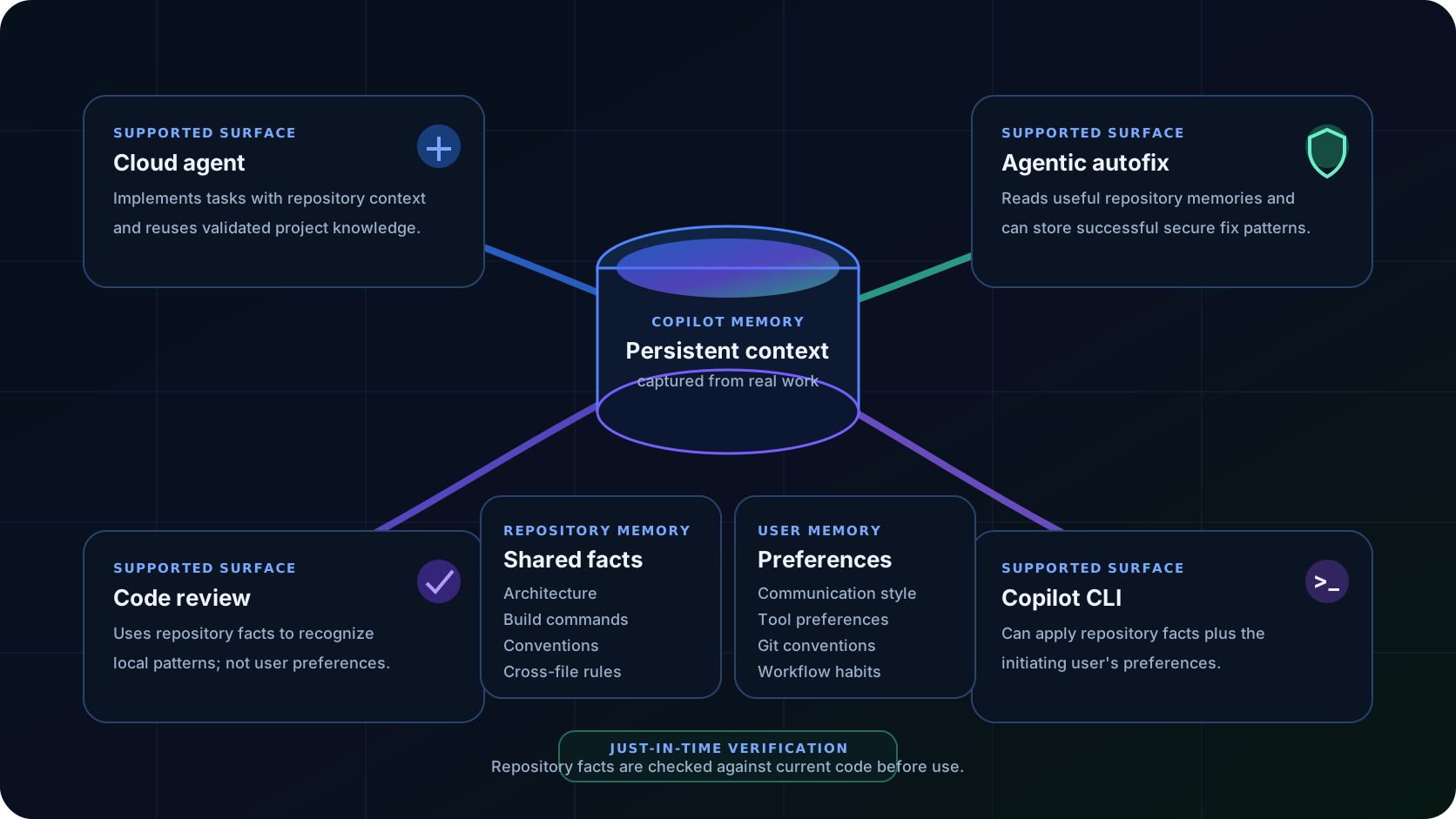
Examples include coding conventions, architectural decisions, build commands, cross-file dependencies and project-specific rules. GitHub scopes these facts to one repository, and collaborators with Copilot Memory access can benefit from them when working in that repository.
Creation boundary: repository facts are created in response to Copilot activity initiated by users with write access and Memory enabled.
Personal workflow preferences across repositories
Examples include communication style, preferred tooling, Git conventions or how a user likes pull requests structured. These preferences belong to the individual interaction context rather than the repository.
Governance boundary: on Business and Enterprise, administrators can manage preferences owned by the applicable billing entity.
This split solves two different problems. Repository memory helps teams preserve local engineering knowledge. User memory helps an individual avoid restating personal preferences everywhere. Mixing the two would be dangerous: one developer's preferred commit style should not silently become a repository-wide rule, while an architectural constraint should not disappear just because a different user opens the task.
MEMORY LIFECYCLE
How Copilot Memory works: capture, retrieve, verify, use, refresh.
GitHub's engineering description is notable because it avoids treating retrieval as proof. Repository memories are stored with citations to code locations that support the fact. When the memory becomes relevant to new work, Copilot verifies those citations against the current branch before applying the fact.
That just-in-time verification is the most important technical distinction in GitHub's design. A branch may never merge. A rule may change. A cited file may disappear. Rather than requiring a central background process to keep every stored conclusion continuously synchronized, GitHub verifies the evidence when the fact is about to matter.
GitHub's January engineering write-up reported early internal evaluation gains: code review saw higher precision and recall with memory, coding-agent pull requests had a higher merge rate in the reported A/B test, and code-review comments received slightly more positive feedback. Those are GitHub-reported product experiments, not independent benchmarks, so they are best read as evidence that cross-agent context can be useful—not as a guarantee that every repository will see the same lift.
WHERE MEMORY WORKS
Four Copilot surfaces currently share the memory layer.
GitHub's current documentation lists Copilot cloud agent, Copilot code review, Copilot CLI and agentic autofix. The shared store does not mean every feature reads the same information in the same way.
| Copilot feature | Repository facts | User preferences | What memory can change |
|---|---|---|---|
| Cloud agent | Yes | Supported under applicable user/policy scope | Implementation choices, repository conventions, cross-file relationships and task execution. |
| Code review | Yes | No according to current docs | Review can recognize repository-specific patterns and flag changes that violate learned facts. |
| Copilot CLI | Yes | Yes, for the initiating user | Terminal work can carry repository knowledge and personal preferences across sessions. |
| Agentic autofix | Yes | Security workflow centers on repository context | Autofix can reuse secure fix patterns and add new patterns after resolving alerts. |
A concrete cross-agent example is more useful than the phrase “shared memory.” If code review discovers that a schema version in two files must stay synchronized, a later coding-agent task can apply that rule while editing one of those files. Knowledge discovered during review becomes implementation context.
Likewise, CLI work can benefit from repository conventions learned elsewhere. The value is not that every agent has a longer chat transcript; it is that supported agents can inherit validated repository-specific knowledge without each independently rediscovering it.
SECURITY FEEDBACK LOOP
Agentic autofix turns Memory into a repository-specific security loop.
On September 25, 2026, GitHub added Copilot Memory to agentic autofix for customers who have Memory enabled. Before generating a fix, agentic autofix can review existing memories for context that may help resolve the alert. After a successful fix, it can store the fix pattern as a new memory.
This matters because secure coding patterns are often repository-specific. One application may require every deserialization call to pass through a wrapper. Another may have a custom authorization helper. A third may need security fixes mirrored across generated files. Generic vulnerability knowledge tells an agent what kind of bug it sees; repository memory can tell it how this codebase normally fixes that class of problem.
This is also where governance matters most. A remembered fix pattern is useful only if the repository still supports it. GitHub's citation-and-verification design reduces the chance that an obsolete security workaround silently survives after the architecture changes.
For the source event that triggered this search opportunity, see the SXF signal: Agentic autofix now uses Copilot Memory.
MEMORY VS INSTRUCTIONS
Copilot Memory is not a replacement for copilot-instructions.md or AGENTS.md.
The strongest Copilot setup uses the right mechanism for the right type of context. Stable rules should not depend on whether an agent happened to learn and retain them. Learned context should not require engineers to manually maintain hundreds of low-level facts in an instructions file.
| Mechanism | Who writes it? | Persistence | Best use | Main tradeoff |
|---|---|---|---|---|
| Copilot Memory | Copilot learns it from supported activity | Unused entries expire after 28 days | Learned conventions, repository relationships, recurring patterns and user preferences | Adaptive, but not deterministic and feature support varies |
| copilot-instructions.md | Humans / repository maintainers | Version-controlled until edited | Repository-wide rules that should always be present | Requires explicit maintenance |
| Path-specific instructions | Humans / repository maintainers | Version-controlled until edited | Rules for particular directories, languages or file types | Support varies by Copilot surface |
| AGENTS.md | Humans / repository maintainers | Version-controlled until edited | Standing agent instructions, including cross-tool conventions | Not every Copilot feature consumes it in the same way |
| Prompt files / skills | Humans / teams | Explicit reusable assets | Task-specific workflows such as reviews, migrations or release procedures | Activated for a task rather than learned automatically |
Use instructions for rules that must not drift.
If every pull request must run a particular test suite, if a security control is mandatory, if generated files must never be edited directly, or if the project has a legally required workflow, keep that rule in version-controlled instructions or documentation. Memory can reinforce it, but it should not be the only place the rule exists.
Use memory for knowledge that is useful because it was discovered.
Examples include “these two legacy settings must remain synchronized,” “this repository wraps database connections with helper X,” or “this developer prefers concise pull-request descriptions.” These facts are exactly the kind of context an agent may learn while solving a real task and benefit from later.
PRIVACY & SECURITY
The security model is mostly about scope, authorship and validation.
Repository facts learned in one repository can only be used for operations on that same repository. GitHub frames this as keeping repository knowledge inside the repository boundary.
Repository facts are created only in response to Copilot activity initiated by users with write access and Memory enabled. That reduces the risk of a read-only visitor teaching the shared memory store.
Before applying a repository fact, Copilot checks the cited code against the current branch. A fact learned from an abandoned or unmerged branch should not influence work unless the current code still supports it.
User-level preferences use a different isolation boundary. They are available only to the user who created them. On Business and Enterprise plans, GitHub ties those preferences to the active billing entity that provided the Copilot entitlement; administrators can export or delete preferences owned by their organization or enterprise.
That billing-entity model is easy to miss. A developer with multiple Copilot licenses may need a default billing entity before user-level preferences can be created. When Copilot later builds context, it looks at the active billing entity again and only retrieves preferences owned by that entity.
FRESHNESS
Why does Copilot Memory expire after 28 days?
GitHub automatically deletes a fact or preference after 28 days of non-use. When an entry is successfully validated and used again, its timer may be refreshed. The policy creates a simple pressure toward recency without forcing every old memory to remain forever.
The 28-day expiry solves only one form of staleness. A memory can become wrong tomorrow if the architecture changes. That is why retention and verification work together: expiry removes knowledge that stops proving useful, while citation checks handle code that changes before the expiration date.
GitHub specifically notes that memories may be captured during pull requests that are later closed without merging. A naïve memory system could carry those branch-specific conclusions into mainline work. The current design instead asks the agent to verify the cited source against the active branch before using the memory.
This is a useful design lesson beyond GitHub Copilot: persistent AI context needs provenance and invalidation, not just storage.
MANAGEMENT
How to enable, inspect and delete Copilot Memory.
Individual users
GitHub's current personal-account documentation says Copilot Memory is enabled by default for paid individual users. A user can disable or re-enable the feature from Copilot settings. Personal Memory settings also expose user-level preferences for review and deletion.
Repository owners
Repository owners can open Repository Settings → Copilot → Memory to inspect stored repository-level facts and delete entries that are misleading, inappropriate or no longer useful. GitHub later added a repository-level off switch: when disabled, repository facts are no longer stored or read for that repository. Existing facts are not automatically deleted by turning the feature off.
Copilot CLI
GitHub added CLI controls including /memory on, /memory off and /memory show. The choice persists across CLI sessions. GitHub also changed the memory-storage permission prompt so it identifies whether an entry is being stored as a repository fact or user-level preference.
Organizations and enterprises
For organization- and enterprise-managed subscriptions, Memory is off by default at the policy layer. An administrator must enable it first; individual users can then opt out. Administrators can export or delete user preferences owned by their billing entity, including bulk operations, which makes Memory reviewable as part of enterprise governance rather than an invisible personal-only feature.
OPERATING MODEL
Six practices for using Copilot Memory without turning it into hidden documentation.
- Keep non-negotiable rules in version control. Security policies, required tests, architecture constraints and release procedures should exist in documentation or instructions even if Memory also learns them.
- Review repository facts like configuration. Owners should periodically inspect stored facts, especially after major refactors, migrations or changes in team conventions.
- Watch the scope label. A personal preference and a repository-wide fact have different audiences. The CLI storage prompt and repository Memory UI are useful checks before assuming who can benefit from an entry.
- Let verification do work—but do not outsource judgment. Citation checks reduce stale repository context, yet a technically true fact may still be irrelevant to a specific task.
- Use Memory where rediscovery is expensive. Cross-file invariants, unusual build steps, architectural wrappers and repository-specific secure fix patterns create more value than trivial facts that are obvious from one file.
- Measure outcomes, not the number of memories. The useful question is whether reviews become more accurate, agent pull requests need less correction, or repeated tasks require less re-explanation—not how many entries are stored.
WHAT CAN GO WRONG?
Memory reduces repeated context work, but it creates new failure modes.
1. A valid fact becomes irrelevant.
Verification can prove that cited code still exists, yet the fact may not matter for the current task. Retrieval quality remains part of the problem. A memory system must select useful context, not merely true context.
2. A team mistakes learned behavior for policy.
If an agent repeatedly observes one engineer's workaround, teams may begin treating the learned pattern as a standard even though nobody approved it. The defense is explicit ownership: policy goes in instructions and documentation; memory remains contextual assistance.
3. Repository facts conflict with explicit instructions.
When teams refactor conventions, old memory may temporarily overlap with new instructions. The safest path is to update the authoritative instruction first and remove clearly obsolete facts rather than waiting for expiration.
4. Scope is misunderstood.
Repository facts are shared within one repository; user preferences are personal and can cross repositories. Code review currently ignores user preferences. Designing a workflow on the assumption that “all Copilot has the same memory everywhere” will produce inconsistent behavior.
5. A team expects Memory to preserve project history.
The 28-day inactivity expiry deliberately makes Memory a working-context layer, not a permanent engineering archive. Architecture decisions that must survive for years belong in ADRs, documentation, issues or other durable records.
TEAM CHECKLIST
A practical rollout plan for engineering teams.
- Inventory existing instructions. Identify what is already defined in
.github/copilot-instructions.md, path-specific instruction files,AGENTS.mdand team documentation. - Define authoritative vs learnable knowledge. Mark mandatory policies as explicit instructions; allow Memory to handle lower-level learned patterns and personal workflow preferences.
- Enable Memory deliberately. For managed subscriptions, set the organization or enterprise policy first, then communicate that users retain an opt-out.
- Review repository facts after the first real tasks. Do not evaluate Memory from a demo prompt. Let coding, review or CLI work discover repository-specific facts, then inspect what was retained.
- Test cross-agent transfer. Have one feature learn a real repository rule, then check whether another supported feature can apply it correctly after validating the source.
- Add security autofix only with clear review boundaries. If agentic autofix is used, monitor which fix patterns become reusable context and keep human review on consequential code changes.
- Re-review after major refactors. Remove obviously obsolete facts and confirm that the explicit instructions still describe the current architecture.
- Track developer outcomes. Compare correction rate, review usefulness, agent PR acceptance and repeated prompt/context overhead before and after rollout.
BOTTOM LINE
When is Copilot Memory actually worth enabling?
Memory has the highest potential value in repositories where the codebase contains important conventions that are discoverable but costly to rediscover: mature monorepos, systems with cross-file invariants, internal frameworks, non-obvious build or test flows, and repositories where coding agents and automated review already perform substantial work.
It is less transformative for tiny repositories with obvious conventions or teams that rarely use the supported agent surfaces. In those cases, a concise instructions file may deliver most of the benefit with less governance overhead.
For broader coding-agent context, see GitHub Copilot signal history, the GitHub Copilot alternatives guide, and SXF's research page on the September 2026 VS Code agent releases.
FAQ
GitHub Copilot Memory questions, answered directly.
What is GitHub Copilot Memory?
GitHub Copilot Memory is a public-preview system that lets supported Copilot agents retain useful repository facts and user-level preferences across interactions. Repository facts can capture conventions, architecture decisions, build commands and cross-file rules; user preferences capture how an individual prefers to work with Copilot.
How long does GitHub Copilot Memory last?
GitHub says a stored fact or preference that goes unused is automatically deleted after 28 days. The timer can reset when Copilot successfully validates and uses the entry again.
Where does Copilot Memory work?
GitHub currently documents Copilot Memory across Copilot cloud agent, Copilot code review, Copilot CLI and agentic autofix. Feature-specific behavior differs: code review uses repository facts but not user-level preferences, while CLI can apply both repository facts and the initiating user's preferences.
Is Copilot Memory the same as copilot-instructions.md?
No. Custom instructions are explicit, version-controlled rules written by people. Copilot Memory is learned from Copilot activity and can expire after 28 days of disuse. Stable rules that must always apply are better kept in instructions; learned repository details and personal workflow preferences are candidates for memory.
Can Copilot Memory share repository knowledge across repositories?
Repository-level facts are scoped to the repository where they were learned and can only be used for work on that repository. User-level preferences can follow the same user across repositories, subject to the active billing entity and applicable policy.
Can repository owners see and delete Copilot memories?
Repository owners can review and delete repository-level facts from Repository Settings under Copilot Memory. Users can review and delete their own user-level preferences. Business and Enterprise administrators have additional export and deletion controls for preferences owned by their billing entity.
Does Copilot validate memory before using it?
For repository-level facts, GitHub stores citations to supporting code locations. When a fact is relevant, Copilot checks those citations against the current branch before applying the fact. This just-in-time verification is designed to reduce the risk of stale knowledge.
Does agentic autofix use Copilot Memory?
Yes, when Copilot Memory is enabled. GitHub says agentic autofix reviews existing memories for context that can help resolve security alerts and can store successful fix patterns as new memories for future security work and other Copilot features.
Is Copilot Memory on by default?
For individual paid Copilot users, GitHub documents Memory as enabled by default. For organization- and enterprise-managed Copilot subscriptions, the policy is off by default and an administrator must enable it before users can use the feature; individual users can still opt out.
Should teams replace documentation with Copilot Memory?
No. Memory is best treated as an adaptive layer on top of durable documentation and explicit instructions. Architecture rules, security requirements, required test commands and compliance controls should remain documented and version-controlled when they must be deterministic and reviewable.
PRIMARY SOURCES
Where these claims come from.
This guide prioritizes GitHub's own product documentation, engineering explanation and dated changelog releases. Product behavior is public preview and can change, so time-sensitive controls should be rechecked against the linked documentation.