SXF FIELD GUIDE · MODEL COMPRESSION & HARDWARE
LLM Quantization Explained:
4-Bit vs 8-Bit, GGUF, AWQ, GPTQ & VRAM
LLM quantization stores model weights in fewer bits, cutting memory use—often enough to run a larger model on your own hardware.
4-bit models usually use less weight memory than 8-bit, but the quality and speed trade-off depends on your model and runtime.
GGUF is a file format; GPTQ and AWQ are quantization approaches, not interchangeable performance rankings.
Always budget for KV cache, context length and runtime overhead before choosing a download.
A practical, source-backed guide to choosing 4-bit or 8-bit LLMs, understanding GGUF vs GPTQ vs AWQ, calculating GPU memory, measuring quality on the same machine and avoiding expensive mistakes.
How much VRAM does a 4-bit or 8-bit LLM need?
For 8 billion parameters, the raw weight payload is approximately 3.73 GiB at 4-bit, 7.45 GiB at 8-bit, or 14.90 GiB at FP16. Actual GGUF files and GPU allocations exceed raw payload sizes. Add KV cache, which can grow sharply with context length, and leave room for temporary buffers and concurrency. Use the configurable VRAM calculator rather than a one-number promise.
LLM QUANTIZATION · FUNDAMENTALS
What does LLM quantization actually change?
Picture a model that fits perfectly in VRAM—until you ask it to read a long document. It fails because the weights are only one part of the memory budget. Quantization reduces the precision of stored numerical values, usually model weights. That often shrinks files and may increase memory-bandwidth-limited inference speed. It does not guarantee equal accuracy, faster computation, or lower memory for activations and KV cache. A model's architecture and inference engine are part of the outcome.
Weight-only post-training quantization takes a trained checkpoint and represents many weights with fewer bits plus scale or block information. Quantization-aware training instead accounts for reduced precision during training. QLoRA uses quantized frozen weights with trainable adapters, a distinct fine-tuning setup. [1, 9–11]
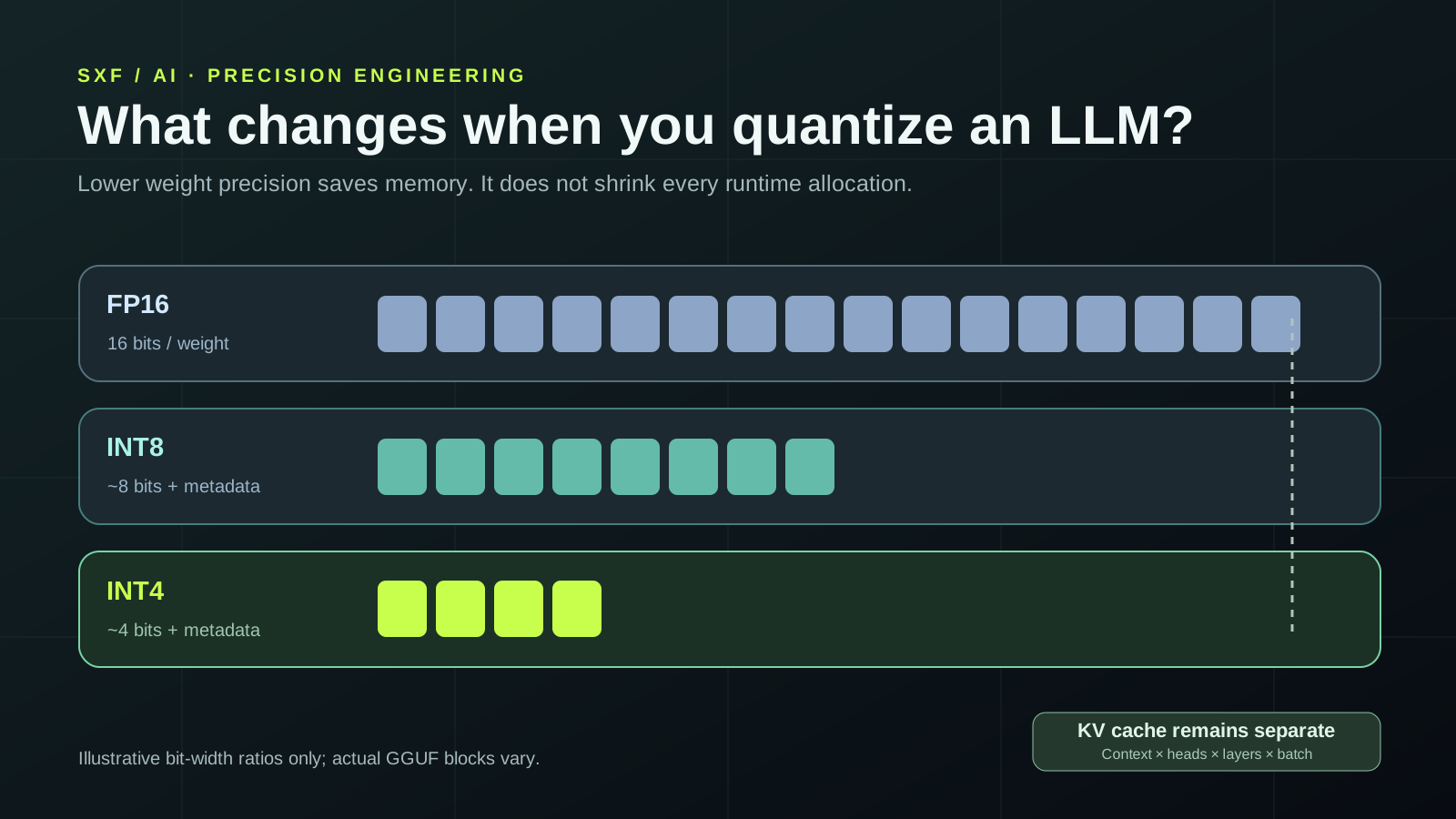
4 BIT VS 8 BIT LLM
4-bit vs 8-bit vs FP16: memory, speed and quality
| Precision | Raw storage for 8B weights | Quality expectation | Where it fits |
|---|---|---|---|
| FP16 / BF16 | 14.90 GiB | Reference higher-precision baseline | Enough GPU memory, maximum compatibility |
| INT8 / 8-bit | 7.45 GiB + metadata | Usually closer to baseline; algorithm-dependent | A quality-oriented compromise |
| INT4 / 4-bit | 3.73 GiB + metadata | Higher compression, potentially more loss | Memory-limited local inference |
| 2–3-bit variants | 1.86–2.79 GiB + metadata | Greater risk of degradation | Very constrained devices after evaluation |
The storage calculation is parameters × bits ÷ 8 ÷ 2³⁰ in GiB. It assumes 8 billion actual parameters and does not predict a download size or memory allocator footprint. Some models use mixed precision, tied embeddings, MoE weights or other exceptions. For a 7B model multiply by 7/8; do not blindly use the advertised active parameter count for a mixture-of-experts model's total disk storage.
The raw weight payload is approximately half. The finished file may not be. Q4_K_M uses mixed block recipes, while Q8_0 has block overhead too. Compare actual artifacts built from the same base checkpoint.
GGUF VS GPTQ VS AWQ
GGUF vs GPTQ vs AWQ vs bitsandbytes: they are not the same kind of thing
This distinction removes a common source of confusion. GGUF is a model file format/container with metadata and tensor storage; a GGUF file can use Q4_K_M, Q5_K_M, Q8_0 and other quantization types. GPTQ and AWQ name weight-quantization approaches associated with particular formats and optimized kernels. bitsandbytes offers practical quantized loading and training paths in the Transformers ecosystem, including NF4 and 8-bit methods. None is a universal benchmark winner. [1–3, 6–10]
| Option | What it is | Typical ecosystem | Practical check |
|---|---|---|---|
| GGUF (Q4_K_M / Q8_0 etc.) | Container holding architecture metadata and quantized tensors | llama.cpp, many local desktop runtimes | Supported architecture and GPU/CPU backend |
| GPTQ | Post-training weight quantization algorithm | Transformers-compatible GPU workflows and selected kernels | Exact model format, backend and version |
| AWQ | Activation-aware weight quantization approach | GPU serving, supported vLLM / Transformers integrations | Calibration recipe and optimized kernel |
| bitsandbytes NF4 / INT8 | Quantized load/compute integration | Hugging Face Transformers, QLoRA | Hardware support, compute dtype and memory |
| FP8 / newer formats | Floating-point reduced precision and deployment-specific implementations | Modern accelerators and serving stacks | Chip generation, scaling and kernel availability |
What does Q4_K_M actually mean?
In llama.cpp, K-quants use block/group structures, and the mixed Q4_K_M preset allocates selected tensors at different precisions. Its effective footprint differs from exactly 4.000 bits per parameter. A higher-precision Q8_0 reference commonly offers smaller quantization error at roughly the cost of more model memory. Do not compare these suffixes as universal, cross-runtime quality grades.
DECISION RULES
Which quantization should you choose for your GPU, CPU or laptop?
Try Q4_K_M GGUF first
Good exploratory balance when the runtime supports your architecture. Verify the download size and reserve KV/compute headroom. If output quality fails, try Q5_K_M or Q8_0 before replacing the base model.
Evaluate Q8_0 and FP16
Compare failure cases and speed on exactly the same hardware. Higher precision often helps, but an 8-bit CPU path can be slower than a tuned 4-bit GPU kernel.
Check AWQ, GPTQ and FP8 support
Use your serving engine's compatibility matrix for the accelerator and kernel. Throughput benefits are not transferable between GPUs and batching policies.
Consider NF4 / QLoRA
QLoRA can reduce frozen base weight memory while training adapters. Training adds gradients, optimizer states and activations; it is not inference-only budgeting.
The deployment guide How to Run AI Models Locally covers setup with Ollama, LM Studio and vLLM. This reference instead focuses on the numeric formats, quality loss, memory and reproducible testing.
LLM VRAM REQUIREMENTS
How to calculate quantized LLM VRAM requirements
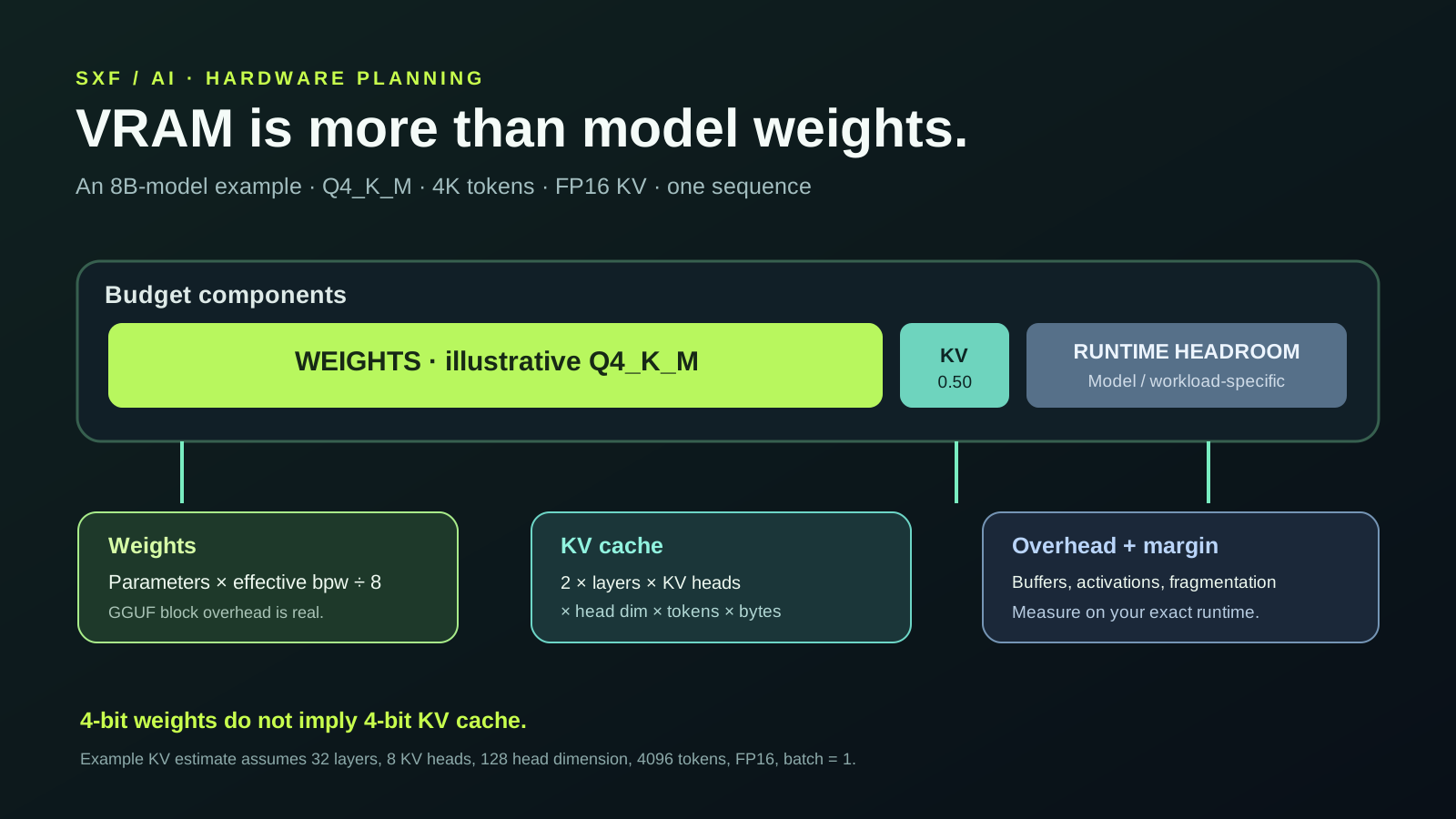
The reliable planning identity is loaded weights + KV cache + runtime buffers + memory headroom. Static model files are not a guaranteed GPU allocation. Other influences include partial CPU offload, model architecture, attention implementation, batch/concurrency, logits buffers, fragmentation and the GPU driver.
parameters × effective bits per weight ÷ 8 ÷ 2^30FP16/BF16 KV cache bytes (simplified)2 × layers × KV heads × head dimension × cached tokens × sequences × bytes per KV elementThe factor of two covers keys and values. Grouped-query attention uses the number of KV heads, not necessarily total query heads. Sliding-window, MLA, hybrid attention, cache sharing and paged allocation can invalidate this simple dense-attention approximation.
INTERACTIVE TOOL · NO ACCOUNT NEEDED
Free LLM VRAM calculator: 4-bit, 8-bit, context length and KV cache
Enter your model's actual total parameters, effective bits per weight (including block overhead when known), attention configuration, context and parallel sequences. The calculator returns a transparent dense-transformer estimate. It neither queries vendor APIs nor predicts precise allocator behavior.
WORKED EXAMPLE · ONE 8B MODEL
How much GPU memory does a quantized 8B model need?
For an 8-billion-parameter dense checkpoint the raw 4-bit weight payload is 3.73 GiB; raw 8-bit is 7.45 GiB, and FP16 is 14.90 GiB. Actual published GGUF checkpoints include non-4-bit tensors and metadata. With 32 layers, 8 KV heads, 128 dimensions per head, 4096 cached tokens and FP16 KV, the simple KV-cache formula yields 0.50 GiB per sequence. At 32K tokens the same configuration needs approximately 4.0 GiB of FP16 KV, before other buffers and any cache optimizations.
The memory planner should therefore not say “8B at 4-bit needs 4 GB” as a universal promise. The runtime may reserve much more. Check actual artifact sizes, memory use while idle and while generating, and whether attention caches are on CPU or GPU. For MoE models, calculate memory from total stored weights, while speed is additionally influenced by active experts.
PUBLISHED COMPARISON EVIDENCE
Real measured comparison: what evidence can we trust?
Rather than inventing a performance test, this guide separates published quantization artifacts and empirical evaluation results from the hardware tests you should reproduce. The llama.cpp quantization documentation publishes comparison examples for particular checkpoints including file size and perplexity changes. Those are versioned examples, not timeless speed promises for every processor. For a genuine apples-to-apples comparison, record your own Q4_K_M and Q8_0 generation and prompt-processing rates with llama-bench, along with held-out correctness.
| Quantity | Q4_K_M | Q8_0 | What it means |
|---|---|---|---|
| Nominal method | Mixed K-quant at roughly four-bit class | Eight-bit block quantization | Not identical to a raw bit count |
| Raw 8B payload floor | 3.73 GiB | 7.45 GiB | Excludes scales, mixed tensors and metadata |
| Relative raw weight bits | 0.5× 8-bit | 1× 8-bit | Storage arithmetic, not measured VRAM |
| Actual model size | Read local GGUF file | Read local GGUF file | Dependent on conversion + tensor mix |
| Generation tokens/sec | Measure on your machine | Measure on your machine | Backend- and hardware-dependent |
| Perplexity / task quality | Evaluate on fixed held-out data | Evaluate on fixed held-out data | Must report evidence; no assumed winner |
There are no claimed SXF-run GPU timings in this article. Upstream documentation supplies published examples; the table explicitly leaves device-dependent numbers unfilled. This is more defensible than presenting synthetic throughput as a lab result.
REPRODUCIBLE SAME-HARDWARE PROTOCOL
Benchmark Q4_K_M vs Q8_0 on exactly the same device
Begin from the same FP16/BF16 base checkpoint and quantize with the same llama.cpp commit. Pin the tokenizer, chat template, output settings, GPU layer count, thread count, prompt length, context, random seed, device drivers and power mode. Warm up the model and repeat each test. Never compare a Q4 conversion of one model version with Q8 of another release.
# Quantize the SAME source GGUF checkpoint.
./build/bin/llama-quantize base-f16.gguf model-q4_k_m.gguf Q4_K_M
./build/bin/llama-quantize base-f16.gguf model-q8_0.gguf Q8_0

# Run prompt-processing and generation benchmarks on the same device.
./build/bin/llama-bench -m model-q4_k_m.gguf -p 512 -n 128 -r 5
./build/bin/llama-bench -m model-q8_0.gguf -p 512 -n 128 -r 5

# Record actual RAM/VRAM separately while each test runs.
# Verify installed flags with: ./build/bin/llama-bench -h
Do a quality evaluation too: hold out 100–300 real tasks, compare acceptance rate, exact-match extraction, JSON validity, source correctness and repeated-run regressions. Log both prompt processing tokens/sec and generation tokens/sec; their relative speeds can differ. Include median, spread, device model, memory and commit ID in your report. The benchmarks explainer explains why quality metrics cannot be collapsed into an invented score.
ACCURACY · PERPLEXITY · HUMAN REVIEW
Does quantization reduce LLM intelligence or accuracy?
Compression changes the numerical approximation of model weights. Some prompts remain effectively unchanged; others expose failure on structured extraction, rare languages, tool calls, arithmetic or brittle instruction-following. Aggregate perplexity is useful but does not guarantee reliability for your workload. Higher precision tends to preserve more information, yet the size–quality balance depends on the quantizer, calibration data, tensor treatment and model architecture.
Use direct task acceptance over generic anecdote. If 4-bit produces more retries or human edits, the total cost can exceed an 8-bit or full-precision deployment even when RAM requirements are lower. Treat model choice and quantization choice together; see How to Choose an AI Model.
CONTEXT & CONCURRENCY
Why a longer context window can exhaust VRAM
During autoregressive generation the engine retains key/value tensors from prior tokens (except in architectures or policies that change this behavior). For many dense attention models, cache memory grows approximately with context length and concurrent sequences. Going from 4K to 32K tokens multiplies the corresponding KV estimate eightfold. A 4-bit weight checkpoint can therefore fail at 32K when it runs comfortably at 4K.
Paged KV allocation, prefix caching, sliding-window attention and reduced KV precision can change actual allocations. GPU fragmentation and prefill activations create additional demand. Some systems spill to RAM, trading speed for capacity. Validate the settings in your specific runtime rather than borrowing a VRAM number from a different serving stack. [8, 12]
PRACTICAL DIAGNOSIS
Common quantization mistakes and how to fix them
| Symptom | Likely problem | Next test |
|---|---|---|
| Model loads but crashes on long chats | KV or runtime memory overwhelms available VRAM | Reduce context/concurrency; measure cache allocation |
| 4-bit is slower than 8-bit | Dequantization kernel, CPU offload or unsupported accelerator path | Benchmark prompt + decode; verify backend and GPU layers |
| Model gives malformed structured output | Quantization error, model mismatch or prompt issue | Compare Q8/FP16 baseline with identical tokenizer |
| GGUF loads with wrong outputs | Wrong architecture conversion or chat template | Check metadata, tokenizer and runtime version |
| File is much larger than raw 4-bit math | Mixed precision, block metadata and extra tensors | Inspect actual GGUF types and file size |
| Context fits but generation suddenly slows | KV placement, memory bandwidth or paging | Profile offload, cache precision and batch size |
DIRECT SEARCH INTENT · FAQs
Frequently asked questions about 4-bit vs 8-bit LLM quantization
What is LLM quantization?
LLM quantization stores and computes some model tensors at lower numerical precision to reduce memory and sometimes improve throughput. Actual results depend on the numerical format, kernels, hardware, architecture and runtime.
Is a 4-bit LLM twice as small as an 8-bit model?
Raw four-bit weight payloads are half the size of eight-bit payloads. Real checkpoint files include scales, block metadata and tensors at other precisions, so GGUF Q4_K_M is not precisely half of Q8_0.
Does 4-bit quantization make an LLM faster?
Not always. Memory-bandwidth-limited generation may improve, but dequantization, kernel availability, CPU/GPU offload and prompt processing can reverse the result. Benchmark both prompt processing and decoding.
Which is better: GGUF, GPTQ or AWQ?
GGUF is a container used by runtimes such as llama.cpp and can hold several quantization types. GPTQ and AWQ are quantization approaches, commonly used with particular GPU kernels. Choose based on runtime, model availability, device and measured quality.
How much VRAM does a 7B or 8B LLM need at 4-bit?
A raw 8B × 4-bit weight payload is about 3.73 GiB, before quantization metadata, KV cache and runtime memory. Real Q4_K_M files and GPU allocations are larger; leave several GiB of headroom and test context/concurrency.
Does 4-bit quantization also shrink the KV cache?
No. Weight precision and KV-cache precision are separate settings. Many inference stacks keep KV tensors in FP16/BF16 unless you deliberately select supported quantized KV caching.
What does Q4_K_M mean?
Q4_K_M is a mixed GGUF/llama.cpp K-quant recipe, not a universal four-bits-per-parameter file. Effective bits per weight and quality depend on the quantizer and tensor-specific treatment.
Is 8-bit always more accurate than 4-bit?
Not universally for every example or quantizer, but higher precision usually preserves more information. Validate both variants on held-out tasks and report accuracy or perplexity together with throughput.
Can I fine-tune a 4-bit LLM?
Approaches such as QLoRA train adapter parameters while storing frozen base weights in a quantized form. This differs from training all base weights as ordinary 4-bit tensors.
How can I benchmark quantized models fairly?
Use the same base model, dataset, machine, runtime build, settings, context and GPU offload. Run multiple repetitions after warmup, record prompt processing and generation speeds, peak RAM/VRAM and independent quality metrics.
PRIMARY SOURCES · REFERENCE METHOD
Official documentation, research papers and evidence policy
Sources were reviewed on October 17, 2026. This reference emphasizes durable equations and explicitly labeled assumptions rather than a transient “best quantizer in 2026” ranking. Llama.cpp and Transformers change implementations rapidly: check your installed build, model checkpoint and GPU compatibility. Published example results remain attributable to their source; this page did not run or fabricate independent hardware measurements.