SXF GUIDES / PRIVATE INFERENCE
How to Run AI Models Locally in 2026:
Ollama vs LM Studio vs vLLM, GPU & VRAM Guide
A source-backed technical guide to running open-weight LLMs on your hardware: setup, memory planning, quantization, local APIs, security and realistic operating costs.
To run an AI model locally, choose a runtime, download compatible weights and make sure your computer has enough RAM or VRAM for the weights, context and runtime overhead.
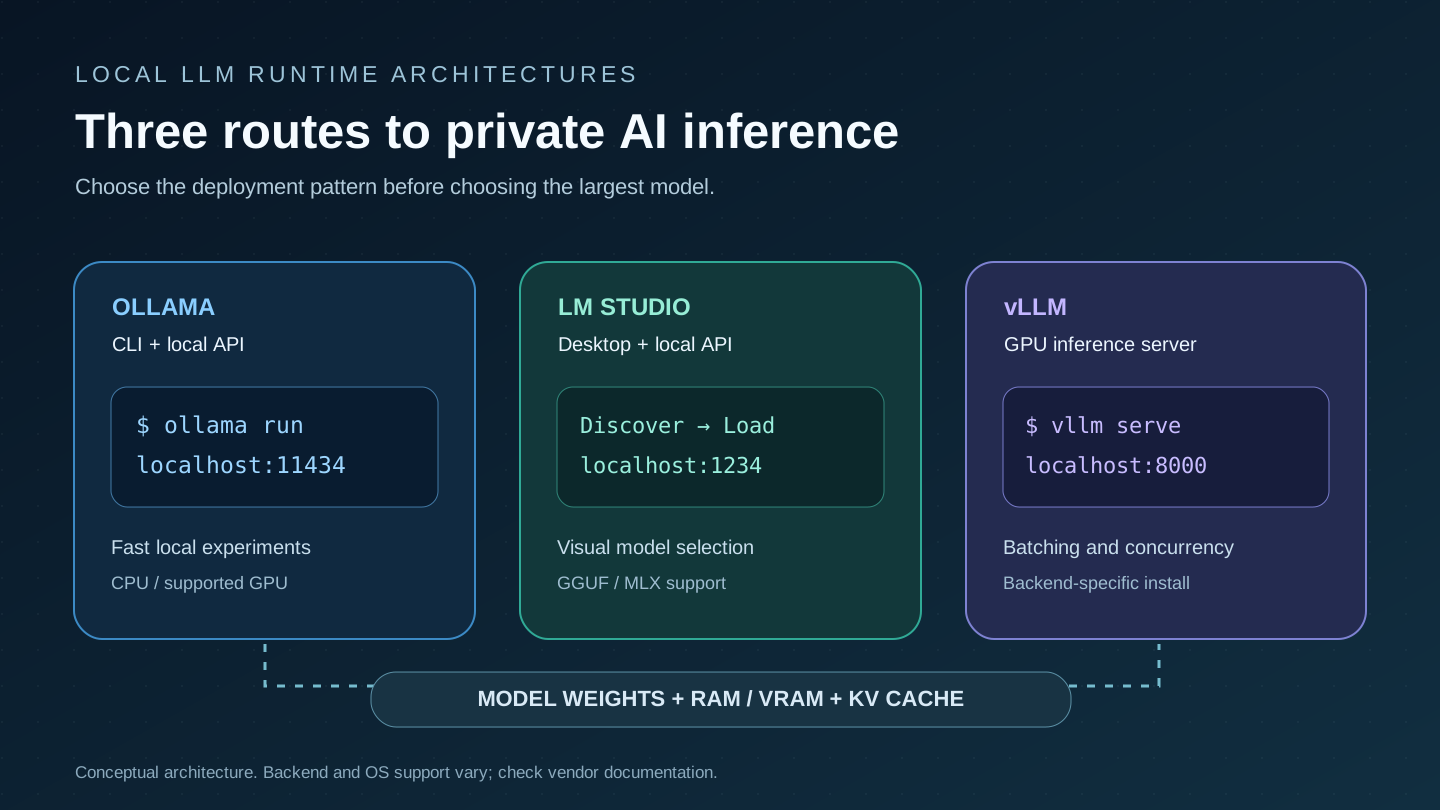
Ollama is a strong command-line and local-API starting point. LM Studio provides a desktop model browser, chat UI and local server. vLLM focuses on high-throughput inference serving and parallel requests on supported accelerators. These are different deployment tools, not models or interchangeable performance rankings. Start with a small quantized instruct model, confirm its license, measure actual performance and only then scale up.
Ollama vs LM Studio vs vLLM: which local LLM runtime should you use?
A local large language model is a set of weights loaded by inference software on a device you control. Downloading a model does not by itself make it useful: the format, tokenizer, quantization, supported GPU backend, operating system, memory budget and serving mode must match. “Local” can mean laptop-only offline use, a workstation serving your team, or a multi-GPU server within your network.
| Capability | Ollama | LM Studio | vLLM |
|---|---|---|---|
| Best for | CLI, scripting, quick local chat/API | Graphical discovery, desktop exploration, local API | Production-style GPU serving and concurrency |
| Primary experience | Terminal + HTTP API | Desktop UI + CLI/local server | Server process + OpenAI-compatible API |
| Common weights | Library models and compatible GGUF imports | GGUF and supported Apple MLX models | Supported Hugging Face model architectures and formats |
| Typical local port | 11434 | 1234 when server enabled | 8000 by default |
| CPU-only? | Possible, depending on model/installation | Possible, with performance limitations | Hardware/backend-dependent; not a simple universal laptop replacement |
| Main trade-off | Ease vs fine-grained distributed serving | Desktop UX vs production orchestration | Throughput/serving controls vs setup complexity |
If your goal is running an LLM on Windows, macOS or Linux without writing deployment code, start with Ollama or LM Studio. If your workload is multiple simultaneous application requests, investigate vLLM after checking device and model compatibility. None of the three supplies a universally “best” model; outputs depend primarily on the model weights and configuration.
How much RAM or VRAM do you need to run an LLM locally?
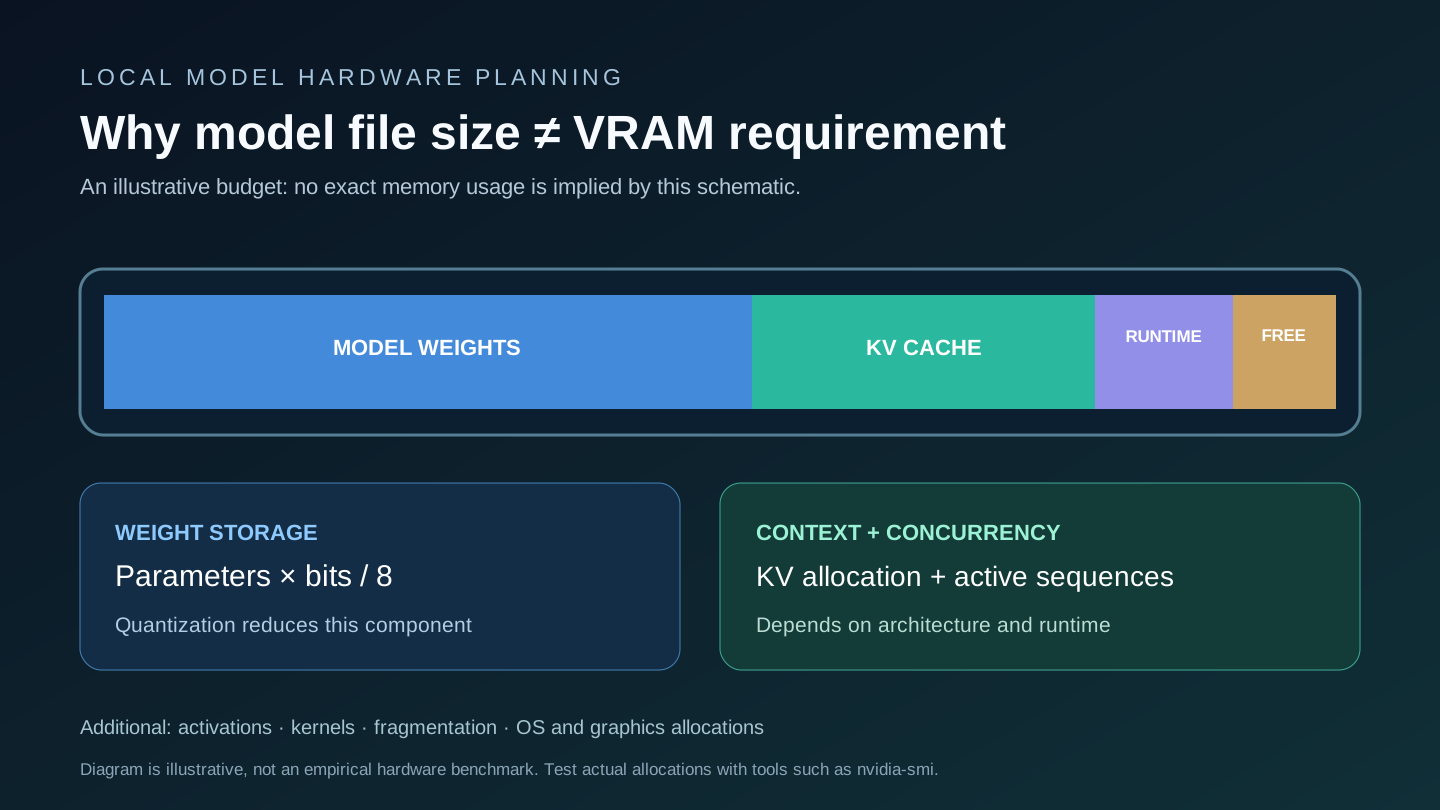
The rough starting point is parameter count times storage precision. For dense model weights at 4-bit, a 7-billion-parameter model has a theoretical lower-bound weight payload of 3.5 decimal GB. At 8-bit it is 7 GB, and at 16-bit it is 14 GB. In practice quantized files contain scales, metadata and mixed-precision tensors; running a model also consumes the KV cache, activations, temporary buffers, framework allocations and operating-system headroom. A GGUF file size is a useful inspection number but not a guaranteed total VRAM requirement.
| Dense parameters | 4-bit weights | 8-bit weights | 16-bit weights |
|---|---|---|---|
| 3B | 1.5 GB | 3 GB | 6 GB |
| 7B | 3.5 GB | 7 GB | 14 GB |
| 8B | 4 GB | 8 GB | 16 GB |
| 14B | 7 GB | 14 GB | 28 GB |
| 32B | 16 GB | 32 GB | 64 GB |
| 70B | 35 GB | 70 GB | 140 GB |
These figures are not the minimum GPU specs for each model. A mixture-of-experts model may have far more total than active parameters yet still requires substantial resident weights; architectures differ, and weight offloading can move some data into system RAM at a performance cost. Unified-memory Macs share a memory pool between CPU and GPU; available usable capacity is less than headline installed RAM.
Why context length and concurrent users change the memory budget
Autoregressive decoders keep key/value attention states for tokens being processed. KV-cache memory depends on layers, KV heads, head dimensions, cache precision, active sequence lengths and concurrent sessions. A large advertised context window is not a promise that your GPU can serve that many tokens. Ollama documents context-length controls and parallel-request effects; vLLM adds serving controls and attention-cache management. Use actual engine statistics for capacity planning, especially with parallel users.
Local LLM GPU memory estimator: weight lower bound plus headroom
Adjust the model size and precision. This is deliberately a transparent planning estimate, not a fake exact VRAM benchmark. The configurable headroom is an allowance for KV cache and runtime overhead, not an architecture-derived prediction.
Method: (billions of parameters × precision bits / 8) + user-selected additional GB. Decimal GB, not GiB. Real quantized file sizes and KV cache differ. This calculator assumes conventional dense parameter storage; for MoE, multimodal encoders, offloading or multi-GPU sharding, inspect the actual model architecture and runtime logs.
How to run AI models locally: Ollama, LM Studio and vLLM installation
Option 1: Ollama quickstart on macOS, Linux and Windows
Download the appropriate operating-system package from Ollama's official download page or follow its quickstart. Once Ollama is installed and its service is available, run a small supported model by its verified library tag. Example:
# Check the exact tag in https://ollama.com/library
ollama run gemma3:4b

# List downloaded models
ollama list

# Show model and quantization details
ollama show gemma3:4b
A tag identifies a model package; it is not an interchangeable instruction to use the newest model. First run downloads the weights and may use substantial disk space. Check output performance and memory use while generating. A CPU-only system can run supported small models but may be significantly slower.
Option 2: LM Studio desktop and local server
Install from LM Studio. Open the model browser, choose an instruct-tuned model that supports your platform and hardware, select a quantization that fits your memory budget, download it, and load it in the chat tab. Models may use GGUF or Apple MLX packaging, and they are not always interchangeable. To expose an API, enable LM Studio's developer/local-server mode and load the model before sending requests. Verify the API port, model identifier and network-binding settings in the official local server documentation.
Option 3: vLLM on a supported Linux GPU server
Use vLLM's official installation guide for the current Python, CUDA/ROCm, compiler and hardware requirements rather than copying a generic GPU command from an outdated blog. Model support varies by architecture and backend; a valid Hugging Face model identifier and access permission are required. Illustrative serving invocation after a compatible environment is installed:
# Example requires a supported model and GPU/backend.
vllm serve Qwen/Qwen3-0.6B \
  --host 127.0.0.1 --port 8000

# Validate availability in another terminal.
curl http://127.0.0.1:8000/v1/models
Do not interpret this as an assurance that every vLLM release supports every model or GPU. Before exposing the server to other machines, configure authentication, network access and resource limits. vLLM's API server implements an OpenAI-compatible interface for supported routes, but extensions and response behaviors vary.
Local AI APIs: build an application without cloud inference calls
Ollama exposes its native API on http://localhost:11434/api by default. For example, send a message to a model already installed locally:
curl http://localhost:11434/api/chat \
  -H "Content-Type: application/json" \
  -d '{
    "model": "gemma3:4b",
    "messages": [{"role":"user","content":"Explain RAG in two sentences."}],
    "stream": false
  }'
LM Studio typically provides an OpenAI-compatible route under http://localhost:1234/v1 after its local server is started; vLLM commonly serves http://localhost:8000/v1. Confirm the exact model ID from each runtime's /v1/models endpoint. A local SDK base URL avoids cloud calls to the model provider, but your application can still make external requests through search, telemetry, plugins or tool integrations. Local weights alone do not prove the entire workflow is offline.
Python using an OpenAI-compatible local server
from openai import OpenAI
# First start LM Studio or vLLM locally and load a model.
client = OpenAI(
    base_url="http://127.0.0.1:1234/v1",
    api_key="local-only",  # placeholder for local development
)
models = client.models.list()
model_id = models.data[0].id
reply = client.chat.completions.create(
    model=model_id,
    messages=[{"role": "user", "content": "Write one sentence about private AI."}],
    temperature=0.2,
)
print(reply.choices[0].message.content)
This is an interface example, not a claim that every backend implements every OpenAI API feature. Keep server binding to localhost unless external clients genuinely require access and security controls are in place.
Best AI models to run locally: start with a workload, not a parameter count
For a laptop, start with 1B–4B instruct models for experimentation, then test a 7B–8B quantized model if memory permits. For complex reasoning, programming and multilingual work, larger models may help but increase memory and latency. Review SXF's best open-source and open-weight models guide for model-specific licenses, architectures and context windows rather than assuming one family wins every benchmark.
Use the model's official tokenizer and chat template; an arbitrary base checkpoint often behaves differently from an instruct-tuned release. Verify whether its license permits your intended commercial use and whether its weights were legitimately distributed. For code retrieval and assistant agents, evaluate file-grounded correctness and tool execution rather than response fluency alone.
| Hardware profile | Practical first experiment | Main limit |
|---|---|---|
| CPU-only PC, 8–16 GB RAM | Small quantized 1B–3B instruct model | RAM pressure and slow token generation |
| 8 GB dedicated VRAM | Investigate 3B–8B 4-bit models with modest context | KV cache / runtime overhead may prevent full offload |
| 16 GB VRAM | Experiment with 7B–14B 4-bit models | Context length and parallel requests |
| 24 GB VRAM | Test larger quantized models subject to runtime allocation | Architecture, offloading and throughput |
| Unified-memory Mac | Supported GGUF or MLX model that fits available memory | Shared system/GPU usage and memory bandwidth |
Every row is a starting hypothesis. Inspect actual model file size, runtime telemetry and operating-system memory rather than treating headline VRAM as guaranteed usable capacity.
What is LLM quantization? FP16 vs INT8 vs 4-bit GGUF
Quantization represents model weights using fewer bits, reducing storage and potentially improving the feasibility of local inference. FP16 commonly uses 16 bits per weight; 8-bit and 4-bit schemes reduce the weight payload, but real implementations store extra scales and metadata and vary in numerical accuracy. GGUF is a model packaging format used in llama.cpp ecosystems; GGUF is not itself a single quantization level. Likewise, MLX is an Apple silicon machine-learning framework with its own supported weight formats.
Use controlled experiments with the same prompts and scoring. A lower-bit model might fit a GPU yet be slower than expected due to kernels, partial CPU offload or memory bandwidth. Quantization can affect reasoning, multilingual fidelity, tool-calling syntax and edge-case reliability. Record precise names such as the upstream checkpoint, quantization family and build revision instead of comparing “4-bit” results without details.
Local LLM vs cloud API: which costs less?
A local model usually has no per-token model-provider inference bill for each generated token, but it is not free. Your cost stack includes GPU or laptop purchase, electricity, depreciation, cooling, engineering maintenance, storage, monitoring, deployment reliability and human review. Cloud API costs depend on model tier, input/output tokens, caching and any tools or data processing.
A useful comparison is cost per accepted task: compute the monthly total cost, divide by the number of genuinely useful results, and measure latency and quality alongside it. An idle $3,000 GPU workstation can cost more per accepted result than an inexpensive hosted API at low usage; sustained high-volume workloads may favor local serving if utilization, hardware and operating costs justify it. Use SXF's verified API pricing database and agent total-cost-of-ownership guide to compare equivalent workloads.
Illustrative method: if a device's monthly allocated cost is $150, electricity $30 and maintenance $70, then a $250 monthly local stack delivering 10,000 accepted outputs costs $0.025 per accepted output, excluding any additional human review. This is hypothetical arithmetic, not a real-world vendor quotation. A hosted API must be measured on the same requests and acceptance criteria.
Is running an LLM locally private? Network and model safety checklist
Local inference can reduce transmission of prompts and private files to remote providers, but it does not automatically establish data privacy. Downloaded files, update checks, local server interfaces, prompt logs, browser plugins and agent tools may still contact outside services. A server bound to 0.0.0.0 can be reachable across networks; default development ports are not production authentication strategies.
- Download weights from trusted publishers and inspect licenses, provenance and file hashes where supplied.
- Run the server on
127.0.0.1first. Use authentication, TLS, a firewall and segmentation for shared access. - Restrict tool access, filesystem permissions and shell execution separately from inference.
- Handle logs, model caches and uploaded documents according to your retention rules.
- Limit concurrent requests to protect availability and VRAM budgets.
- Review agent-security controls before letting a local model operate tools autonomously.
How to benchmark local LLM performance fairly
Tokens per second alone is insufficient. Compare time to first token (TTFT), generation throughput, prefill latency, peak RAM/VRAM, quality on labeled tasks and latency at p50/p95 under a fixed concurrency. Document hardware, power limit, runtime version, backend, quantization, model ID, context window and sampling settings. Measure a warm system separately from model loading time.
For a reliable cross-runtime test, keep model architecture and quantization as comparable as possible, run the same prompts, test short and long input lengths, allow the same output cap and repeat across multiple trials. An Ollama CPU run against a vLLM multi-GPU server is a hardware comparison, not a valid engine-only benchmark. For agentic applications, evaluate success on real tasks and cost per accepted result; use SXF's benchmark methodology reference to avoid mixing incompatible metrics.
Local AI troubleshooting: out of memory, slow output and model errors
The model downloads but fails to load
Try a smaller checkpoint, lower-weight quantization, shorter context or fewer concurrent requests. Monitor RAM/VRAM and leave OS headroom.
Generation is much slower than expected
Inspect GPU utilization, CPU offload, memory bandwidth, thermal throttling and prompt length. Measure first-token and decode times separately.
The model ignores instructions
Verify the model is instruction-tuned and uses the expected chat template; evaluate representative tasks, not one example.
Connection refused or unknown model
Start the server, inspect the advertised model ID, confirm the port and local binding, and compare native versus OpenAI-compatible routes.
Inference falls back to CPU
Check driver, runtime backend compatibility and the vendor's GPU support matrix before changing unrelated settings.
Other users can access your server
Bind to localhost or add reverse-proxy authentication, TLS, rate limits and firewall rules. Avoid exposing a development endpoint to the public internet.
Running AI models locally: frequently asked questions
How do I run an AI model locally on my computer?
Install Ollama or LM Studio, select an instruct-tuned model compatible with your operating system, download supported weights and start a local chat or API endpoint. Check RAM, VRAM and model license before downloading.
Is Ollama better than LM Studio?
Ollama is convenient for CLI, scripting and local API workflows, while LM Studio emphasizes a visual model browser, desktop chat and local server. Choose by workflow and test the same model for meaningful performance comparisons.
What is the difference between Ollama and vLLM?
Ollama prioritizes straightforward local inference and model management. vLLM specializes in supported high-throughput serving with batching and OpenAI-compatible routes, often on Linux GPU servers. They target different deployment needs.
How much VRAM do I need for a 7B model?
Theoretical dense weight storage for seven billion parameters is roughly 3.5 GB at 4-bit, 7 GB at 8-bit and 14 GB at 16-bit. Actual VRAM needs more capacity for quantization metadata, KV cache, runtime buffers and context; measure your exact model and serving settings.
Can I run a local LLM without a GPU?
Yes, supported smaller models can run on a CPU with enough system RAM, but generation often becomes much slower. Use modest context settings and measure real latency on your device.
Can I run local AI on a Mac with Apple Silicon?
Yes. Ollama and LM Studio support relevant Apple Silicon workflows and LM Studio can load compatible MLX models. Mac unified memory is shared with the system, so total installed RAM is not wholly available to the model.
What is quantization in local LLMs?
Quantization stores model weights at reduced numerical precision, such as 8-bit or 4-bit, to reduce memory use. It can alter quality and performance, and does not eliminate KV-cache or runtime memory.
Is a local AI model free to use?
It may avoid per-token hosted API inference charges, but you still pay for hardware, electricity, storage, operation and maintenance. Model licenses can limit commercial use.
Is local AI completely private?
No. Local inference reduces the need to send prompts to a hosted model, but updates, model downloads, logging, tools and exposed servers can still transfer data. Configure network controls and inspect dependencies.
Which local LLM runtime is best for serving multiple users?
vLLM is designed for throughput-oriented serving on supported accelerators, but its advantage depends on hardware, model architecture, concurrency and configuration. Benchmark it against an appropriate baseline.
Primary documentation and editorial methodology
This is an independent guide. Product positioning and commands are grounded in vendor documentation. The RAM/VRAM table and calculator are explicitly labeled theoretical estimates, not measured hardware requirements; cost arithmetic is illustrative, not a price quotation. No invented speed ranking or benchmark scores are supplied.