SXF RESEARCH EXPLAINER
What the technical evidence means.
TECHNICAL ANALYSIS / 01
Which REST endpoints control GitHub AI Scan for repositories?
GitHub extends the existing AI Scan enablement routes for organizations and repositories. The organization endpoints are GET and PATCH /orgs/{org}/code-scanning/ai-scan, while the repository endpoints are GET and PATCH /repos/{owner}/{repo}/code-scanning/ai-scan. The new repository_scan property can be enabled or disabled, alongside the existing pr_scan setting.
This is a configuration API for authorized administrators, not a scan-execution command. The payload examples in this guide are conceptual field illustrations rather than live tested requests; use GitHub's current REST reference to confirm headers, API version, permissions and supported request bodies before automating production policy changes.
Check primary-source evidence ↗
SXF VERIFIED REFERENCE
GitHub AI Scan REST API Examples: GET and PATCH repository_scan
Documentation-derived, unexecuted examples. Replace ORG, OWNER and REPO; export an authorized GH_TOKEN. Requests use GitHub API version 2026-03-10. A PATCH modifies configuration only and does not trigger a scan.
Read organization setting
curl -L -sS \
  -H "Accept: application/vnd.github+json" \
  -H "Authorization: Bearer $GH_TOKEN" \
  -H "X-GitHub-Api-Version: 2026-03-10" \
  https://api.github.com/orgs/ORG/code-scanning/ai-scan
Enable organization repository_scan
curl -L -sS -X PATCH \
  -H "Accept: application/vnd.github+json" \
  -H "Authorization: Bearer $GH_TOKEN" \
  -H "X-GitHub-Api-Version: 2026-03-10" \
  https://api.github.com/orgs/ORG/code-scanning/ai-scan \
  -d '{"repository_scan":"enabled"}'
Read repository setting
curl -L -sS \
  -H "Accept: application/vnd.github+json" \
  -H "Authorization: Bearer $GH_TOKEN" \
  -H "X-GitHub-Api-Version: 2026-03-10" \
  https://api.github.com/repos/OWNER/REPO/code-scanning/ai-scan
Disable one repository
curl -L -sS -X PATCH \
  -H "Accept: application/vnd.github+json" \
  -H "Authorization: Bearer $GH_TOKEN" \
  -H "X-GitHub-Api-Version: 2026-03-10" \
  https://api.github.com/repos/OWNER/REPO/code-scanning/ai-scan \
  -d '{"repository_scan":"disabled"}'
HTTP 422 example (illustrative, not captured)
HTTP/2 422
{ "message": "[read GitHub validation details here]" }
A blocked enterprise policy is one documented cause of 422; it is not the only possible validation error. Required permissions: org GET needs owner/security-manager access and fine-grained Administration:read; org PATCH requires Administration:write. Repository GET needs Code scanning alerts:read; PATCH needs Administration:write for the repository and admin access. Classic PAT scopes: org endpoints document admin:org, repo or write:org according to role; repo GET documents security_events (or public-only public_repo), while PATCH documents repo (or public-only public_repo). Confirm the exact endpoint, actor role and entitlement.
Official GitHub AI Scan REST API reference.
TECHNICAL ANALYSIS / 02
What do org inheritance and HTTP 422 mean?
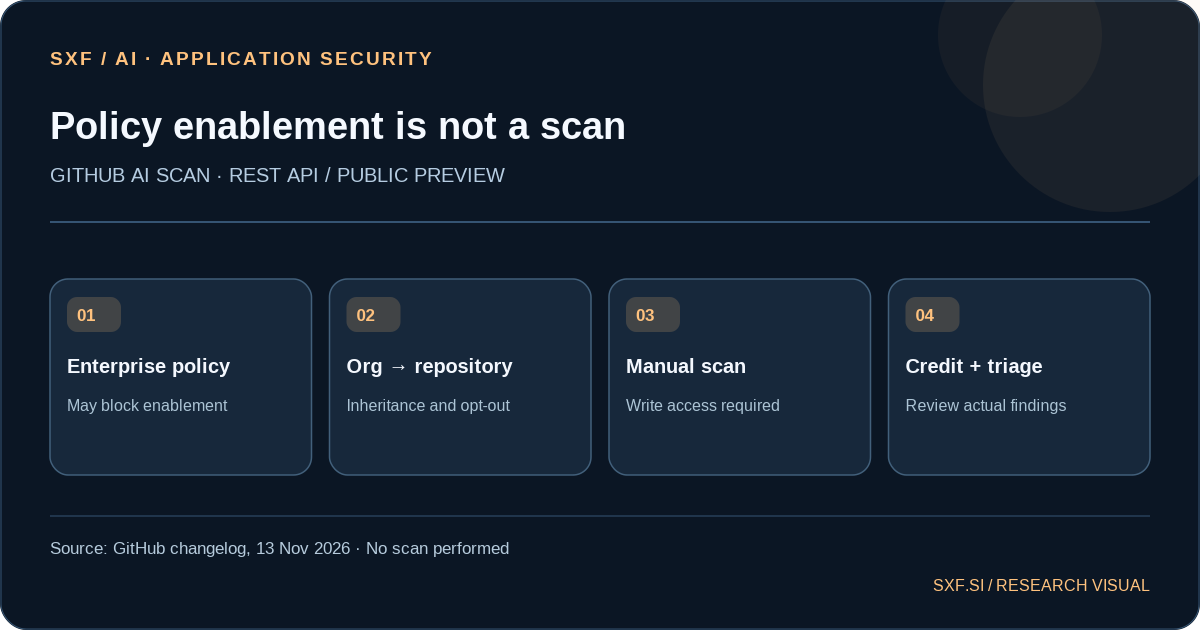
If an organization disables repository scanning, an individual repository under it cannot enable the feature. If the organization enables scanning, repositories inherit that policy but may opt out. Enterprise rules sit above both, and GitHub says a disallowed enablement returns HTTP 422. A batch PATCH that includes pr_scan and repository_scan is atomic when one change is blocked: neither setting changes.
A rollout script should therefore read current effective policy, validate that the enterprise permits the setting, PATCH only intended fields, and read the settings again. Log any 422 as a policy conflict rather than retrying blindly or trying to bypass the enterprise control. An infrastructure-as-code workflow benefits from explicit desired state and a rollback record.
Check primary-source evidence ↗
SXF VERIFIED REFERENCE
GitHub AI Scan Policy Hierarchy: Enterprise vs Organization vs Repository
Enterprise policy is Not allowed by default. Permitting AI Scan at enterprise level does not itself enable scanning. Lower-level settings are constrained by higher levels.
| Layer | Authority | Effect |
|---|
| Enterprise | Enterprise owners | Permits or prohibits enabling AI Scan |
|---|
| Organization | Organization owners and security managers | repository_scan enables eligible repositories or prevents opt-in |
|---|
| Repository | Repository administrators | Inherit organization setting, or opt out when allowed |
|---|
1 · Enterprise ↓Allowed? No → blocked
2 · Organization ↓Enabled? No → blocked
3 · Repository ↓Inherited? Opt-out → disabled
4 · On-demand scanSeparate writer action; credits apply
Allowed path: enterprise permits → organization enables → repository does not opt out → authorized user triggers a manual scan. A disabled organization cannot be bypassed through repository PATCH. If either pr_scan or repository_scan fails in a combined update, neither changes.
Policy inheritance and eligibility documentation.
SXF VERIFIED REFERENCE
GitHub AI Scan REST API Errors: 422, 403 and Configuration Failures
HTTP status alone does not prove a particular cause. Inspect the actual GitHub response body and security policy.
| Status | Possible cause | First check |
|---|
| 422 | Enterprise denial, validation conflict or blocked combined PATCH | Review enterprise policy, organization setting and requested fields |
|---|
| 403 | Token/role restrictions, entitlement, archive or repository state | Inspect fine-grained permissions, role and eligibility |
|---|
| 404 | Bad owner/repo path or unavailable/inaccessible resource | Verify URL, resource visibility and access |
|---|
| 400 | Malformed HTTP or JSON at a general request-handling layer | Validate JSON and headers; not a listed AI Scan PATCH-specific status |
|---|
Scope note: GitHub explicitly documents 403, 404 and 422 for the AI Scan PATCH operations. HTTP 400 is a general troubleshooting possibility, not a promised endpoint-specific response. The documented 422 caused by enterprise denial is one case, not a universal error translation.
Official response codes.
TECHNICAL ANALYSIS / 03
Does turning on AI Scan automatically scan the repository?
No. GitHub explicitly says that enabling AI Scan for repositories does not initiate a scan. Users with write access run repository scans on demand, and each one consumes GitHub Code Security AI credits. A dashboard displaying an enabled toggle is therefore not evidence that a security assessment has happened.
SXF's suggested acceptance test tracks three separate states: policy enabled, scan requested and scan completed with findings reviewed. This avoids conflating administrative configuration, queue processing and human remediation. Budget checks should use the live enterprise credit ledger rather than a fabricated per-run price.
Check primary-source evidence ↗
SXF VERIFIED REFERENCE
GitHub AI Scan vs CodeQL vs Dependabot: What Does Each Tool Do?
| Tool | Main job | Best used for |
|---|
| AI Scan | AI-assisted vulnerability search in the default branch | Additional on-demand code security analysis |
|---|
| CodeQL | Semantic code analysis and vulnerabilities | Repeatable static code checks |
|---|
| Dependabot | Vulnerable dependencies and security updates | Supply-chain and package updates |
|---|
| Secret scanning | Exposed credentials and tokens | Credential discovery, rotation and prevention |
|---|
AI Scan for repositories runs independently of CodeQL and adds findings to the same code-scanning backlog. It does not exhaustively inspect every file; results may be inaccurate or duplicate CodeQL. Keep Dependabot and secret scanning for risks AI Scan does not replace. In this mode, scanning is manual, default-branch-only, and uses Code Security AI credits.
AI Scan limitations · Dependabot · Secret scanning.
TECHNICAL ANALYSIS / 04
SXF security rollout: what teams should measure
Pilot on a small set of eligible repositories representing different languages, sensitivity levels and maintainer groups. Check the effective organization and enterprise policy first, then enable repository_scan where appropriate. Run an authorized on-demand scan and review findings alongside existing static analysis. Record time to triage, false positives, fixes accepted and credit consumption.
Do not disable established SAST, dependency alerts or secret scanning because an AI feature is enabled. Connect your rollout with the SXF agent-security checklist for authorization boundaries and with the production-agent guide for auditability, retries and rollback. Review every automated finding in source context before changing production code.
Check primary-source evidence ↗
SXF VERIFIED REFERENCE
SXF AI Scan Deployment Lab: A 7-Step Repository Security Test
SXF-designed testing plan, not an executed test. Use only a repository where you have authorization. Preserve baseline settings and the rollback plan; never log real tokens.
- Choose an eligible pilot repository and identify its default branch.
- Ask an enterprise owner to verify enterprise policy.
- GET organization repository_scan and pr_scan values.
- GET repository settings and confirm inheritance or opt-out.
- PATCH only the approved field; re-GET and preserve rollback data.
- Manually start a separate on-demand scan as a repository writer; record status and Code Security AI credit use. PATCH itself does not scan.
- Triage AI Scan alerts and compare them to CodeQL, Dependabot and secret scanning.
| Pilot test | Expected record |
|---|
| Policy validation | Allowed enterprise/org policy and eligible repository |
|---|
| API configuration | Successful PATCH plus confirming GET |
|---|
| Scan execution | On-demand scan start and completion recorded |
|---|
| Credits | Measured account/budget impact, not assumed pricing |
|---|
| Findings review | Review log, duplicates, false positives, remediation |
|---|
Record repository, original settings, permission class (not token value), response status, scan timestamps, credits before/after, alert overlap and rollback outcome. These are expected observations, not SXF measurement results.
Official scan controls and billing guidance.