SXF FIELD GUIDE / AI CODING · REPRODUCIBLE LAB
What Is Vibe Coding?
Tools, Costs & Risks (2026)
A source-backed explanation of vibe coding: its origin, real tool choices, difference from agentic coding, step-by-step website workflow, pricing factors and security checks — plus a runnable SXF calculator with tests.
QUICK ANSWER
Vibe coding turns a natural-language description into working code — but a working demo is not a verified product.
The safer workflow is: specify what success means, generate a small part, inspect it, test independently and approve only after security and accessibility checks. Follow the seven steps or try the SXF lab.
DEFINITION
What is vibe coding?
Vibe coding is a way of creating software by asking an AI system to generate code in natural language and then changing the result through further prompts. Andrej Karpathy popularized the term in February 2025. The original phrasing described accepting generated code without closely reading it. That informal approach may speed up experiments but is not sufficient for production.
Example: a founder requests a cost calculator. The AI produces a page. The founder notices that a negative number results in a nonsensical bill and asks for a correction. The next version looks better, but only an independently calculated expected output and automated tests establish whether it is right.
A useful distinction: prompting is how the implementation begins; testing and review decide whether it is safe and correct. Vibe coding is not a programming language, a single product, or a guarantee that non-programmers can safely maintain complex applications.
WORKFLOW DIFFERENCES
Vibe coding vs agentic coding: what changes?
| Workflow | Meaning | Main concern |
|---|---|---|
| Vibe coding | A person directs generation and iteration by describing outcomes | Whether they understand and test what was generated |
| Agentic coding | An agent may inspect repos, edit several files, run commands and iterate | Its tool permissions, approval gates and reproducible execution |
| Traditional coding | A developer explicitly authors and inspects implementation | Requirements, test coverage and ongoing maintenance |
These categories overlap. You can use an agent in a careful, fully reviewed workflow without “vibing,” or write a prototype through chat without enabling an autonomous agent. Explore SXF's coding-agent architecture research and agentic AI explainer.
TOOL SELECTION
Best vibe coding tools by use case
There is no single objective winner across products. This comparison describes workflow fit; it is not a hands-on speed benchmark or endorsement. Check current pricing, entitlements and supported integrations with each provider.
| Tool | Typical use | Before you commit |
|---|---|---|
| Lovable | Prompt-driven web app prototypes | Code export, deployment, database policies |
| Replit Agent | Build and host in a development workspace | Credits, hosting, data permissions |
| Bolt.new | Browser-based prototype building | Framework support, dependencies, usage caps |
| Cursor | AI-first IDE and codebase editing | Diff review, agent actions, model limits |
| GitHub Copilot | IDE + GitHub workflows and code review | Plan, organizational policies and human approval |
| Claude Code | Terminal-oriented repository coding | Shell permissions, usage economics, testing |
For nontechnical demos, start with a hosted builder. For changes to an existing repository, favor an IDE or CLI agent with diffs and tests. See SXF's detailed AI coding tool comparison for workflow distinctions.
PLAN RESEARCH · OCTOBER 2026
Vibe coding tool pricing: starting plans and usage limits
Plan information is a dated snapshot of public vendor pages, not a quote or price guarantee. Plan allowances, billing intervals, taxes and add-on usage vary; follow the official links immediately before subscribing. A free entry point is not the same as free unlimited deployment.
| Tool | Free entry | Listed paid entry / billing detail | Practical constraint | Official plans |
|---|---|---|---|---|
| GitHub Copilot | Yes, limited free tier | Pro: $10/month (individual) | Monthly AI-credit allowance; chat, agents and code review use credits, and overages may apply | Plans ↗ |
| Cursor | Yes, Hobby | Pro: $20/month | Agent usage allowance and model-related consumption limits | Plans ↗ |
| Lovable | Yes, limited credits | Pro: from $25/month | Credits and cloud/AI usage are separate constraints | Plans ↗ |
| Replit | Yes, Starter | Core: from $25/month on monthly billing | Agent, compute, hosting and credits must be checked together | Plans ↗ |
| Bolt.new | Yes, limited tokens | Pro: from $25/month on monthly billing | Monthly token allowance and hosting/usage limits | Plans ↗ |
| Claude Code | No standalone unlimited free plan | Available through eligible Claude subscriptions and usage-based access | Usage limits, model access and API billing differ by channel | Plans ↗ |
Dollar amounts are illustrative starting published US prices and subject to promotional, regional and annual-billing differences. For exact current credits and entitlements, the linked vendor plans are authoritative. Also compare SXF's coding tool guide.
PRACTICAL WORKFLOW
How to vibe code a website in seven steps
- Define a narrow outcome: for example, a static API cost calculator with five numeric fields.
- Specify acceptance tests first: correct formula, invalid inputs, zero requests, mobile labels, and accessible errors.
- Choose a controlled environment: a disposable sandbox and a version-controlled repository when possible.
- Generate one working slice: form plus calculation, without accounts, payments, third-party trackers or unnecessary packages.
- Inspect what changed: check the code diff, dependencies, outbound requests and any privilege escalation.
- Run independent tests: expected values computed by hand; invalid, extreme and adversarial input.
- Publish only after human approval: check accessibility, security, performance, recovery and ongoing ownership.
Copyable build prompt
Build an accessible static API token cost calculator.
Inputs: requests, input/output tokens per request,
input/output USD prices per million tokens.
Use plain HTML, CSS and JavaScript without dependencies.
No network requests, API keys, or unsafe HTML injection.
Reject negative, invalid or non-finite inputs.
Add unit tests for zero, ordinary, decimal-rate,
negative, malformed and overflow cases.
Show the formula and explain assumptions.
Do not claim tests passed unless you ran them.
Follow up with: “Show every changed file, run the tests, give exact outputs and identify limitations.” Do not accept “done” without inspecting test logs.
ORIGINAL SXF ENGINEERING LAB
SXF Vibe Coding Lab: a reproducible cost estimator
To make this guide useful beyond theory, SXF publishes an original deterministic reference application with public JavaScript source and unit tests. It estimates token charges from inputs; it does not call model APIs or measure a commercial builder's coding quality.
Try the interactive model cost example
This calculation runs in your browser. No data is uploaded.
Illustrative rates only; excluding hosting, caching, retries, taxes, model-specific features and human review.Expected result: show the math
100 requests × 1,000 input tokens × $2/1M = $0.20
100 requests × 500 output tokens × $8/1M = $0.40
Estimated total = $0.60
Test matrix
- Zero requests give $0.
- Normal inputs give $0.20 + $0.40 = $0.60.
- Fractional USD rates remain valid.
- Negative, malformed, non-finite, unsafe integers and cost overflow are rejected.
- Results are inserted as text, not user-controlled HTML.
The general lesson is do not ask the code generator whether its own answer is correct; use independent assertions and reproducible inputs. SXF also offers an extended model-cost tool.
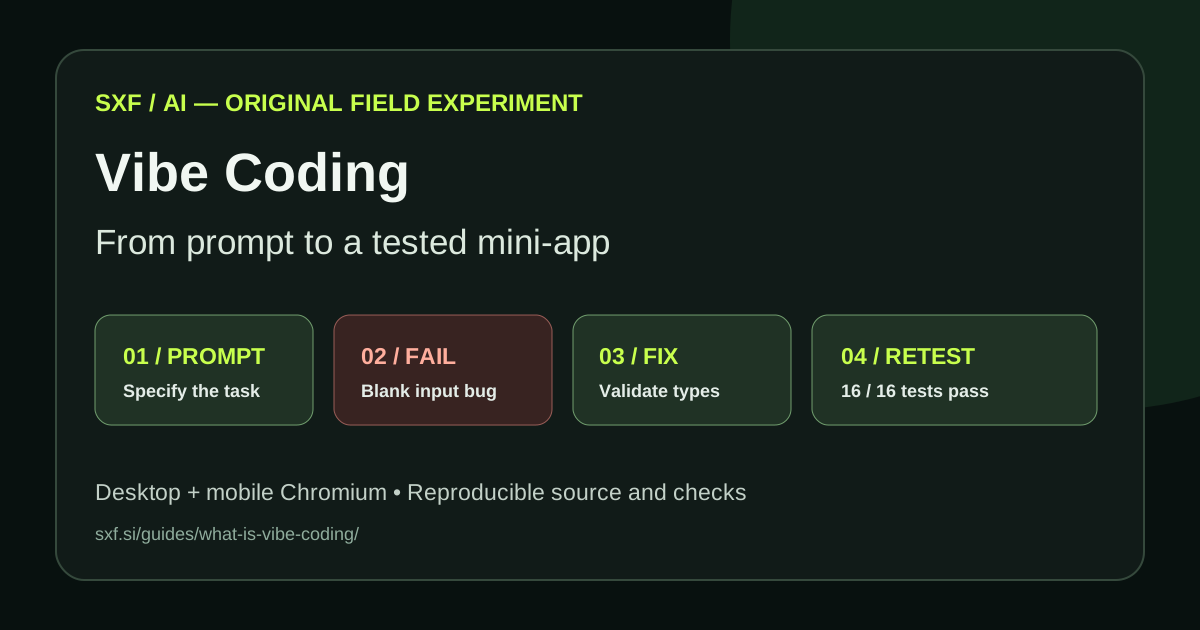
SXF FIELD EXPERIMENT · EXECUTED OCTOBER 23, 2026
We built, broke, fixed and retested a working Vibe Coding app
We worked from a single, concrete build specification: five fields for request counts, input and output token volume, and per-million-token prices; all arithmetic runs locally, without network requests or external packages. We created a standalone SXF Cost Studio, a responsive website demonstrating the complete workflow: specify, implement, write a failing test, fix and verify.
1. Exact build prompt
Build an accessible static API token-cost estimator.
Use five nonnegative numeric inputs: requests, input tokens
per request, output tokens per request, and the two
USD prices per million tokens. Reject missing or invalid
values. Show an independently verifiable calculation.
No secrets, dependencies, network requests or tracking.
Support small-screen layouts and keyboard operation.
Add deterministic tests for normal and adversarial input.
2. First implementation and a reproducible failure
The initial implementation converted every input with Number(value). That meant an empty string silently became zero (Number("") === 0). An isolated regression check asserted that an empty request count must throw an error. The first run failed:
FAIL — missing expected exception (RangeError):
An empty request count must not silently become zero
Node.js v22.16.0; exit code: 1
Instead of masking the result with UI validation alone, we fixed the calculation boundary: reject blank strings, null, booleans, arrays and objects before numeric conversion, then enforce finite, nonnegative values and safe integer token counts.
3. Retest results and reproducibility
| Verification | Observed result |
|---|---|
| Before fix | 1 targeted empty-input test failed (exit code 1) |
| After fix | 16 of 16 assertions passed in the expanded Node.js regression suite |
| Illustrative calculation | 100 requests → $0.20 input + $0.40 output = $0.60 |
| Local loop check | 10,000 calculations in 20.79 ms on one container run (not an internet or mobile benchmark) |
| Chromium desktop | 1366px viewport: expected result displayed, no JS errors and no horizontal overflow |
| Chromium mobile | 390px viewport: expected result displayed, no JS errors and no horizontal overflow |
4. Inspect the working application
Open the interactive SXF Cost Studio → The desktop and mobile layouts use the same local calculator and require no login. The public source and tests allow independent review: calculator and regression tests.
What it demonstrates: visual polish is only the first milestone. One precisely stated acceptance condition caught a bug that the default values and initial interface did not reveal. The human-controlled verification loop made the app more trustworthy.
TOTAL COST OF OWNERSHIP
How much does vibe coding cost?
Separate the builder subscription from AI inference charges, hosting and integrations, and human review and maintenance. Some services bundle usage while others sell credits, seats or API tokens. Double-counting included model calls exaggerates estimates; ignoring retries, deployment and review understates them.
A simplified token-budget equation is:
requests × (input_tokens × input_rate +
            output_tokens × output_rate) / 1,000,000
The lab above makes those assumptions transparent, but it is not a live pricing feed and deliberately omits caching and tool charges. The more useful economic metric is cost per accepted, verified outcome, not cost per prompt. See the SXF API pricing directory and the vendors' official plan documentation.
PRODUCTION SAFETY
Security and quality checklist
Working demos can conceal insecure authentication, secrets in frontend JavaScript, vulnerable packages, unvalidated inputs and excessive agent permissions. The OWASP prompt-injection guidance covers malicious instructions in untrusted content; GitHub recommends reviewing Copilot-generated pull requests as carefully as human work.
- Keep API keys, credentials and admin controls outside public clients.
- Enforce authorization on servers, not only in the visual interface.
- Validate inputs and encode untrusted output; avoid unsanitized innerHTML.
- Review package dependencies, versions, licenses and security advisories.
- Use least-privilege tool access and human approval for spending and deployment.
- Run unit, integration and browser tests; include negative and permission-denied cases.
- Test mobile usability, labels, keyboard navigation and readable error messages.
- Add backups, alerting, usage limits, rollback and change ownership before a production launch.
Go deeper with the SXF agent security guide, prompt injection overview and production deployment checklist.
WHAT GOES WRONG
Common vibe coding mistakes
- Publishing the first visually attractive build without an acceptance test.
- Letting an agent modify production databases with broad credentials.
- Assuming a plausible explanation is evidence the code passed tests.
- Requesting too many features before validating the simplest user journey.
- Forgetting usage caps, storage charges and ongoing support.
- Failing to verify behavior on small screens and with keyboard navigation.
- Choosing a tool solely because of a model name rather than repository control and team workflow.
SEARCH INTENT
Frequently asked questions
What is vibe coding?
Vibe coding uses natural-language instructions to build and iteratively refine software with an AI coding tool. Review and tests are still needed before launch.
Is vibe coding the same as agentic coding?
No. Vibe coding is a human workflow style; agentic coding refers to an agent that can plan, change files and use tools. They can overlap.
Can beginners vibe code?
Yes for prototypes, but understanding HTML, JavaScript, Git and basic security makes production work substantially safer.
Is vibe coding free?
Some products offer free plans or trials. Real cost includes credit or token charges, hosting, integrations, testing and maintenance.
Can vibe-coded apps be production ready?
Yes if they pass appropriate security, permissions, accessibility, performance and acceptance tests, and an accountable human reviews changes.
Which vibe coding tool is best?
Use hosted builders for fast demo creation and IDE or CLI agents for repo ownership, test execution and code review. There is no universal winner.
Do I need to know programming?
Not for the first demo; debugging, data protection and deployment benefit greatly from programming literacy.
What are the main risks?
Broken behavior, unreviewed dependencies, unsafe data access, secrets exposure, prompt injection and unexpected usage bills.
How do I test AI-generated code?
Write expected outputs independently, run unit and browser tests, test invalid input, inspect diffs, audit dependencies and restrict permissions.
FAQ structured data explains visible page content; Google does not guarantee FAQ rich results for general technology sites.
EMPIRICAL EVIDENCE
Does AI coding really make developers faster?
Productivity effects depend heavily on experience, workflow and task. In a 2025 randomized controlled trial involving experienced open-source developers working in familiar repositories, METR observed developers taking longer with AI coding tools despite expectations of speedup. This is one context, not a universal finding. Meanwhile, controlled research and field studies of code-assistance workflows have sometimes shown substantial gains on narrower tasks. Both findings are consistent with a practical lesson: benchmark your own workflow against quality-adjusted completion time and measure review and debugging, rather than assuming every generated line saves time.
Security evidence also supports explicit release gates. OWASP's 2025 LLM risk guidance identifies prompt-injection attack paths when agentic systems ingest untrusted instructions, while the NIST Secure Software Development Framework emphasizes design, verification and vulnerability response across the lifecycle.
These studies examine different populations and tasks; comparisons should not collapse their results into a single “AI productivity” percentage.
SOURCE TRANSPARENCY
Primary references and method
SXF differentiates sourced product claims from editorial recommendations and independently tested calculations. Official plan features change, so follow the linked current documentation. The lab is a public deterministic implementation, not a benchmark of Lovable, Bolt, Replit, Cursor, Copilot or Claude Code.
Read SXF's editorial method. Sources reviewed October 23, 2026.