SXF / EVERYDAY AI & PRIVACY / SOURCE-VERIFIED GUIDE
How to Remove Your Personal Information From Google, Data Brokers & AI Tools
Your phone number, home address, email or private photo appears online. Where do you start? Follow this 2026 removal guide to reduce exposure in Google Search, the original website, people-search databases and AI services—without confusing a hidden search result with data that was actually deleted.
DIRECT ANSWER / REMOVE MY INFORMATION ONLINE
How do I remove my personal information from the internet?
Start with the page that exposes your information. Save its exact URL. Ask the publisher to delete or redact the information; separately request removal from Google Search via Results about you or Google's personal-content removal process. Opt out of people-search/data-broker records, then review AI chat histories, memories and shared links. Recheck every result because delisting is not deletion.
- Find the source URL, the displayed information and any duplicate results.
- Request removal from Google (or another search engine) when the result qualifies.
- Contact the original website so the information is removed where it is hosted.
- Opt out of data brokers and delete or limit data retained by relevant AI services.
- Verify the source, search results and any later reappearance—then record the outcome.
Evidence boundary: This procedure is SXF's synthesis of official Google, FTC, data-protection authority and AI-provider guidance. It is not a claim that SXF can delete data on your behalf or guarantee removal.
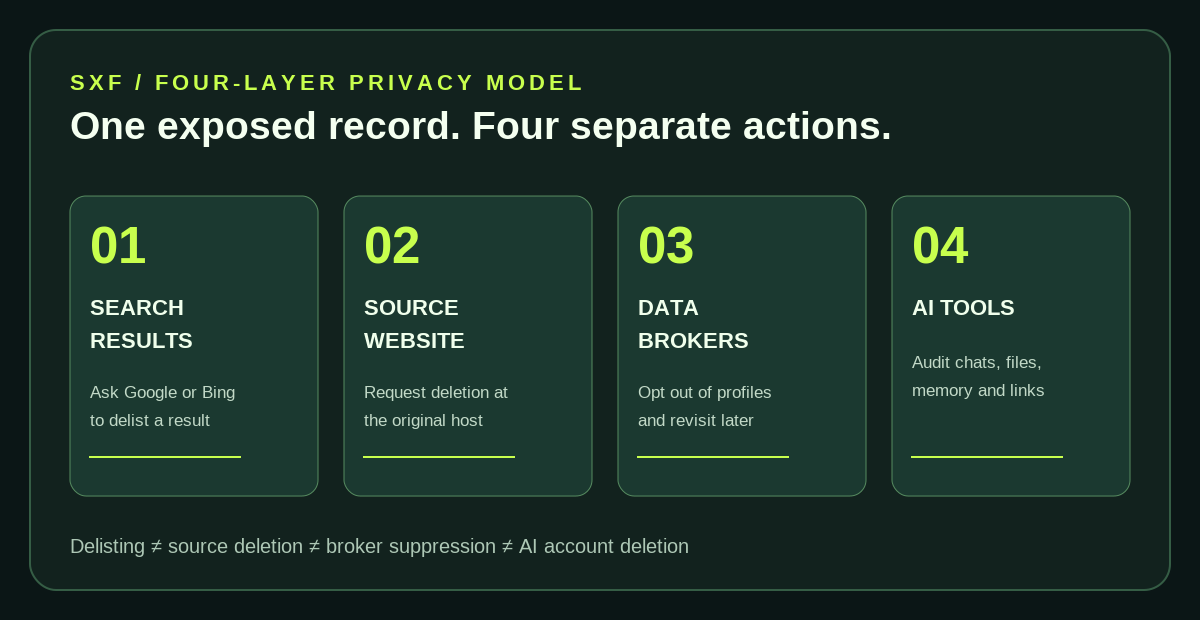
01 / FIND THE ACTUAL DATA HOLDER
Remove personal information online: which request actually works?
Imagine that an old directory publishes your address. Google indexes the directory. A people-search service copies the record. You later paste the page into an AI chat for advice. Those are four different stores or distribution channels. Removing one instance does not automatically remove the others.
| Where it appears | Best first action | What success means | What it does not mean |
|---|---|---|---|
| Google Search | Submit a qualifying result for removal | URL is delisted fully or for particular name queries | The source website has been erased |
| Original website | Contact owner or submit a privacy-rights request | Page is deleted or personal details are redacted | Copies elsewhere disappear |
| People-search broker | Use its opt-out or eligible bulk deletion service | Specified broker record is removed or suppressed | Government records and other brokers are deleted |
| ChatGPT, Gemini, Claude | Review histories, data controls, shared links and privacy requests | Eligible account data is removed or processed under provider policy | All model training or third-party copies are reversed |
| AI-generated image or false profile | Report to hosting platform and search engine under applicable policy | Platform removes content or search result | Every repost, screenshot or download vanishes |
Find your exposure without spreading it further
Search your full name in quotation marks with your city, an older username and known business aliases. Search one identifier at a time when necessary; use a private browser window to compare results. Record the exact source URL, publisher, date found, exposed data category and search engine—not just a screenshot of the results page. For images, preserve the original image URL when possible. Avoid uploading passports, IDs, home addresses or intimate images to an unknown “privacy scanner”.
Start with entries that expose identity documents, financial details, a home address linked to an active threat or non-consensual intimate material. If there is an immediate threat, seek local emergency or specialist assistance; removal forms are not a substitute for urgent protection.
02 / GOOGLE SEARCH
How to remove personal information from Google Search (2026)
Google can remove qualifying search results that expose your personal information even when a website refuses to cooperate. Google's Results about you documentation covers personal contact information such as phone numbers, home addresses and email addresses, and certain government ID numbers. Approval is not automatic; Google considers eligibility and public interest.
Method A: use Google's Results about you
- Open the official hub. Visit Results about you while signed in. Availability and the categories you can monitor can differ by region and account.
- Add the information to monitor. Follow Google's prompts for eligible contact details or ID categories. Only disclose sensitive identifiers inside Google's verified official flow.
- Review matches. Google may identify results that contain the monitored information. Inspect the match to confirm it concerns you and is not a namesake.
- Request removal. Select the relevant result and choose the removal option. If necessary, use the detailed Google removal form with the exact URL and requested evidence.
- Watch the decision. Check requests and email notifications. A rejected request may be resubmitted with additional relevant evidence or routed under applicable law.
On February 10, 2026, Google announced expansion to government-issued ID numbers, including passports, driver's licenses and Social Security numbers; this does not mean every jurisdiction, account or document type is supported equally. Google's own product announcement reported more than 10 million people had used the tool by then. Source: Google, February 2026.
Method B: request removal of a particular result
When a sensitive result is already visible, use the three-dot menu beside the Google result where that option is offered, or go directly to Google's personal-content request form. Provide a specific URL, identify the category (for example government ID, contact information or doxxing) and follow the documentation relevant to that category. A result involving an official government agency, an educational institution or newsworthy material may be treated differently because of public-interest considerations.
Method C: refresh outdated search results
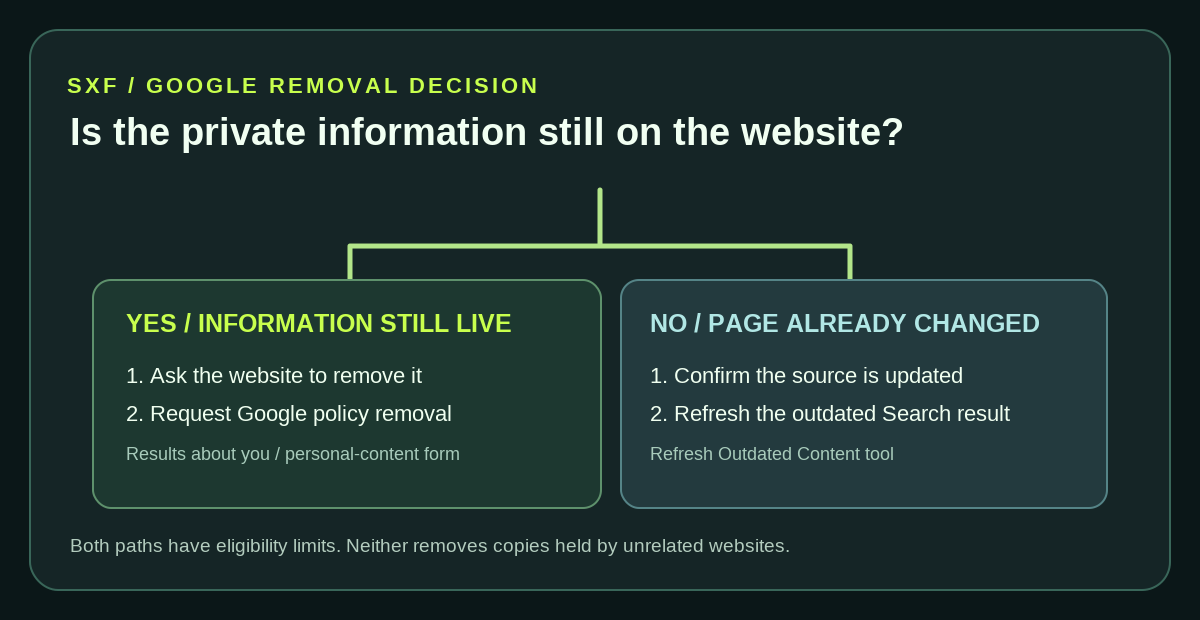
If the website already deleted or changed the sensitive material but Google still shows the old snippet or URL, use Google's Refresh Outdated Content process. This is not the correct tool for forcing removal of material that is still live and unchanged on the publisher's website. Google differentiates outdated-content refreshing from policy-based personal-data removal.
Google says approved requests can produce full delisting or removal only for searches containing your name. A result removed from Google may remain accessible by direct link, on other search engines and at the original website. Check the actual result after a decision rather than treating a notification as proof of full deletion.
What about Bing, Copilot and other search engines?
Removing a Google listing does not automatically clear Bing. If the source is already updated, check Bing's content-removal guidance. European residents can review Microsoft's separate Bing privacy-related results request. Search engines operate their own policies and may balance privacy rights against the public interest.
03 / ORIGINAL SOURCE
How to delete personal information from the website that published it
If the original page remains online, a search engine cannot make the information cease to exist. Find the publisher's privacy policy, contact page, help desk, registrar contact or abuse channel. If you control the account, delete the entry or make the profile private where possible; check whether the public URL changes or remains accessible to non-members.
What to send the website owner
Describe the exact URL, the specific details that should be removed, why publication creates a privacy problem and the lawful basis for your request if relevant. Ask whether they can remove the record at its source and whether downstream syndication partners can be notified. Do not include more identification than needed for verification. Keep a dated copy of the request and the response.
Subject: Request to remove personal information from [exact page URL]

Hello [Site / Privacy Team],

I am the person identified on this page: [exact URL].

The page displays my [category of personal information]. I request that you remove or redact this information and confirm whether your public caches or syndicated copies can also be updated.

Please tell me what information you need to verify my request using a secure channel, and confirm your decision in writing. If applicable, I am also exercising my right to erasure under the data-protection law relevant to my location.

Thank you,
[Your name or authorized representative]
[Safe reply address]
A successful source removal should be verified by reopening the page in a signed-out browser and checking any alternate URLs. Then check the search snippet again and request a refresh when necessary. A noindex tag can restrict indexing, but it does not by itself remove public access to the original page. A takedown email, a blocked search result and a deleted page are three different states.
What if the site refuses, ignores you or claims the information is public?
Check whether a legal privacy right applies, whether the publisher is subject to relevant law and whether exceptions protect public records, journalism, legal obligations or freedom of expression. Do not assume that every factual statement about you must be deleted. If a legally eligible request is mishandled, follow the regulator's complaint procedure. For threats, impersonation or illegal content, use the platform's abuse process in parallel.
04 / PEOPLE-SEARCH DATABASES
How to remove your information from data brokers and people-search sites
A people-search site can aggregate your name, prior addresses, relatives and phone numbers from public records and other data sources. The US Federal Trade Commission recommends finding the record, locating the site's opt-out instructions and repeating the process for other sites. The FTC also warns that opt-outs may need repeating and do not remove underlying public records.
Free manual data-broker opt-out: the repeatable process
- Search each people-search site. Find your specific profile, not merely a search listing with a similar name.
- Open its privacy or opt-out page. Prefer links available from the site's actual footer or privacy policy; verify the domain before entering information.
- Submit the minimum necessary identifiers. Complete identity verification only through a trusted first-party form. A site that demands an excessive scan of an ID deserves extra scrutiny.
- Document the confirmation. Save the date, confirmation identifier and the alias of the record rather than keeping its sensitive contents in a shared document.
- Recheck and repeat. Old information may return from other sources or newly acquired datasets; opt-out is not a permanent deletion guarantee.
No for many individual opt-outs: manual requests are possible. Paid services may reduce the work of repeatedly submitting requests, but coverage, permissions, fees and verification should be compared carefully. SXF does not recommend purchasing a subscription merely to follow the steps in this guide.
California's 2026 DROP: one request for registered brokers
California introduced its official Delete Request and Opt-out Platform (DROP) in January 2026; registered data brokers began processing requests in August 2026 and must access them at least every 45 days. The agency's October 2026 FAQ reported coverage of more than 650 registered brokers. Eligibility is limited to California residents; this is not a universal worldwide removal tool.
DROP covers applicable non-exempt broker data but generally does not delete information you gave directly to an unrelated business or erase public records. Check the official How DROP works page before making promises about outcomes or timelines. A 45-day broker processing cycle is not a promise that every profile disappears within 45 days.
Can you remove every data broker record forever?
No reliable provider can make that universal guarantee. Information can be re-collected, public records may remain available and some records are legally exempt. The practical goal is measurable exposure reduction across the brokers and results that matter most, followed by periodic rechecks.
05 / AI TOOLS & ACCOUNT DATA
How to delete personal information from ChatGPT, Gemini and Claude
Privacy in an AI service is a different problem from removing a public Google result. A conversation, uploaded file, saved personalization, shared link and a provider's model-training setting can each have different controls and retention rules. Disabling future training is not the same as deleting existing data. Deleting a chat does not necessarily revoke copies that other people already saved.
ChatGPT: delete chats, review memory, files and training settings
- Open ChatGPT's Settings → Data controls or the Privacy Center, depending on your interface. Review the model-improvement setting separately from chat deletion.
- Delete individual conversations or use eligible bulk deletion controls. Archiving is not deletion. OpenAI says deleted chats are scheduled for deletion within 30 days, subject to stated legal, security and de-identification exceptions.
- Check files, projects and other retained objects separately; OpenAI says deleting a chat does not necessarily delete a file saved separately.
- Review Memory, personalization sources and connected apps in the controls available to your account. Changing or turning off memory does not necessarily delete the chats, files or connected sources that supplied information.
- Use OpenAI's Privacy Portal for eligible access, correction or deletion requests concerning personal data; check whether shared links or separately published content require additional action.
Important distinction: OpenAI's Privacy Center says turning off model improvement does not delete chat history. Its retention guidance describes exceptions, while Memory guidance explains source-data separation. Temporary Chat also has limited retention for safety purposes; it is not a promise of instantaneous erasure.
Google Gemini: delete history and audit public links
- Open Gemini History or Gemini's Settings → History.
- Delete the relevant item, date range or all eligible history, then review the setting for future history and related data use.
- Inspect any public shared conversation links, connected apps and personalization or saved information separately.
- Read Google's Gemini Apps Privacy Hub because some reviewed or safety-related data has different retention conditions.
Google's Gemini history instructions explicitly note that deleting a shared chat does not remove its public link. Google also describes exceptions for certain reviewed content and safety data. Verify your account type: work and school settings may be managed by an administrator.
Claude: remove conversations and use Anthropic's privacy process
- Open Claude's chat history and delete the conversations you no longer need using Anthropic's conversation controls.
- Review your account privacy settings and any content-sharing or model-improvement controls available to your plan.
- If you need to close an account, follow Anthropic's account-deletion process; account closure and removing one conversation are different requests.
- For data-access or deletion issues beyond self-service controls, consult Anthropic's current privacy notice and support channel.
Do not assume the consumer interface, API and managed workspace retain data in identical ways. Read the terms for the product you actually used.
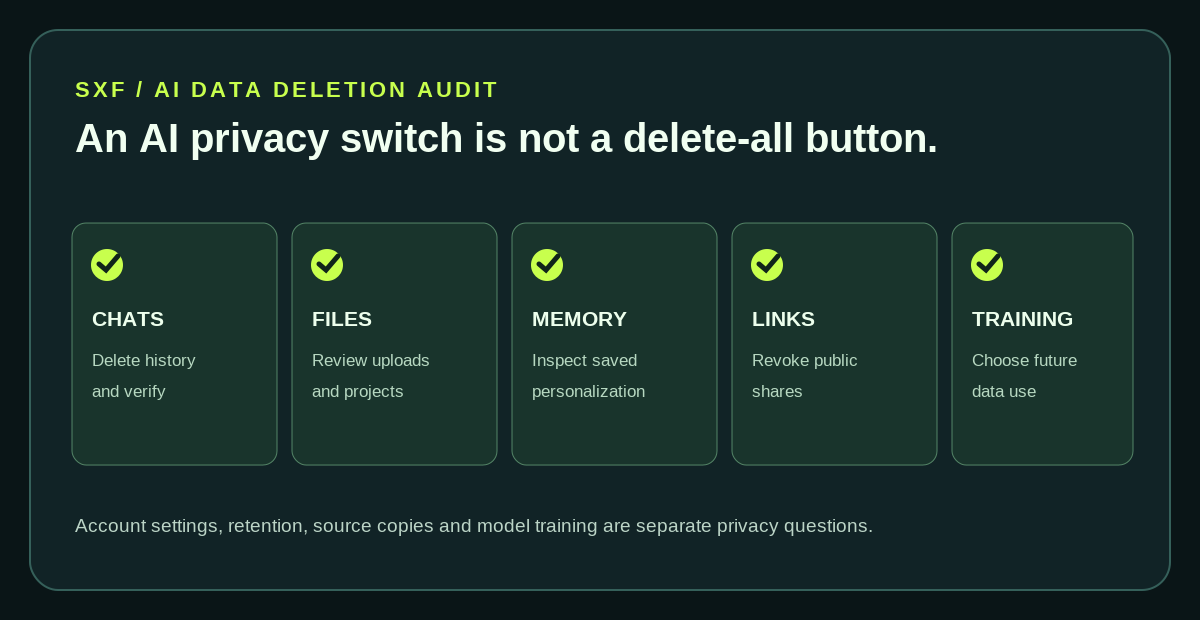
Can you force an AI model to forget information it already learned?
There is no universal consumer button that verifies all knowledge of a fact has been removed from every model and downstream copy. Provider privacy requests can govern personal data held by that company, but controlling account records, training-data use, model outputs and third-party reposts are different technical and legal operations. If an AI product returns a false or sensitive assertion about you, document the output safely and use that product's reporting/privacy process. If the answer quotes a live public page, also pursue source removal.
For a broader technical explanation of why an AI answer can be wrong even when it sounds confident, read SXF's AI hallucinations guide. For image-specific authenticity checks, use our AI-generated-image verification guide.
06 / RIGHTS BY JURISDICTION
Can you legally request that a company delete your personal data?
Often, yes—but the right depends on where you live, which organization controls the data, the purpose of processing and statutory exemptions. A platform may be required to keep some information for compliance, fraud prevention or legal claims. A request to delete personal data held by a company is not identical to a request to remove a public news article or a public register.
| Region | Route to start | Key limit |
|---|---|---|
| EU / EEA | GDPR right to erasure; write to the controller, then your national DPA if necessary | Not absolute; generally one month to respond, possible extension for complex requests |
| United Kingdom | UK GDPR right to erasure; contact controller and, if needed, the ICO | Generally one month to respond; exceptions apply |
| California | Applicable California consumer rights and DROP for eligible registered brokers | DROP only for eligible residents and covered broker data |
| Other US states / countries | Check the relevant consumer/privacy law and provider's published process | Rights, identity checks, exclusions and deadlines vary; no single global right to be forgotten |
The European Data Protection Board states that the GDPR erasure right is not absolute; organizations should generally respond within one month and can, in qualifying complex cases, extend by up to two more months while notifying the requester. The UK ICO gives corresponding UK guidance. Legal frameworks vary, so this guide is information—not personalized legal advice.
What do you do when the deadline passes?
Reply in the same thread with the request date and ask for a documented decision or lawful reason for delay. Escalate using the local data protection authority, consumer regulator or appropriate legal route where you have rights. Keep evidence, but do not publish the private material again while complaining.
07 / PHOTOS, DOXXING & IMPERSONATION
How to remove personal photos, doxxing and AI deepfakes from search results
Some harmful content needs a different reporting route from an ordinary address listing. Google's personal sexual-content removal policy covers qualifying intimate content and certain AI-generated fake sexual imagery. The policy can apply when a person is identifiable and fake intimate content was distributed without consent. Follow the official form and avoid circulating the material in public posts as “proof.”
For other private photographs, impersonation, hacked accounts or threats, report the original post or account through the platform's corresponding abuse or impersonation channel, then address search-engine indexing separately. Ask trusted people not to reshare screenshots. Where abuse involves a minor or an immediate threat, use specialist resources and local authorities rather than distributing evidence through ordinary online forms.
Metadata, reverse image search and provenance checks can help establish whether a picture is genuine, but authenticity tools do not themselves delete a harmful image. SXF's 7 free image checks explain these evidence limits.
08 / ORIGINAL SXF FREE TOOL
SXF Privacy Removal Tracker: document requests without sending us your data
One successful removal request can leave three others unresolved. SXF designed this local-only removal tracker to make that distinction visible. Enter a non-sensitive alias (for example “Old directory A,” not your address or identity number), choose the layer and status, and export a CSV for your own records.
| Alias | Layer | Status | Added | Next check* | |
|---|---|---|---|---|---|
| Your records appear here. Nothing is transmitted to SXF. | |||||
* SXF suggests a 7-day follow-up as an organizational reminder, not as a legal deadline or guaranteed processing time. Downloaded CSV files are stored wherever your device saves them. The tracker does not use localStorage, cookies or a backend.
The SXF removal outcome rubric
You have evidence of exposure, but no request or result yet.
A request was sent. Removal is not yet verified.
The search result is gone; verify the underlying website separately.
The specific source record is no longer publicly accessible.
Our method intentionally refuses to merge submitted, delisted and deleted into one “success” badge. That separation makes repeat checks more honest—and makes privacy claims auditable.
09 / SXF FIELD SCENARIOS
Three everyday examples: what a complete removal attempt looks like
These are illustrative scenarios created by SXF, not claims that we submitted requests for identifiable people or measured approval rates. They show how to route cases using documented provider rules.
Example A: an old home address appears in a people-search directory
First, document the exact record and request its removal using that site's verified opt-out process. Second, submit the Google result through Results about you if it qualifies. Third, check Bing and other relevant search engines. Fourth, mark the broker record “removed at source” only after confirming the public page no longer exposes the address. Schedule periodic rechecks because other brokers may still have copies.
Example B: a school document was removed but Google still shows the old snippet
Confirm that the document is actually gone or redacted at the school's website. The next action is usually Google's outdated-result refresh rather than another request asking the school to delete the already-removed file. Public-interest and institutional exceptions can affect requests about content still live on an institutional site.
Example C: a user pasted a sensitive document into an AI chatbot
Delete the relevant conversation, identify whether an uploaded file remains saved in a project or library, review personalization/memory, inspect share links and exercise applicable provider privacy controls. If a copy is also available on the public web, send a separate request to the host and search engine. A model-improvement toggle alone does not complete this workflow.
SXF independently designed the four-layer decision matrix, request rubric, privacy tracker and scenarios from provider documentation reviewed on November 17, 2026. We did not submit live removal requests, impersonate requesters or measure successful takedown rates. No synthetic success statistics are presented as real experiments.
10 / FAILURE MODES
Seven mistakes that stop personal information removal from working
- Only asking Google. The source remains visible by direct URL.
- Only asking the website. Old snippets and duplicates may persist until search engines refresh.
- Conflating suppression with deletion. An opt-out might hide one profile while a broker keeps other lawful records.
- Sending ID scans to unverified services. A privacy request should not create a new identity-theft risk.
- Assuming AI training controls delete old chats. Account history, files, memory and improvement settings differ.
- Relying on a single check. Brokers may refresh data and reposted images may appear elsewhere.
- Assuming a paid subscription guarantees global removal. Coverage, public-record exemptions and legal rights differ.
11 / QUICK ANSWERS
Frequently asked questions about removing personal information online
Can I remove my personal information from Google for free?
Yes. Google's eligible personal-information removal and outdated-result processes are free. Submit requests through the official Google support and Results about you pages, and remember that delisting does not delete the source website.
How long does it take to remove my information from the internet?
There is no universal time. Search-engine reviews, website responses and broker processes each vary. Under the EU GDPR, qualifying erasure requests generally require a response within one month, subject to lawful extensions and exceptions. California DROP brokers process requests on a recurring 45-day cycle; that is not a universal guarantee of deletion.
How do I remove my phone number and home address from Google?
Find the specific result, use Results about you or Google's personal-content removal request for eligible contact information, then seek deletion at the original source and check people-search brokers separately.
Can I remove my name from the entire internet?
Not reliably with a single request. Search listings, source sites, government records, copies, social posts and AI services have different rights and limits. Focus on reducing specific harmful exposure and verifying each removal.
Does deleting a ChatGPT chat delete it from AI training?
Chat deletion and model-improvement settings are different controls. OpenAI describes deletion schedules and exceptions. Turning off future model improvement does not automatically delete existing chats, separately stored files or all related personalization sources.
Can data brokers collect my information again after an opt-out?
Yes, in some situations. The FTC recommends checking people-search sites periodically because new information may appear. Eligibility, restrictions and ongoing suppression vary by broker and law.
Can an AI-generated deepfake of me be removed?
Qualifying non-consensual intimate deepfakes may be reported to the hosting service and Google under specific personal sexual-content policies. Removing a result does not guarantee all downloaded or reposted copies have disappeared.
Should I pay a company to remove my information?
Start with free official tools. A reputable paid service may save time on repeated broker requests, but evaluate exact coverage, identity-verification practices, ongoing fees, exemptions and measurable results before paying.
12 / DOCUMENTATION & RESEARCH METHOD
Primary sources and how SXF verified this guide
We prioritized official provider documentation and regulators over marketing pages from paid deletion services. The guide is a source-verified editorial synthesis as of November 17, 2026, not a proprietary removal success study. Interfaces, eligibility and data-retention rules can change; follow the linked official pages for your account and region.
- Google Search Help: Find and remove personal info in Search results — eligible contact details, removal outcomes and public-interest limitations.
- Google Blog, February 10, 2026: government ID expansion — date and scope of the product update.
- Google Search Help: Refresh outdated content — distinction between a changed source page and live content.
- FTC Consumer Advice: people-search sites — opt-out workflow, limits and rechecks.
- CalPrivacy: DROP and How DROP works — residency, coverage, exemptions and broker processing.
- European Data Protection Board: GDPR data-subject rights FAQ — erasure boundaries, response periods and exemptions.
- UK Information Commissioner's Office: right to erasure — UK procedure and limitations.
- OpenAI: Privacy Center, retention and Memory — separate controls for ChatGPT data.
- Google Gemini Help: manage and delete Gemini History and Privacy Hub — public links and retention caveats.
- Anthropic: delete a Claude conversation — consumer self-service controls.
- Google Search Help: remove personal sexual content — AI-generated intimate imagery and qualifying requests.
- Microsoft Bing: content removal — independent search-engine workflow.
SXF editorial standard: Our original contribution is the four-layer decision framework, request-status rubric, local-only tracker, cross-provider control matrix and worked scenarios. This page does not sell privacy-removal services or ask visitors to submit identity documents to SXF. Corrections and verifiable source updates: info@sxf.si.