SXF GUIDES / SPEECH TECHNOLOGY
Best AI Text-to-Speech Models in 2026:
Gemini TTS, Pricing & Benchmarks
A practical comparison of Gemini 3.8 Flash and Flash-Lite TTS: API costs, generated-audio math, voice quality, evaluation metrics and Python implementation.
The best AI text-to-speech model depends on whether you prioritize expressive narration, low latency, language coverage or cost per completed audio minute.
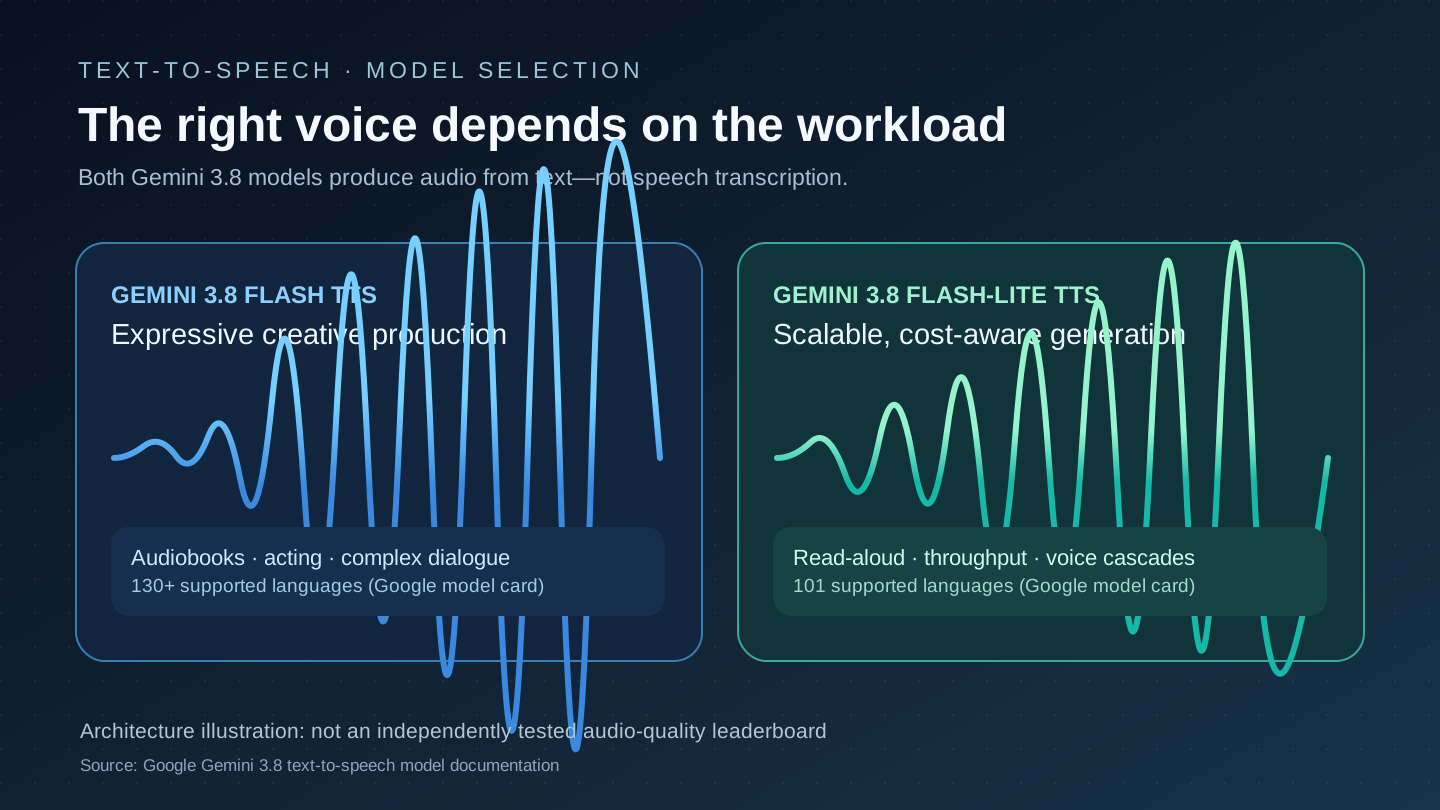
Gemini 3.8 Flash TTS is Google's creative voice tier for studio-style narration, emotional acting, difficult pronunciation and long-form delivery. Gemini 3.8 Flash-Lite TTS is designed for high-throughput, latency-sensitive read-aloud and conversational speech. Both use the same structured TTS API schema, accept text and return audio; neither should be confused with speech recognition or a bidirectional Live voice model.
Under Google's published introductory Standard rates, Flash audio output is $9 per million audio tokens and Flash-Lite is $6 per million. At Google's stated 25 audio tokens per second, those audio-only rates translate to approximately $0.0135 versus $0.009 per generated minute, before input-text charges, retries, storage and other services. These are provider reference prices, not independent quality rankings.
Best AI text-to-speech models: comparison for developers and creators
Text-to-speech (TTS) systems take written words and synthesize spoken audio. Good TTS preserves the transcript, pronounces names correctly, maintains speaker continuity and renders a convincing voice. Requirements differ dramatically between audiobook narration, interactive voice assistants, IVR, accessible reading and marketing videos. The comparison below separates verified capabilities from providers' qualitative positioning; no undisclosed “SXF benchmark score” has been fabricated.
| Model | Input → output | Best starting use case | Published limit | Reference pricing |
|---|---|---|---|---|
| Gemini 3.8 Flash TTS | Text → audio | Expressive storytelling, multi-speaker dialogue, audiobooks | 8,192 input tokens; 16,384 output token serving limit | $9/M audio-output tokens; $0.50/M input-text tokens (introductory Standard) |
| Gemini 3.8 Flash-Lite TTS | Text → audio | Bulk narration, read-aloud, latency-sensitive speech | 8,192 input tokens; 16,384 output token serving limit | $6/M audio-output tokens; $0.50/M input-text tokens (introductory Standard) |
| OpenAI GPT-4o mini TTS | Text → audio | Steerable narration, voice apps using the OpenAI Audio speech endpoint | 2,000 input tokens per model card | See model pricing and lifecycle; model card currently flags deprecated |
| Local and open-weight TTS | Text → audio | Private deployment, experiment control and specialized languages | Depends on model and hardware | No universally comparable hosted price; compute, operations and licensing apply |
Selection note: Google advertises broader language coverage for the full Flash model (over 130 supported languages) versus Flash-Lite (101). A supported-language list does not guarantee identical prosody, accents or error rates in every language. Test the exact language, dialect and voice identity that matter to your users.
Gemini TTS API pricing: standard, batch and future rates
Audio synthesis is billed differently from a text-only chatbot. Google meters input text tokens and output audio tokens. Google's pricing documentation specifies approximately 25 audio tokens per second for these TTS models. Therefore one minute of synthesized audio corresponds to about 1,500 audio tokens and 60 minutes to about 90,000 audio tokens. Charges for the original text are additional.
| Model / mode | Text input, introductory | Audio output, introductory | Text input, subsequent | Audio output, subsequent |
|---|---|---|---|---|
| Flash TTS · Standard | $0.50 | $9.00 | $1.00 | $18.00 |
| Flash-Lite TTS · Standard | $0.50 | $6.00 | $1.00 | $12.00 |
| Flash TTS · Batch | $0.25 | $4.50 | $0.50 | $9.00 |
| Flash-Lite TTS · Batch | $0.25 | $3.00 | $0.50 | $6.00 |
Batch is useful when offline rendering can wait. Real-time or interactive applications need to consider queueing, time to first audio and the serving tier rather than applying Batch prices to a low-latency request. Google also publishes Free-tier eligibility and optional Flex/Priority policies; eligibility, quotas, use-of-data terms and regional availability must be verified for the configured account.
Estimate TTS generation cost by duration and input size
This calculator is arithmetic, runs locally in your browser and sends no form data. Formula: (audio_seconds × 25 × audio_output_rate + text_input_tokens × text_input_rate) / 1,000,000. Actual metered audio tokens, failed requests, retries, cached inputs, taxes, storage and other services may change billing. Always validate against Google's live pricing table.
Concrete example: 10 minutes, 1 hour and 100 hours of speech
| Duration | Estimated output audio tokens | Flash TTS | Flash-Lite TTS |
|---|---|---|---|
| 10 minutes | 15,000 | $0.135 | $0.090 |
| 1 hour | 90,000 | $0.810 | $0.540 |
| 100 hours | 9,000,000 | $81.00 | $54.00 |
These arithmetic examples are useful for shortlisting, not for projecting all production cost. Your text may contain pacing markup, multilingual phonemes and pronunciation hints; a returned clip may need regeneration. Budget successful audio minutes delivered, not solely requested minutes. A 5% rerender rate increases your generated output volume even before human review.
What actually makes a text-to-speech model sound good?
There is no single “natural voice” score that captures every use case. A model can produce expressive dialogue and still misread a medicine, proper noun or street number. For professional deployments, assess at least six independent dimensions:
Does it say the intended words?
Check omitted words, substitutions, dates, numbers, acronyms and unfamiliar names. A generated clip should remain faithful to the source transcript.
Does it sound human and clean?
Listen for unnatural pauses, metallic artifacts, clipped syllables, breathing glitches and changes in loudness.
Is style controllable?
Evaluate emotional consistency, pacing, turn-taking and whether markup instructions leak into spoken audio.
Is one voice recognizable?
Test voice drift across clips, languages and longer passages rather than just a perfect ten-second demo.
How quickly is speech usable?
Measure time to first audio (TTFA), end-to-end response latency and real-time generation factor (RTF/RTFx).
Can it serve your users?
Check language coverage, cost per accepted minute, rights to cloned voices, quotas, fallback models and operational support.
Gemini 3.8 Flash TTS vs Gemini 3.8 Flash-Lite TTS
Google's official model cards position Flash for high voice fidelity, acting nuance, difficult dialects and stable long-form performance. Flash-Lite focuses on throughput, reduced latency and lower output-token cost. They use the same Interactions API schema, so many applications can test both by switching a model ID while keeping the same structured request pattern.
The documented shared limits are 8,192 input tokens and 16,384 maximum output tokens as an API serving limit. These values are not a guaranteed duration for an audiobook segment; actual clip length depends on speech pacing and serving behavior. Both take text as input and produce audio, not images, embeddings, model thoughts or chat answers.
Pronunciation, multilingual voice choice and long-form stability
Language support is broader in the full Flash tier: Google lists more than 130 languages versus 101 for Flash-Lite. Both include English and major world languages, but support is not proof that every voice and regional accent performs equally. Test Standard Arabic versus Egyptian Arabic, named entities, mixed-language text, numbers and speech tags if your listeners are multilingual.
For audiobooks and podcasts, segment chapters and enforce a consistent character-to-voice mapping. Compare coherence across five or ten consecutive clips, not isolated sentences. Multi-speaker output has to preserve speaker identity and avoid cross-talk or incorrect narrator assignment. For scale-out systems, measure output rate and concurrency constraints rather than assuming “Lite” guarantees latency under every load.
Structured style controls versus spoken script
Google's current TTS guide treats the transcript text as intended spoken content. Use speech_metadata.style for delivery instructions such as “warm and measured” or “urgent whisper,” and supported inline vocal tags for localized events. Keeping performance directions out of ordinary transcript prose reduces the risk of stage instructions being spoken aloud. The same general schema is documented for both 3.8 TTS model IDs. Google's speech-generation API guide.
Gemini TTS alternatives: OpenAI speech API and local models
Google is not the only API choice. OpenAI's Audio speech API documents gpt-4o-mini-tts with instruction-controlled style and output formats including MP3, WAV and PCM; its current model card flags the model as deprecated, so check lifecycle status before a new long-term integration. OpenAI also documents older tts-1 and tts-1-hd choices. A cross-provider price comparison must use the same billable dimensions and generation strategy; text-token rates alone are not “price per spoken minute.” OpenAI speech API reference.
Open-weight systems can be attractive when you need local deployment, custom pronunciation dictionaries, offline use or specialized voices. However, “open source” is not one licensing category: inspect each model's weights license, speaker-consent restrictions and commercial terms. Real costs include GPU instances, RAM, audio preprocessing, voice data governance, updates and operations. A fully local model can be cheaper at sustained load and more expensive at low utilization.
Do not confuse text-to-speech with voice cloning. TTS can use a preset voice; replicating a real person's voice involves consent, authorization and additional legal, platform and anti-impersonation controls. Test the provider's policy before using voice replicas, and clearly disclose synthetic audio when appropriate or required.
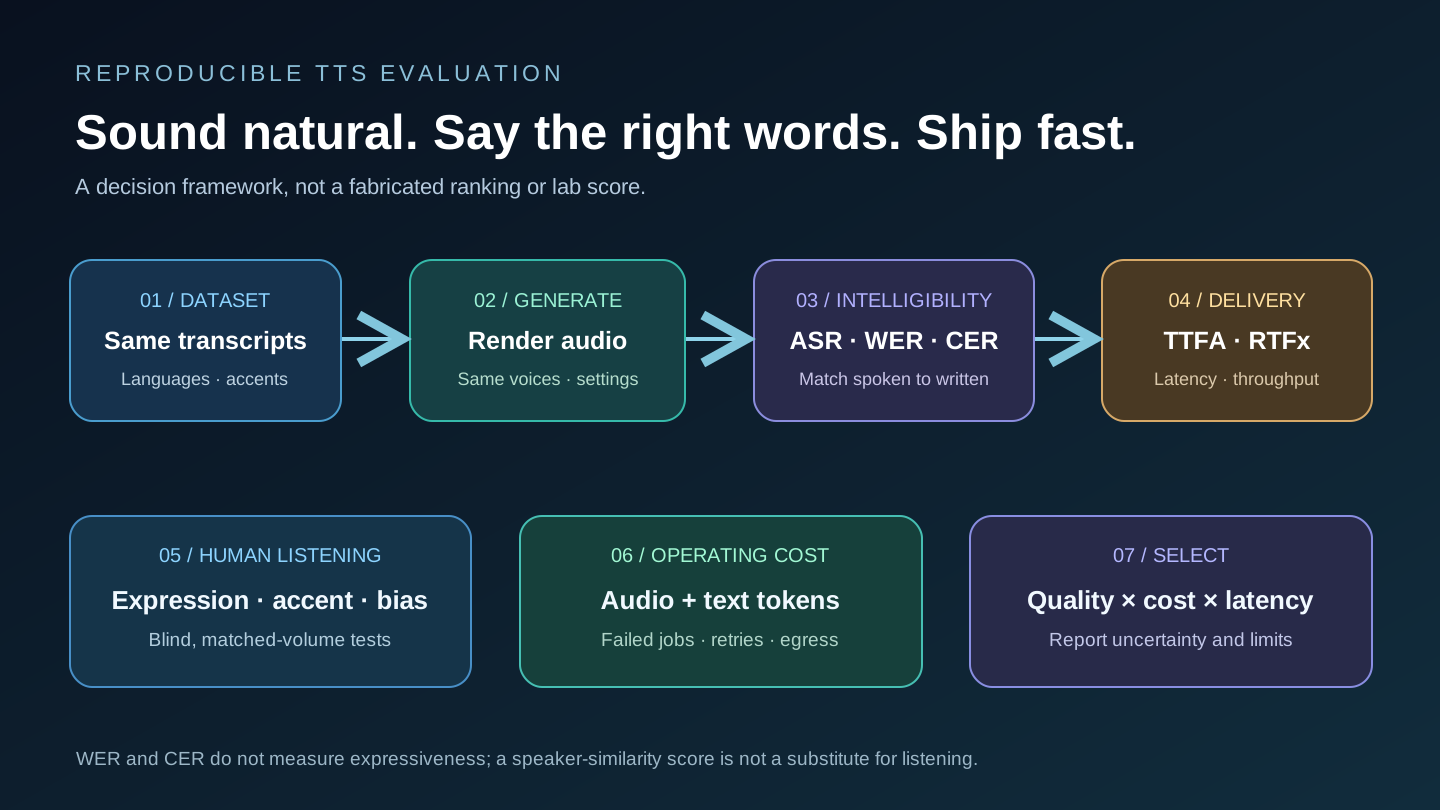
TTS benchmarks explained: WER, CER, TTFA, RTFx and listening tests
A credible text-to-speech leaderboard must specify the source transcripts, speakers, language coverage, audio quality controls, metrics, and evaluation software. Public TTS evaluation projects—including open multilingual efforts—can help researchers compare systems, but rankings change when the datasets, reference audio or ASR recognizer change. Never copy a leaderboard score as an independent SXF result without repeating its test.
| Metric | Meaning | How to interpret | Limitation |
|---|---|---|---|
| WER | Word Error Rate = (substitutions + deletions + insertions) / reference words | Lower is better for exact recitation | Depends on the ASR recognizer; not emotional fidelity |
| CER | Character Error Rate on transcribed speech | Helps with some scripts and tokenization cases | Not a replacement for human pronunciation review |
| TTFA | Time to first playable audio | Lower often benefits interactive apps | Doesn't describe final clip quality or completeness |
| RTF / RTFx | Generation wall-clock time relative to audio duration | Document the precise convention; lower RTF or higher inverse RTFx is faster | Can omit network and queue latency |
| Speaker similarity | Distance or similarity between speaker embeddings | Useful for voice identity consistency | May ignore expression, pronunciation and consent |
| Human preference / MOS | Listener ratings of naturalness or preference | Useful for perceptual quality under blind tests | Population, playback and prompt selection strongly influence scores |
How to run a fair Gemini Flash vs Flash-Lite voice benchmark
- Build a common script corpus: include at least 100 representative texts across your target languages, lengths, numeric formats and voice styles, plus difficult names.
- Control the inputs: set equivalent voices where supported, style instructions, request modes, sample rates and listening levels.
- Generate repeatedly: collect more than one run per model to estimate variability; track failures and retries.
- Score intelligibility: use a disclosed ASR recognizer and reference text, then report WER/CER by language, not just one mean.
- Run blind listening tests: randomize clips, hide providers, normalize playback volume, use multiple independent listeners and document uncertainty.
- Measure delivery: record TTFA, latency percentiles, audio duration, batch throughput and dollars per accepted minute.
- Publish reproducibly: retain script IDs, model versions, voice settings, evaluation code, excluded clips and methodology.
Different languages require careful normalization: punctuation, contractions, numeral expansion and script conventions alter WER/CER. A model can score well on English audiobook speech but perform poorly on colloquial Arabic dialogue. For more on interpreting benchmark methodology, see SXF's AI model benchmark reference. The existing Open TTS Leaderboard signal is useful context but should not be presented as an SXF-tested winner.
Gemini 3.8 TTS Python API example: generate a WAV file
The current Google Python SDK uses the Interactions API for 3.8 TTS; older tutorials using a generic text-generation call for voice synthesis may not match today's interface. Install google-genai >= 2.25.0, configure GEMINI_API_KEY and use this official-pattern single-speaker example. It writes complete WAV audio returned by the nonstreaming request.
import base64
from google import genai

client = genai.Client()
interaction = client.interactions.create(
    model="gemini-3.8-flash-tts",  # Try gemini-3.8-flash-lite-tts
    input=[{
        "type": "user_input",
        "content": [{
            "type": "text",
            "text": "Welcome to a clearer way to explore AI.",
            "annotations": [{
                "type": "speech_metadata",
                "style": "warm, confident and conversational",
            }],
        }],
    }],
    response_format={"type": "audio"},
    generation_config={"speech_config": [{"voice": "Kore"}]},
)
with open("narration.wav", "wb") as file:
    file.write(base64.b64decode(interaction.output_audio.data))
The example deliberately places delivery style in metadata rather than mixing it into the transcript. For two speakers, Google's guide uses separate text segments annotated with a speaker name and a matching speech_config.speakers list. Keep assigned voices stable across a script and validate the returned audio with an actual listening test. Official single- and multi-speaker reference.
Streaming audio and audio formats
For low time-to-first-audio, Google's Interactions API supports stream=True. Nonstreaming requests return a complete WAV file by default; streaming uses headerless 24 kHz mono 16-bit signed PCM by default. Don't save bare PCM bytes with a WAV extension without adding the correct header. The API documentation also covers audio/mulaw, audio/alaw and sample-rate settings for telephony integration.
If you're building an interactive spoken assistant, you may need speech-to-text → reasoning model → TTS (a cascade) or a native audio-to-audio Gemini Live architecture. TTS alone cannot listen, transcribe or decide a conversational response. Keep the audio-generation stage and the conversational inference stage conceptually separate.
Production text-to-speech checklist: accessibility, safety and reliability
Provide controls and captions
Offer pause, playback rate, replay and alternative text. Screen-reader usability matters even when your product generates speech.
Make voices reproducible
Version voice IDs, input scripts, prompt styles, audio codec, sample rates and model IDs to detect unexpected changes.
Minimize data disclosure
Keep API credentials server-side and avoid transmitting confidential documents or speech patterns without authorization.
Plan for retries and fallbacks
Handle empty or partial audio, timeouts, transient rate limits, tool errors and re-render policies.
For commercial narration, track ownership and usage rights for scripts and voice identities. Disclose AI-generated voice where required, avoid impersonation, and preserve a record of voice consent. For audiobook pipelines, create small reviewable segments to correct errors without re-rendering an entire hour. For telephony, match the receiving system's audio format and account for encoding delay.
Which TTS model should you choose for your project?
Gemini 3.8 Flash TTS
Start with full Flash for audiobooks, performance-oriented scripts, dialect diversity and longer narration. Benchmark expressive control and corrections.
Gemini 3.8 Flash-Lite
Start with Lite for scalable read-aloud, bulk localization and voice-agent cascades; measure time to first audio and quality by language.
OpenAI speech API
Useful to test if your application already uses its audio tooling; verify deprecation status and actual API pricing.
Open-weight TTS
Evaluate if local inference, privacy, offline execution or custom phoneme handling justify hardware and operations.
A reasonable default is to compare the two Gemini 3.8 voice models against a fixed reference script suite, then check whether the quality advantage of Flash justifies its higher audio output rate. There is no reproducible basis to declare one universal winner for all voices and languages.
Best AI text-to-speech models: frequently asked questions
Which is the best AI text-to-speech model?
There is no universal winner. Google's Gemini 3.8 Flash TTS targets expressive audio, while Gemini 3.8 Flash-Lite TTS targets cost, low latency and throughput. Compare intelligibility, language quality, voice consistency, delivery time and total cost on identical scripts.
How much does Gemini 3.8 Flash TTS cost?
Google lists introductory paid Standard rates of $0.50 per million input text tokens and $9 per million output audio tokens through December 31, 2026, changing to $1 and $18 respectively from January 1, 2027. The live Gemini pricing page governs actual rates.
How much does Gemini Flash-Lite TTS cost per minute?
Using Google's 25 audio tokens per second reference, Flash-Lite at its introductory $6 per million output audio tokens is approximately $0.009 per output minute before text input and other costs. Rate schedules and metering can change.
What is the difference between Gemini Flash TTS and Flash-Lite TTS?
Both models use the same text-to-audio API request structure. Flash prioritizes expressive acting, long-form fidelity and 130-plus supported languages; Lite emphasizes lower-cost, lower-latency high-volume generation and 101 languages.
Can Gemini TTS generate two-person conversations?
Yes. Google's structured speech configuration supports multi-speaker text segments with assigned speaker voices, allowing scripted conversations. The implementation is separate from the real-time Gemini Live API.
Does Gemini Flash TTS support Arabic?
Google lists Standard Arabic and Egyptian Arabic among the supported languages for Gemini 3.8 Flash TTS. Test the exact regional accent, voice and pronunciation conventions required in your application.
What is WER in a TTS benchmark?
Word Error Rate measures substitutions, deletions and insertions in a speech transcript compared with reference text, divided by reference word count. It measures intelligibility under the chosen ASR system, not human-like expression.
What is the difference between TTS and speech-to-text?
Text-to-speech converts written text into spoken audio; speech-to-text transcribes audio into written words. Interactive voice agents may combine speech recognition, a reasoning model and TTS, or use a native live audio model.
Can I use Gemini text-to-speech from Python?
Yes. The current Google GenAI SDK supports the Interactions API. Use client.interactions.create with a Gemini 3.8 TTS model, text content, speech metadata and speech_config, then decode the returned audio bytes.
How do I compare TTS models fairly?
Test the same scripts and target languages, use compatible audio playback conditions, measure WER/CER, latency and voice stability, conduct blind human listening studies and compare cost per accepted minute rather than per nominal request.
Official documentation and editorial method
This guide prioritizes directly linked provider model cards and API pricing over social-media leaderboards or unidentified demos. Price calculations use the published audio-token conversion; they are illustrative arithmetic, not live billing quotes. No fabricated WER, TTFA, MOS, RTFx or speaker-similarity scores are attributed to these models. Where hosted providers use different units, the comparison is intentionally qualitative until equivalent measurements exist.
Editorial disclosure: SXF / AI does not claim to have performed an independent audio listening benchmark in this article. Recheck provider documentation before making contractual purchasing decisions.